
The warning dialog box is used to provide important information to the user.
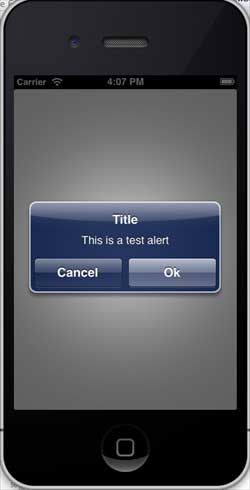
You can proceed to further use the application only after you select an option in the warning dialog box view. AlertViewStyle CancelButtonIndex Delegate Message NumberOfButtons Title 让类符合警告对话框视图的委托协议,如下所示,在ViewController.h中添加 Now when we run the application, we will see the following output:
In recent years, Geographic Information Systems (GIS) have undergone rapid development in both theoretical and practical dimensions. GIS has been widely applied for modeling and decision-making support across various fields such as urban management, regional planning, and environmental remediation, establishing geographic information as a vital component of the information era. The introduction of the “Digital Earth” concept has further accelerated the advancement of GIS, which serves as its technical foundation. Concurrently, scholars have been dedicated to theoretical research in areas like spatial cognition, spatial data uncertainty, and the formalization of spatial relationships. This reflects the dual nature of GIS as both an applied technology and an academic discipline, with the two aspects forming a mutually reinforcing cycle of progress. 9.26.1. Important attribute 
An important method 
- (NSInteger)addButtonWithTitle:(NSString *)title
- (NSString *)buttonTitleAtIndex:(NSInteger)buttonIndex
- (void)dismissWithClickedButtonIndex:
  (NSInteger)buttonIndex animated:(BOOL)animated
- (id)initWithTitle:(NSString *)title message:
  (NSString *)message delegate:(id)delegate
  cancelButtonTitle:(NSString *)cancelButtonTitle
  otherButtonTitles:(NSString*)otherButtonTitles, ...
- (void)show
9.26.2. Update ViewController.h, as shown below 
#import Add a custom method addAlertView 
-(void)addAlertView{
UIAlertView *alertView = [[UIAlertView alloc]initWithTitle:
@"Title" message:@"This is a test alert" delegate:self
cancelButtonTitle:@"Cancel" otherButtonTitles:@"Ok", nil];
[alertView show];
}
Execute the delegate method for the warning dialog view 
#pragma mark - Alert view delegate
- (void)alertView:(UIAlertView *)alertView clickedButtonAtIndex:
(NSInteger)buttonIndex{
switch (buttonIndex) {
case 0:
NSLog(@"Cancel button clicked");
break;
case 1:
NSLog(@"OK button clicked");
break;
default:
break;
}
}
Modify the viewDidLoad in ViewController.m, as follows 
(void)viewDidLoad
{
[super viewDidLoad];
[self addAlertView];
}
9.26.3. Output 
Principles, Technologies, and Methods of Geographic Information Systems
102