最近几年来,地理信息系统无论是在理论上还是应用上都处在一个飞速发展的阶段。 GIS被应用于多个领域的建模和决策支持,如城市管理、区划、环境整治等等,地理信息成为信息时代重要的组成部分之一; “数字地球”概念的提出,更进一步推动了作为其技术支撑的GIS的发展。 与此同时,一些学者致力于相关的理论研究,如空间感知、空间数据误差、空间关系的形式化等等。 这恰好说明了地理信息系统作为应用技术和学科的两个方面,并且这两个方面构成了相互促进的发展过程。
11.2.1. HTML instance 
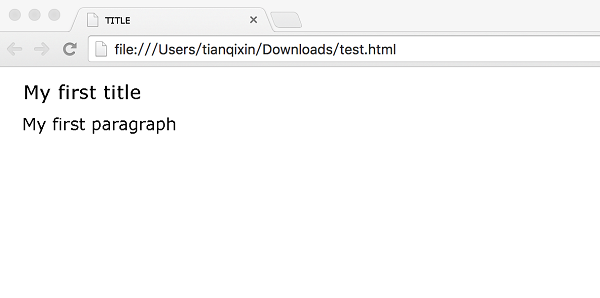
Rookie Tutorial(runoob.com) My first title
My first paragraph.
Case analysis 
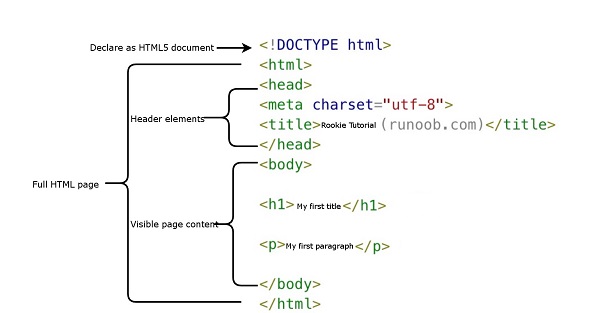
-
is declared as an HTML5 document
-
The < html > element is the root element of the HTML page
-
The < head > element contains the meta data of the document, such as < meta charset= “utf-8” > defines the page encoding format as utf-8.
-
The < title > element describes the title of the document
-
The < body > element contains visible page content
-
< H1 > element defines a supertitle
-
< p > element defines a paragraph
Note: use the F12 key on the keyboard to turn on debug mode on the browser page, and you can see the composition label.
What is HTML? 
HTML is a language used to describe web pages.
-
HTML refers to the hypertext markup language: Hyper Text Markup Language
-
HTML is not a programming language, but a markup language
-
Markup language is a set of markup tags
-
HTML uses tag tags to describe web pages
-
The HTML document contains HTML tags and text content
-
HTML documents are also called web pages
HTML tag 
HTML tag tags are often referred to as HTML tags.
-
HTML tags are keywords surrounded by angle brackets, such as < html >
-
HTML tags usually appear in pairs, such as < b > and < / b >
-
The first tag in the tag pair is the opening tag, and the second tag is the closing tag.
-
Start and end tags are also known as open and closed tags
< tag > content < / tag >
HTML element 
“HTML tag” and “HTML element” usually describe the same meaning.
Strictly speaking, however, a HTML element contains the opening and closing tags, as shown in the following example:
HTML element:
< p > this is a paragraph. < / p >
Web browser 
Web browsers (such as Google browser, Internet Explorer,Firefox,Safari) are used to read HTML files and display them as web pages.
Browsers do not display HTML tags directly, but they can use tags to decide how to present the contents of the HTML page to the user:
HTML web page structure 
Here is a visual HTML page structure:

Only the < body > area (the white part) is displayed in the browser.
HTML version 
Since the birth of the early days of the network, there have been many HTML versions:
Version
Release time
HTML
1991
HTML+
1993
HTML 2.0
1995
HTML 3.2
1997
HTML 4.01
1999
XHTML 1.0
2000
HTML5
2012
XHTML5
2013
statement 
The declaration helps to display the web page correctly in the browser.
There are many different files on the web, and if you can correctly declare the version of HTML, the browser will be able to display the content of the page correctly.
doctype declarations are case-insensitive and can be done in the following ways:
General declaration 
11.2.2. HTML5 
11.2.3. HTML 4.01 
11.2.4. XHTML 1.0 
Chinese coding 
At present, in most browsers, Chinese garbled will occur in the direct output of Chinese, so we need to declare the character as UTF-8 or GBK in the header.
11.2.5. HTML instance 
TITLE My first title
My first paragraph.
-
1. Angularjs2
8
-
1. SVG tutorial
19
-
1. Memcached
20
-
1. C# tutorial
61
-
1. Sqlite
47
-
2. Go
43
-
2. Docker
59
-
2. Vue3
19
-
2. Servlet
21
-
3. React
23
-
3. SOAP tutorial
10
-
3. Android
18
-
3. Mongodb
44
-
3. Kotlin
18
-
4. Lua
31
-
4. MySQL tutorial
35
-
4. Appml
12
-
5. Perl
45
-
5. Postgresql
41
-
web
15
-
5. Web Services tutorial
6
-
6. Ruby
42
-
6. Design-pattern
35
-
7. Django
18
-
7. Rust
22
-
6. WSDL tutorial
8
-
8. Foundation
39
-
9. Ios
43
-
8. Css3
26
-
9. Swift
44
-
11. HTML tutorial-(HTML5 Standard)
54
-
11.25. HTML uniform Resource Locator
-
11.18. HTML forms and input
-
11.8. HTML paragraph
-
11.7. HTML title
-
11.39. HTML5 Audio
-
11.49. HTML5 code specification
-
11.28. You have finished your HTML study. What should you learn next?
-
11.3. HTML Editor
-
11.54. HTML instance
-
11.29. HTML- XHTML
-
12. Http
6
-
13. Regex
6
-
14. Regexp
8
-
1. Introduction to geographic information system
6
-
2. From the Real World to the Bit World
3
-
3. Spatial Data Model
7
-
4. 空间参照系统和 地图投影
5
-
5. Data in GIS
3
-
6. Spatial data acquisition
2
-
7. Spatial Data Management
6
-
8. Spatial analysis
8
-
9. 数字地形模型( DTM )与地形分析
5
-
10. 空间建模与 空间决策支持
6
-
11. Spatial data representation and map making
6
-
12. 3S Integration Technology
5
-
13. 网络地理信息系统
3
-
14. Examples of Geographic Information System Application
8
-
15. Organization and Management of Geographic Information System Application Projects
9
-
16. Geographic Information system Software Engineering Technology
6
-
17. Geographic Information System Standards
3
-
18. Geographic Information System and Society
3
-
19. Earth Information Science and Digital Earth
3