最近几年来,地理信息系统无论是在理论上还是应用上都处在一个飞速发展的阶段。 GIS被应用于多个领域的建模和决策支持,如城市管理、区划、环境整治等等,地理信息成为信息时代重要的组成部分之一; “数字地球”概念的提出,更进一步推动了作为其技术支撑的GIS的发展。 与此同时,一些学者致力于相关的理论研究,如空间感知、空间数据误差、空间关系的形式化等等。 这恰好说明了地理信息系统作为应用技术和学科的两个方面,并且这两个方面构成了相互促进的发展过程。
11.13.1. Example 
Norwegian Mountain Trip
In HTML, images are made up of To display the image on the page, you need to use the src attribute. The syntax for defining an image is: URL refers to the location where the image is stored. The browser displays the image where the image label appears in the document. If you place the image tag between two paragraphs, the browser will first display the first paragraph, then the picture, and finally the second paragraph. The value of the replacement text property is user-defined. When the browser cannot load the image, replace the text attribute to tell the reader what information they have lost. At this point, the browser will display the alternative text instead of the image. It is a good habit to add replacement text attributes to all images on the page, which helps to better display information and is very useful for those who use plain text browsers. The height and width properties are used to set the height and width of the image. The default unit of the attribute value is pixels: Tip: it is a good habit to specify the height and width of the image. If theimage specifies a height width, the specified size is retained when the page is loaded. If you do not specify the size of the picture, it is possible to destroy the overall layout of the HTML page when the page is loaded. Note: if a HTML file contains ten images, 11 files need to be loaded in order to display the page correctly. It takes time to load pictures, so our advice is: use pictures carefully. Note: when loading a page, pay attention to the path of inserting the page image. If the location of the image is not set correctly, the browser cannotload the image, and the image label will display a broken picture. Label Description < img > Define Ima < map > Define an image map < area > Define clickable areas in an image map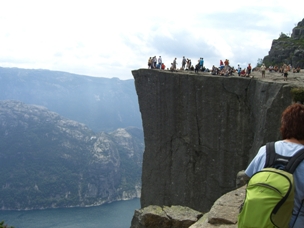
HTML Image-Image tag (< img >) and Source attribute (Src) 
label definition.
is an empty tag, meaning that it contains only attributes and doesnot have a closed tag.
src means “source”. The value of the source property is the URL address of the image.<img src="*url*" alt="*some_text*">
HTML Image-Alt attribute 
alt property is used to define a string of prepared replaceable text for the image.<img src="boat.gif" alt="Big Boat">
HTML image-sets the height and width of the image 
<img src="pulpit.jpg" alt="Pulpit rock" width="304" height="228">
Basic precautions-useful tips: 
HTML image label 