最近几年来,地理信息系统无论是在理论上还是应用上都处在一个飞速发展的阶段。 GIS被应用于多个领域的建模和决策支持,如城市管理、区划、环境整治等等,地理信息成为信息时代重要的组成部分之一; “数字地球”概念的提出,更进一步推动了作为其技术支撑的GIS的发展。 与此同时,一些学者致力于相关的理论研究,如空间感知、空间数据误差、空间关系的形式化等等。 这恰好说明了地理信息系统作为应用技术和学科的两个方面,并且这两个方面构成了相互促进的发展过程。
When a browser requests a web page, it sends specific information to the Webserver that cannot be read directly because it is transmitted as part of the header of the HTTP request. You can check the HTTP protocol for more information.
The following is important header information from the browser side, which you can use frequently in Web programming:
Header information | Description |
|---|---|
| This header information specifies the type of MIME that the browser or otherclient can handle. The value image/png or image/jpeg are the two most common possible values. |
| This header information specifies the character set that the browser can useto display the information. For example, ISO-8859-1. |
| This header information specifies the type of encoding that the browser knows how to handle. The value gzip or compress are the two most common possible values. |
| This header information specifies the preferred language of the client, in which case Servlet produces results in multiple languages. For example, en, en-us, ru, and so on. |
| This header information is used for clients to identify themselves when visiting password-protected web pages. |
| This header indicates whether the client can handle persistent HTTP connections. Persistent connections allow clients or other browsers to retrieve multiple files through a single request. A value of Keep-Alive means that a persistent connection is used. |
| This header information applies only to POST requests and gives the size of the POST data in bytes. |
| This header returns the cookies that was previously sent to the browser to the server. |
| This header information specifies the host and port in the original URL. |
| This header information represents the page that the client wants only if the page has changed after the specified date. If no new results are available, the server sends a 304code indicating the Not Modified header information. |
| This header information is the opposite of If-Modified-Since, which specifies that the operation will succeed only if the document is earlier than the specified date. |
| This header information indicates the URL of the Web page you are pointing to. For example, if you click a link to page 2 on page 1, the URL of page 1 will be included in the Referer header information when the browser requestspage 2. |
| This header information identifies the browser or other client that made therequest and can return different content to different types of browsers. |
2.7.1. The method of reading HTTP header 
The following method can be used to read the HTTP header in a Servlet program. These methods are passed through HttpServletRequest object is available.
Serial number | Method & description |
|---|---|
1 |
|
2 |
|
3 |
|
4 |
|
5 |
|
6 |
|
7 |
|
8 |
|
9 |
|
10 |
|
11 |
|
12 |
|
13 |
|
14 |
|
15 |
|
16 |
|
17 |
|
18 |
|
19 |
|
20 |
|
21 |
|
22 |
|
23 |
|
24 |
|
25 |
|
26 |
|
27 |
|
28 |
|
29 |
|
30 |
|
31 |
|
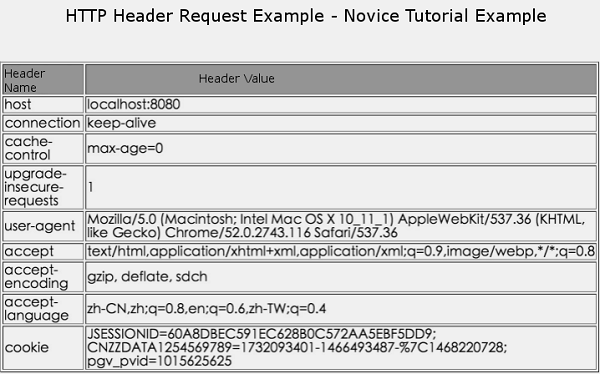
2.7.2. HTTP Header request instance 
The following example uses the HttpServletRequest of getHeaderNames() method to read the HTTP header information. This methodreturns an enumeration containing header information related to the currentHTTP request.
Once we have an enumeration, we can loop through it in a standard way, usingthe hasMoreElements() method to determine when to stop, using the nextElement() method to get the name of each parameter.
//Import necessary Java libraries import java.io.IOException; import java.io.PrintWriter; import java.util.Enumeration; import javax.servlet.ServletException; import javax.servlet.annotation.WebServlet; import javax.servlet.http.HttpServlet; import javax.servlet.http.HttpServletRequest; import javax.servlet.http.HttpServletResponse; @WebServlet("/DisplayHeader") //Extend HttpServlet Class public class DisplayHeader extends HttpServlet { // Method for handling GET method requests public void doGet(HttpServletRequest request, HttpServletResponse response) throws ServletException, IOException { // Set response content type response.setContentType("text/html;charset=UTF-8"); PrintWriter out = response.getWriter(); String title = "HTTP Header Request Example - Rookie Tutorial Example"; String docType = " \n"; out.println(docType + "\n" + "\"utf-8\">"</span> <span class="o">+</span> <span class="n">title</span> <span class="o">+</span> <span class="s2">" \n"+ "\"#f0f0f0\">\n" + "\"center\">" + title + "\n" + "