
11.3.1. HTML Editor recommendation 
You can use a professional HTML editor to edit HTML. Rookie tutorials recommend several commonly used editors:
VS Code: https://code.visualstudio.com/
Sublime Text: http://www.sublimetext.com/
You can download the corresponding software from the official website of theabove software and install it step by step.
Next we will show you how to use the VS Code tool to create a HTML file.
11.3.2. VS Code 
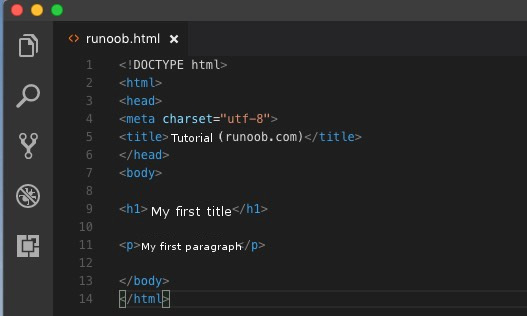
Visual Studio Code (VS Code for short) is an open source code editor developed by Microsoft and supports operating systems such as Windows, Linuxand macOS. The editor has built-in functions of extension management. After the VS Code installation is complete, select File (F)-> New File (N), and enter the following code in the new file: My first paragraph. Then select File (F)-> Save as (A), the file name is When you save a HTML file, you can either use the Save this file in a folder that is easy to remember, such as Then right-click the file name on the editor and choose to open it in the default browser (you can also use other browsers): Note: The result of the run display is similar to the following: VS Code and Sublime Text can also cooperate.
In recent years, Geographic Information Systems (GIS) have undergone rapid development in both theoretical and practical dimensions. GIS has been widely applied for modeling and decision-making support across various fields such as urban management, regional planning, and environmental remediation, establishing geographic information as a vital component of the information era. The introduction of the “Digital Earth” concept has further accelerated the advancement of GIS, which serves as its technical foundation. Concurrently, scholars have been dedicated to theoretical research in areas like spatial cognition, spatial data uncertainty, and the formalization of spatial relationships. This reflects the dual nature of GIS as both an applied technology and an academic discipline, with the two aspects forming a mutually reinforcing cycle of progress. Step 1: create a new HTML file 
My first title
Step 2: save as a HTML file 
runoob.html : 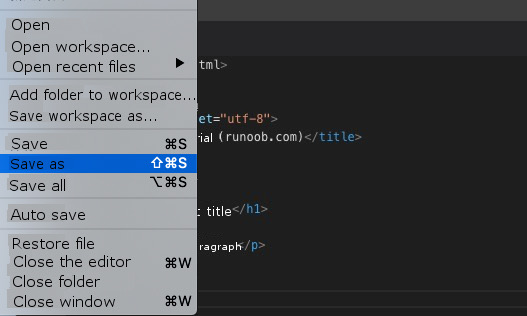
.htm can also usethe .html extension name. There is no difference between the two. According to your preference, I suggest using it together. .html . runoob Step 3: run the HTML file in the browser 
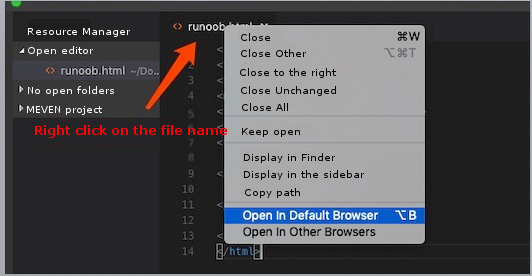
vscode open it using a browser in the html the file needs tohave the “open in browser” extension installed. 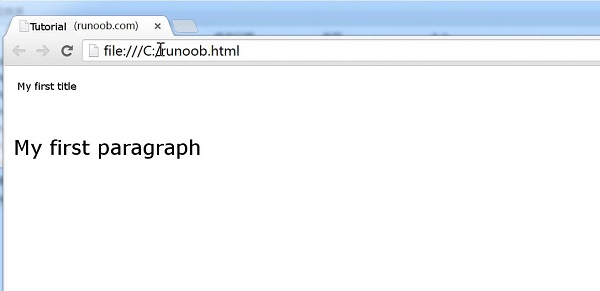
Emmet plug-ins to improve coding speed. Emmet official website: http://emmet.io/
Principles, Technologies, and Methods of Geographic Information Systems
102