最近几年来,地理信息系统无论是在理论上还是应用上都处在一个飞速发展的阶段。 GIS被应用于多个领域的建模和决策支持,如城市管理、区划、环境整治等等,地理信息成为信息时代重要的组成部分之一; “数字地球”概念的提出,更进一步推动了作为其技术支撑的GIS的发展。 与此同时,一些学者致力于相关的理论研究,如空间感知、空间数据误差、空间关系的形式化等等。 这恰好说明了地理信息系统作为应用技术和学科的两个方面,并且这两个方面构成了相互促进的发展过程。
11.3.1. HTML Editor recommendation 
You can use a professional HTML editor to edit HTML. Rookie tutorials recommend several commonly used editors:
VS Code: https://code.visualstudio.com/
Sublime Text: http://www.sublimetext.com/
You can download the corresponding software from the official website of theabove software and install it step by step.
Next we will show you how to use the VS Code tool to create a HTML file.
11.3.2. VS Code 
Visual Studio Code (VS Code for short) is an open source code editor developed by Microsoft and supports operating systems such as Windows, Linuxand macOS. The editor has built-in functions of extension management. After the VS Code installation is complete, select File (F)-> New File (N), and enter the following code in the new file: My first paragraph. Then select File (F)-> Save as (A), the file name is When you save a HTML file, you can either use the Save this file in a folder that is easy to remember, such as Then right-click the file name on the editor and choose to open it in the default browser (you can also use other browsers): Note: The result of the run display is similar to the following: VS Code and Sublime Text can also cooperate. Step 1: create a new HTML file 
My first title
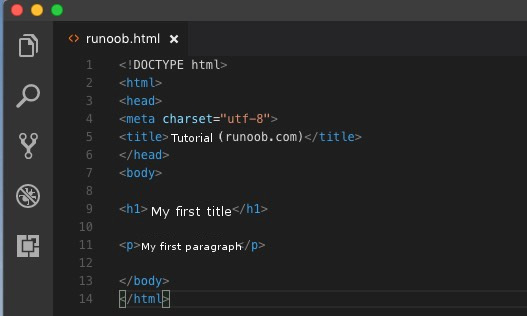
Step 2: save as a HTML file 
runoob.html : 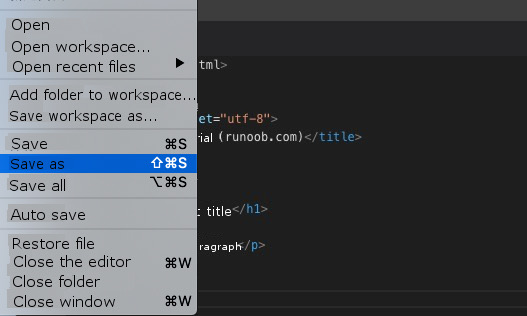
.htm can also usethe .html extension name. There is no difference between the two. According to your preference, I suggest using it together. .html . runoob Step 3: run the HTML file in the browser 
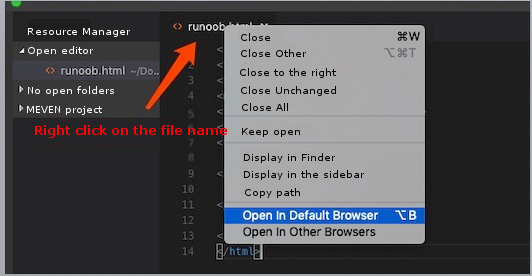
vscode open it using a browser in the html the file needs tohave the “open in browser” extension installed. 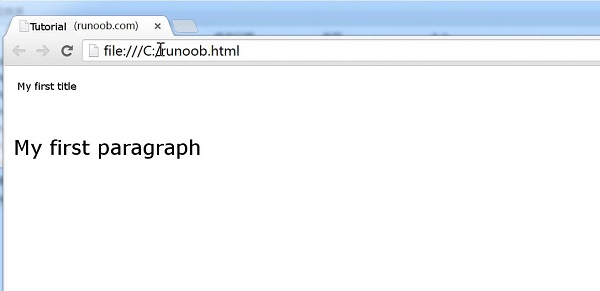
Emmet plug-ins to improve coding speed. Emmet official website: http://emmet.io/