最近几年来,地理信息系统无论是在理论上还是应用上都处在一个飞速发展的阶段。 GIS被应用于多个领域的建模和决策支持,如城市管理、区划、环境整治等等,地理信息成为信息时代重要的组成部分之一; “数字地球”概念的提出,更进一步推动了作为其技术支撑的GIS的发展。 与此同时,一些学者致力于相关的理论研究,如空间感知、空间数据误差、空间关系的形式化等等。 这恰好说明了地理信息系统作为应用技术和学科的两个方面,并且这两个方面构成了相互促进的发展过程。
Servlet can be used with the HTML form tag to allow users to upload files tothe server. The uploaded file can be a text file or an image file or any document.
The files used in this article are:
upload.jsp: File upload formmessage.jsp: Jump to the page after the upload is successfulUploadServlet.java: Upload processing Servlet.The jar file that needs to be introduced:
commons-fileupload-1.3.2、commons-io-2.5.jar.
The structure diagram is as follows:
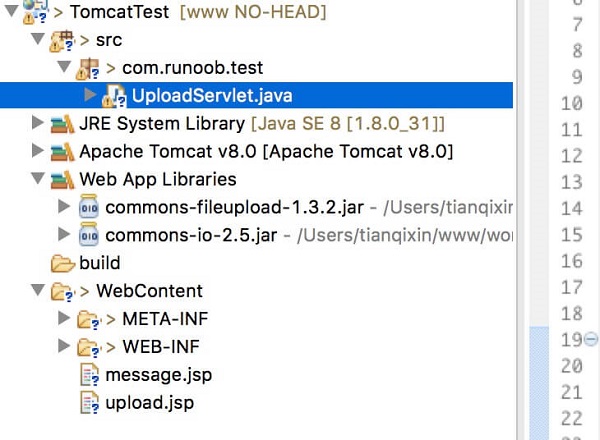
Note: Servlet3.0 has built-in file upload feature, so developers no longer need to import Commons FileUpload components into the project.
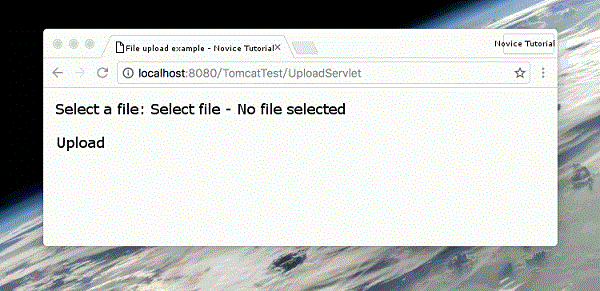
Next, we will introduce it in detail. The following HTML code creates a file upload form. The following points need to be noted: Form Form Form To upload a single file, you should use a single < input… / > tag with theattribute type= “file”. To allow multiple file uploads, include multiple name tags with different input attribute values. Enter a value for the labelwith a different name attribute. The browser associates a browse button foreach input tag. The following is the source code of UploadServlet, which is the same as dealing with file upload. Before that, let’s make sure that the dependency package has been introduced into the project’s WEB-INF/lib directory: The following example depends on FileUpload, so make sure you have the latest version of the FileUpload depends on Commons IO, so make sure you have the latest version of the You can download the two dependency packages provided by this site directly: The The Compile the Servlet UploadServlet above, and in the Now try uploading the file using the HTML form you created above. When you visit: http://localhost:8080/TomcatTest/upload.jsp in the browser, the demonstration is as follows: 2.15.1. Create a file upload form 
method property should be set to the POST method and cannot use the GET method. enctype property should be set to multipart/form-data . action property should be set to handle Servlet files uploaded by files on the back-end server. The following example uses UploadServlet Servlet to upload files. upload.jsp : The file code is as follows:<%@ page language="java" contentType="text/html; charset=UTF-8" pageEncoding="UTF-8"%>
File Upload Example - Rookie Tutorial
2.15.2. Write background Servlet 
commons-fileupload.x.x.jar files. Can be downloaded from http://commons.apache.org/proper/commons-fileupload/ . commons-io-x.x.jar files. Can be downloaded from http://commons.apache.org/proper/commons-io/ . UploadServlet source code is as follows:package com.runoob.test; import java.io.File; import java.io.IOException; import java.io.PrintWriter; import java.util.List; import javax.servlet.ServletException; import javax.servlet.annotation.WebServlet; import javax.servlet.http.HttpServlet; import javax.servlet.http.HttpServletRequest; import javax.servlet.http.HttpServletResponse; import org.apache.commons.fileupload.FileItem; import org.apache.commons.fileupload.disk.DiskFileItemFactory; import org.apache.commons.fileupload.servlet.ServletFileUpload; /** * Servlet implementation class UploadServlet */ @WebServlet("/UploadServlet") public class UploadServlet extends HttpServlet { private static final long serialVersionUID = 1L; // Upload file storage directory private static final String UPLOAD_DIRECTORY = "upload"; // Upload Configuration private static final int MEMORY_THRESHOLD = 1024 * 1024 * 3; // 3MB private static final int MAX_FILE_SIZE = 1024 * 1024 * 40; // 40MB private static final int MAX_REQUEST_SIZE = 1024 * 1024 * 50; // 50MB /** * Upload data and save files */ protected void doPost(HttpServletRequest request, HttpServletResponse response) throws ServletException, IOException { // Check if it is a multimedia upload if (!ServletFileUpload.isMultipartContent(request)) { // If not, stop PrintWriter writer = response.getWriter(); writer.println("Error: The form must contain enctype=multipart/form-data"); writer.flush(); return; } // Configure upload parameters DiskFileItemFactory factory = new DiskFileItemFactory(); // Set memory threshold - if exceeded, temporary files will be generated and stored in the temporary directory factory.setSizeThreshold(MEMORY_THRESHOLD); // Set temporary storage directory factory.setRepository(new File(System.getProperty("java.io.tmpdir"))); ServletFileUpload upload = new ServletFileUpload(factory); // Set maximum file upload value upload.setFileSizeMax(MAX_FILE_SIZE); // Set maximum request value (including file and form data) upload.setSizeMax(MAX_REQUEST_SIZE); // Chinese Processing upload.setHeaderEncoding("UTF-8"); // Construct a temporary path to store uploaded files // This path is relative to the directory of the current application String uploadPath = request.getServletContext().getRealPath("./") + File.separator + UPLOAD_DIRECTORY; // If the directory does not exist, create it File uploadDir = new File(uploadPath); if (!uploadDir.exists()) { uploadDir.mkdir(); } try { // Parse the requested content and extract file data @SuppressWarnings("unchecked") List message.jsp file code is as follows: <%@ page language="java" contentType="text/html; charset=UTF-8" pageEncoding="UTF-8"%>
${message}
2.15.3. Compile and run Servlet 
web.xml create the required entries in the file, as follows: