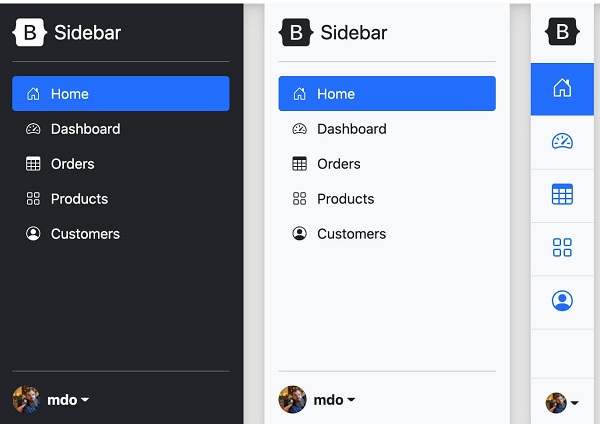
The Bootstrap5 sidebar is similar to the modal box and is commonly used in mobile devices. We can use JavaScript to set whether the You can use a-linked Create a sliding navigation example as follows: You can control the orientation of the sidebar through the following four classes: We can set it when the sidebar pops up.
In recent years, Geographic Information Systems (GIS) have undergone rapid development in both theoretical and practical dimensions. GIS has been widely applied for modeling and decision-making support across various fields such as urban management, regional planning, and environmental remediation, establishing geographic information as a vital component of the information era. The introduction of the “Digital Earth” concept has further accelerated the advancement of GIS, which serves as its technical foundation. Concurrently, scholars have been dedicated to theoretical research in areas like spatial cognition, spatial data uncertainty, and the formalization of spatial relationships. This reflects the dual nature of GIS as both an applied technology and an academic discipline, with the two aspects forming a mutually reinforcing cycle of progress. 7.28.1. Create sliding navigation 
.offcanvas add after the class``.show`` class to control the display and hiding of the sidebar: .offcanvas Hide content (default) .offcanvas.show display content href Property or button element usage data-bs-target property to set the sidebar. Both cases require the use of data-bs-toggle="offcanvas" .Example 
<a class="btn btn-primary" data-bs-toggle="offcanvas" href="#offcanvasExample" role="button" aria-controls="offcanvasExample">
Use the link's href attribute
a>
<button class="btn btn-primary" type="button" data-bs-toggle="offcanvas" data-bs-target="#offcanvasExample" aria-controls="offcanvasExample">
Used in buttons data-bs-target
button>
<div class="offcanvas offcanvas-start" tabindex="-1" id="offcanvasExample" aria-labelledby="offcanvasExampleLabel">
<div class="offcanvas-header">
<h5 class="offcanvas-title" id="offcanvasExampleLabel">sidebarh5>
<button type="button" class="btn-close text-reset" data-bs-dismiss="offcanvas" aria-label="Close">button>
div>
<div class="offcanvas-body">
<div>
Some text as placeholder. In real life you can have the elements you have chosen. Like, text, images, lists, etc.
div>
<div class="dropdown mt-3">
<button class="btn btn-secondary dropdown-toggle" type="button" id="dropdownMenuButton" data-bs-toggle="dropdown">
Dropdown button
button>
<ul class="dropdown-menu" aria-labelledby="dropdownMenuButton">
<li><a class="dropdown-item" href="#">Actiona>li>
<li><a class="dropdown-item" href="#">Another actiona>li>
<li><a class="dropdown-item" href="#">Something else herea>li>
ul>
div>
div>
div>
7.28.2. The direction of the sidebar 
.offcanvas-start is shown on the left, as in the example above. .offcanvas-end Display on the right .offcanvas-top Display at the top .offcanvas-bottom Display at the bottom Example 
<button class="btn btn-primary" type="button" data-bs-toggle="offcanvas" data-bs-target="#offcanvasTop" aria-controls="offcanvasTop">Top navigation barbutton>
<div class="offcanvas offcanvas-top" tabindex="-1" id="offcanvasTop" aria-labelledby="offcanvasTopLabel">
<div class="offcanvas-header">
<h5 id="offcanvasTopLabel">Display in the top navigation barh5>
<button type="button" class="btn-close text-reset" data-bs-dismiss="offcanvas" aria-label="Close">button>
div>
<div class="offcanvas-body">
...
div>
div>
Example 
<button class="btn btn-primary" type="button" data-bs-toggle="offcanvas" data-bs-target="#offcanvasRight" aria-controls="offcanvasRight">Right sidebarbutton>
<div class="offcanvas offcanvas-end" tabindex="-1" id="offcanvasRight" aria-labelledby="offcanvasRightLabel">
<div class="offcanvas-header">
<h5 id="offcanvasRightLabel">Display in the right sidebarh5>
<button type="button" class="btn-close text-reset" data-bs-dismiss="offcanvas" aria-label="Close">button>
div>
<div class="offcanvas-body">
...
div>
div>
Example 
<button class="btn btn-primary" type="button" data-bs-toggle="offcanvas" data-bs-target="#offcanvasBottom" aria-controls="offcanvasBottom">Bottom navigation barbutton>
<div class="offcanvas offcanvas-bottom" tabindex="-1" id="offcanvasBottom" aria-labelledby="offcanvasBottomLabel">
<div class="offcanvas-header">
<h5 class="offcanvas-title" id="offcanvasBottomLabel">Display in the bottom navigation barh5>
<button type="button" class="btn-close text-reset" data-bs-dismiss="offcanvas" aria-label="Close">button>
div>
<div class="offcanvas-body small">
...
div>
div>
7.28.3. Set the background and whether it can be scrollable 
whether the element can be scrolled or whether a background canvas is displayed. Use data-bs-scroll property to set the whether the element is scrollable data-bs-backdrop to toggle whether to display the background canvas. Example 
<button class="btn btn-primary" type="button" data-bs-toggle="offcanvas" data-bs-target="#offcanvasScrolling" aria-controls="offcanvasScrolling">body elements can scrollbutton>
<button class="btn btn-primary" type="button" data-bs-toggle="offcanvas" data-bs-target="#offcanvasWithBackdrop" aria-controls="offcanvasWithBackdrop">Display Canvas (default)button>
<button class="btn btn-primary" type="button" data-bs-toggle="offcanvas" data-bs-target="#offcanvasWithBothOptions" aria-controls="offcanvasWithBothOptions">Allow scrolling and displaying the canvasbutton>
<div class="offcanvas offcanvas-start" data-bs-scroll="true" data-bs-backdrop="false" tabindex="-1" id="offcanvasScrolling" aria-labelledby="offcanvasScrollingLabel">
<div class="offcanvas-header">
<h5 class="offcanvas-title" id="offcanvasScrollingLabel">The main content can be scrolledh5>
<button type="button" class="btn-close text-reset" data-bs-dismiss="offcanvas" aria-label="Close">button>
div>
<div class="offcanvas-body">
<p>Scroll the page to see the effect.p>
div>
div>
<div class="offcanvas offcanvas-start" tabindex="-1" id="offcanvasWithBackdrop" aria-labelledby="offcanvasWithBackdropLabel">
<div class="offcanvas-header">
<h5 class="offcanvas-title" id="offcanvasWithBackdropLabel">Use background canvash5>
<button type="button" class="btn-close text-reset" data-bs-dismiss="offcanvas" aria-label="Close">button>
div>
<div class="offcanvas-body">
<p>The main content cannot be scrolledp>
div>
div>
<div class="offcanvas offcanvas-start" data-bs-scroll="true" tabindex="-1" id="offcanvasWithBothOptions" aria-labelledby="offcanvasWithBothOptionsLabel">
<div class="offcanvas-header">
<h5 class="offcanvas-title" id="offcanvasWithBothOptionsLabel">Use a background canvas, with scrollable body contenth5>
<button type="button" class="btn-close text-reset" data-bs-dismiss="offcanvas" aria-label="Close">button>
div>
<div class="offcanvas-body">
<p>Scroll the page to see the effect.p>
div>
div>
7.28.4. Sidebar case 
Example 
Principles, Technologies, and Methods of Geographic Information Systems
102
