
One switch statement allows you to test when a variable is equal to multiple values. Each value is called a case, and the variable being tested will be for each switch case check it out.
Install using CPAN Open a command window and enter Ubuntu usage The syntax format is as follows: The following is Any type of In a The scalar When the variable being tested is equal to When matching When matching Execute the above program, and the output is as follows: Next let’s take a look at the use of Execute the above program, and the output is as follows: switch case execution is based on Switch module Switch the module is not installed by default. 5.17.1. Install the Switch.pm module #
cpan command, and then enter installSwitch command:# cpan
cpan[1]> install Switch // install
cpan[2]> exit // exit
apt-get installationsudo apt-get install libswitch-perl
5.17.2. Grammar #
Grammar #
Use Switch; Switch (argument) {case1 {print "number 1"} case "a" {print "string
{case [1.. 10,42] {print "Number in list"}case ( @ array) {print "Number in array"}case/ w+/
{print "Regular matching pattern"}caseqr/ w+/{
Print "regular matching pattern"} case ( % hash) {print "hash"}
case ( &sub) {print "child process"} else {print "does not match the previous condition"}}
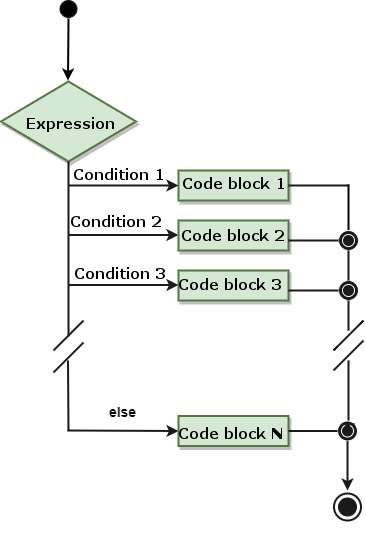
switch rules for the statement: switch scalar parameter can be used in parentheses of the statement. switch there can be any number of case statement. Every one of them. case followed by a value to be compared and a colon. case after the statement will match the switch the scalar of the statement is compared to determine whether it is equal. case Constant time in case The following statement will be executed until it is encountered break Statement. switch statement can have an optional else the statement is at the end, and the statement is in all case executed in the case of a mismatch. case after that, it will be executed case statement block code, jump out after execution switch statement. case later, if we need to continue with the next case statement, you need to add next statement. 5.17.3. Flow chart #
Example #
#/ Usr/bin/perluse
Switch$ Var=10@ Array=(10,20,30);% Hash=('key1 '=>10,'key2'=>20); Switch ($var) {case10 {print "number
10 n "{case" a "{print" string
{case [1.. 10,42] {print "Number in list"} case ( @ array) {print "Number in array"} case
( % hash) {print "In hash"}else {print "No matching condition"}}
Number 10
next example:Example #
#/ Usr/bin/perluse
Switch$ Var=10@ Array=(10,20,30);% Hash=('key1 '=>10,'key2'=>20); Switch ($var) {case10 {print "number
10 n "; next;} # Continue executing case" a "{print" string after matching
{case [1.. 10,42] {print "Number in list"} case ( @ array) {print "Number in array"} case
( % hash) {print "In hash"}else {print "No matching condition"}}
Number 10
Numbers in the list