最近几年来,地理信息系统无论是在理论上还是应用上都处在一个飞速发展的阶段。 GIS被应用于多个领域的建模和决策支持,如城市管理、区划、环境整治等等,地理信息成为信息时代重要的组成部分之一; “数字地球”概念的提出,更进一步推动了作为其技术支撑的GIS的发展。 与此同时,一些学者致力于相关的理论研究,如空间感知、空间数据误差、空间关系的形式化等等。 这恰好说明了地理信息系统作为应用技术和学科的两个方面,并且这两个方面构成了相互促进的发展过程。
Let’s start with real programming based on the Android framework. Before you start writing the first example using Android SDK, make sure that you have finished building your Android development environment as described in the Android-Environment Building tutorial. In the meantime, I assume you have some knowledge of Eclipse IDE.
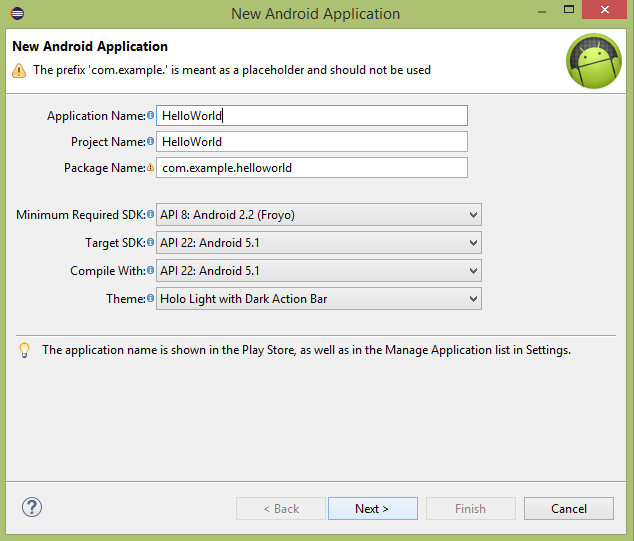
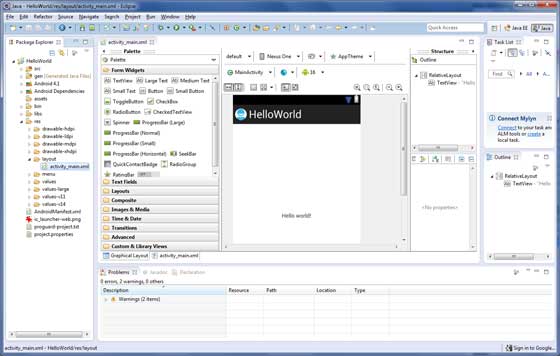
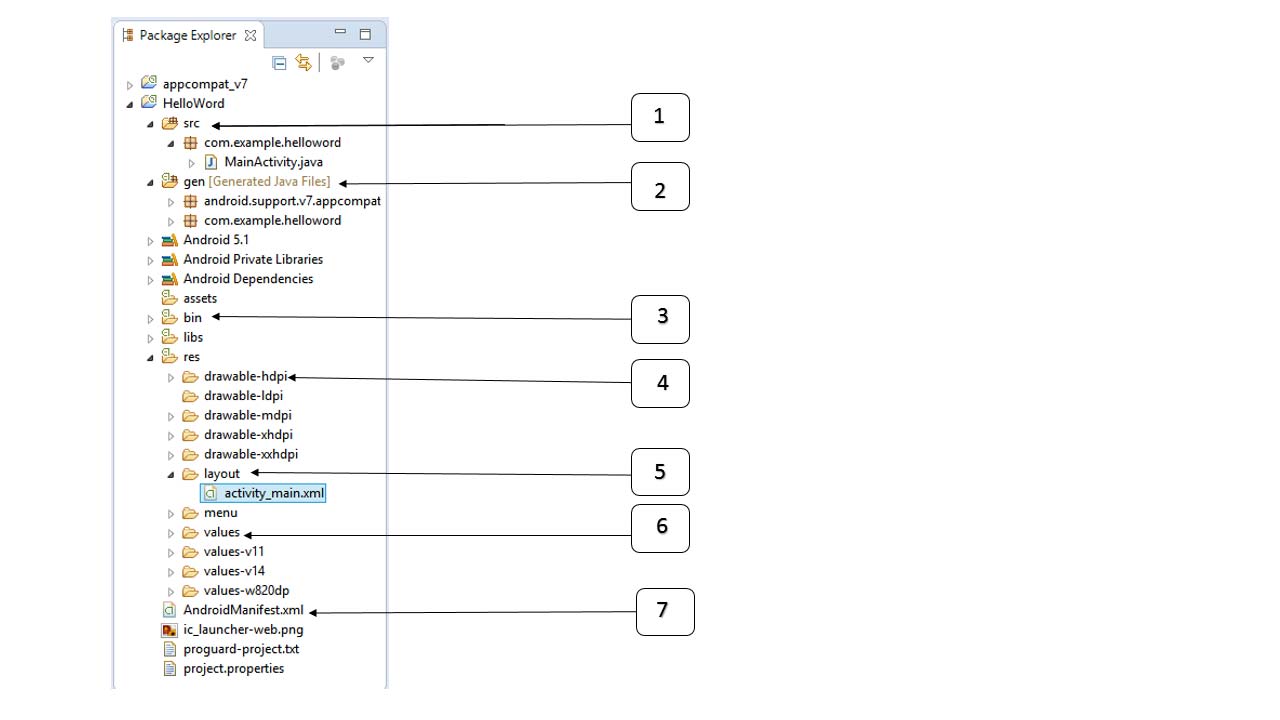
Now let’s start writing a simple Android application that prints out “Hello World”. The first step is to create a simple Android application through Eclipse IDE. Follow the option File-> New-> Project, and finally select Android New Application from the wizard list. Now name the application HelloWorld using the following window wizard: Next, follow the instructions provided to keep all default inputs until the last step. Once the project is created successfully, you will see the following project interface- Before running the application, you need to know some file directories and files in the Android project- Serial number Folders, files, and descriptions 1 Src: contains all the .java source files in the project. By default, it includes an active class corresponding to the MainActivity.java source file, which will be run when the application is launched with the application icon. 2 Gen: this contains .R files generated by the compiler, referencing all the resources in the project. The file cannot be modified. 3 bin:该文件夹包含Android由APT构建的.apk包文件,以及运行Android应用程序需要的其他所有东西。 4 Res/drawable-hdpi: this directory includes all the drawable objects needed for high-density screen design. 5 Res/layout: this directory holds the files defined for the user interface. 6 Res/values: this directory holds a wide range of XML files containing a range of resources, such as strings and color definitions. 7 AndroidManifest.xml:这是应用程序的清单文件,描述了应用程序的基础特性,定义了它的各种组件。 The following sections give an overview of some important application files. The main activity code is in Here, No matter what components you develop as part of your application, you need to use the 这里,…标签之间是应用程序相关的组件。 The label is used to specify an activity Intention filter Here are the tags that will be used in your manifest file to specify different Android application components: Active element Service element Broadcast receiver element Content provider element 这是一个简单的 Let’s try to run the Hello World we just created! Applications. Suppose you have already created the AVD when you set up the environment. Run the application from Eclipse, open an active file in your project, and click Congratulations on developing your first Android application. Follow the remaining tutorials step by step, and you will become a great Android developer. 3.8.1. Create an Android application 
3.8.2. Analysis of Android Application Program 
3.8.3. Main activity file 
MainActivity.java In the Java file of This is the actual application file that will be converted to a Dalvik executable and run. The following is the default code generated by the Application Wizard for the Hello World application-package com.example.helloworld; import android.os.Bundle; import android.app.Activity; import android.view.Menu; import android.view.MenuItem; import android.support.v4.app.NavUtils; public class MainActivity extends Activity { @Override public void onCreate(Bundle savedInstanceState) { super.onCreate(savedInstanceState); setContentView(R.layout.activity_main); } @Override public boolean onCreateOptionsMenu(Menu menu) { getMenuInflater().inflate(R.menu.activity_main, menu); return true; } }
R.layout.activity_main Quote from res/layout Under the directory activity_main.xml Files. onCreate() Is one of the many methods that are called after the activity is loaded. 3.8.4. Manifest file 
manifest.xml All components are declared in the file. This file is the interface between the Android operating system and your application, so if your component is not declared in this file, it will not be recognized by the operating system. For example, a default manifest file looks like this:<manifest xmlns:android="http://schemas.android.com/apk/res/android" package="com.example.helloworld" android:versionCode="1" android:versionName="1.0" > <uses-sdk android:minSdkVersion="8" android:targetSdkVersion="22" /> <application android:icon="@drawable/ic_launcher" android:label="@string/app_name" android:theme="@style/AppTheme" > <activity android:name=".MainActivity" android:label="@string/title_activity_main" > <intent-filter> <action android:name="android.intent.action.MAIN" /> <category android:name="android.intent.category.LAUNCHER"/> intent-filter> activity> application> manifest>
andnroid:icon Property indicates that it is located in res/drawable-hdpi The application icon below. This application uses the drawable Under the folder named ic_launcher.png It’s a picture. android:name Property specifies the full name of a subclass of the Activity class. android:label Property specifies the string used for the activity name. You can use tags to specify multiple activities. action Be named android.intent.action.MAIN Indicating that this activity is used as an entry into the application Intention filter category Be named android.intent.category.LAUNCHER Indicating that the application can be started through the icon of the device initiator @string It refers to strings.xml (will be introduced later). therefore, @string/app_name Refers to the definition of the strings.xml In app_name , which is actually “Hello World” Similarly, other strings in the application are also popular.
3.8.5. Strings file 
strings.xml The file is in res/value Folder, which contains all the text used by the application. For example, the name of the button, label, default text, and other similar strings . This file is responsible for their text content. A default strings The file looks like this: 3.8.6. R file 
gen/com.example.helloworld/R.java The file is the active Java file, such as MainActivity.java And resources such as strings.xml The glue between. This is an automatically generated file. Do not modify it. R.java The contents of the file. Here is one. R.java Example of a file: /* AUTO-GENERATED FILE. DO NOT MODIFY. * * This class was automatically generated by the * aapt tool from the resource data it found. It * should not be modified by hand. */ package com.example.helloworld; public final class R { public static final class attr { } public static final class dimen { public static final int padding_large=0x7f040002; public static final int padding_medium=0x7f040001; public static final int padding_small=0x7f040000; } public static final class drawable { public static final int ic_action_search=0x7f020000; public static final int ic_launcher=0x7f020001; } public static final class id { public static final int menu_settings=0x7f080000; } public static final class layout { public static final int activity_main=0x7f030000; } public static final class menu { public static final int activity_main=0x7f070000; } public static final class string { public static final int app_name=0x7f050000; public static final int hello_world=0x7f050001; public static final int menu_settings=0x7f050002; public static final int title_activity_main=0x7f050003; } public static final class style { public static final int AppTheme=0x7f060000; } }
3.8.7. Layout file 
activity_main.xml It’s a person in res/layout Under the directory layout Files. Is referenced when the application builds its interface. You will modify this file very frequently to change the layout of the application. In the “Hello World” application, this file has a default layout, as follows: <RelativeLayout xmlns:android="http://schemas.android.com/apk/res/android" xmlns:tools="http://schemas.android.com/tools" android:layout_width="match_parent" android:layout_height="match_parent" > <TextView android:layout_width="wrap_content" android:layout_height="wrap_content" android:layout_centerHorizontal="true" android:layout_centerVertical="true" android:padding="@dimen/padding_medium" android:text="@string/hello_world" tools:context=".MainActivity" /> RelativeLayout>
RelativeLayout 的示例,更多内容会在独立的章节中讲解。 TextView是一个Android的控件用于构建用户图形界面。它包含有许多不同的属性, 诸如 android:layout_width , android:layout_height 等用来设置它的宽度和高度等。 @string 指的是 res/values 文件夹下的 strings.xml 文件。 因此, @string/hello_world 指的是定义在 strings.xml 中的名为hello的字符串:”Hello World!”。 3.8.8. Run the application 
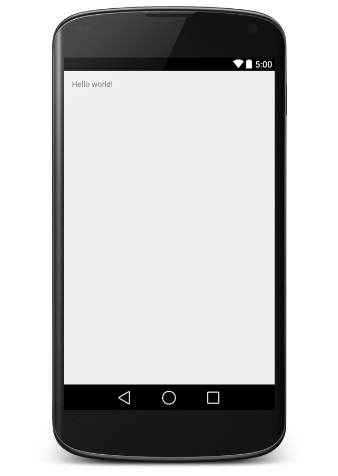
 Icon. Eclipse installs the application on AVD and starts it. If all goes well, the following simulator window will be displayed-