One In C # If the Boolean expression is When the above code is compiled and executed, it produces the following results: One When using One One Once someone In C # When the above code is compiled and executed, it produces the following results: if statement can be followed by an optional else statement else statement is executed when the Boolean expression is false. 1.12.1. Grammar #
if...else syntax of the statement:if(boolean_expression) { /* The statement to be executed if the Boolean expression is true */ } else { /* The statement to be executed if the Boolean expression is false */ }
true , then execute if the code within the block. If the Boolean expression is false ,then execute else code within the block. 1.12.2. Flow chart #
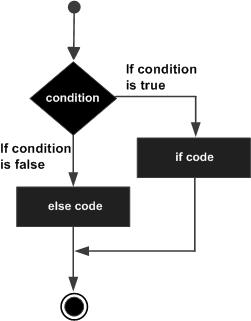
Example #
using System; namespace DecisionMaking { class Program { static void Main(string[] args) { /* Definition of Local Variables */ int a = 100; /* Check Boolean conditions */ if (a < 20) { /* If the condition is true, output the following statement */ Console.WriteLine("A less than 20"); } else { /* If the condition is false, output the following statement */ Console.WriteLine("A greater than 20"); } Console.WriteLine("The value of a is {0}", a); Console.ReadLine(); } } }
A greater than 20 The value of a is 100
1.12.3.
if...else if...else statement # if statement can be followed by an optional else if...else statement, which can be used to test a variety of conditions if...else if...else statement, the following points need to be noted: if can be followed by zero or one. else must be in any one else if after that. if can be followed by zero or more else if must be in the else before. else if , the match is successful, and the rest else if or else will not be tested. 1.12.4. Grammar #
if...else if...else syntax of the statement:if(boolean_expression 1) { /* Execute when Boolean expression 1 is true */ } else if( boolean_expression 2) { /* Execute when Boolean expression 2 is true */ } else if( boolean_expression 3) { /* Execute when Boolean expression 3 is true */ } else { /* Execute when none of the above conditions are true */ }
1.12.5. Example #
using System; namespace DecisionMaking { class Program { static void Main(string[] args) { /* Definition of Local Variables */ int a = 100; /* Check Boolean conditions */ if (a == 10) { /* If the if condition is true, output the following statement */ Console.WriteLine("The value of a is 10"); } else if (a == 20) { /* If the else if condition is true, output the following statement */ Console.WriteLine("The value of a is 20"); } else if (a == 30) { /* If the else if condition is true, output the following statement */ Console.WriteLine("The value of a is 30"); } else { /* If none of the above conditions are true, output the following statement */ Console.WriteLine("No matching values"); } Console.WriteLine("The exact value of a is {0}", a); Console.ReadLine(); } } }
No matching values The accurate value of a is 100