
MongoDB provides 64-bit installation packages for all linux distributions, which you can download from the official website.
We need to install each Linux platform dependency package before installation.
Red Hat/CentOS:
sudo yum install libcurl openssl
Ubuntu 18.04 LTS (“Bionic”)/Debian 10 “Buster”:
sudo apt-get install libcurl4 openssl
Ubuntu 16.04 LTS (“Xenial”)/Debian 9 “Stretch”:
sudo apt-get install libcurl3 openssl
MongoDB source code download address: https://www.mongodb.com/download-center#community
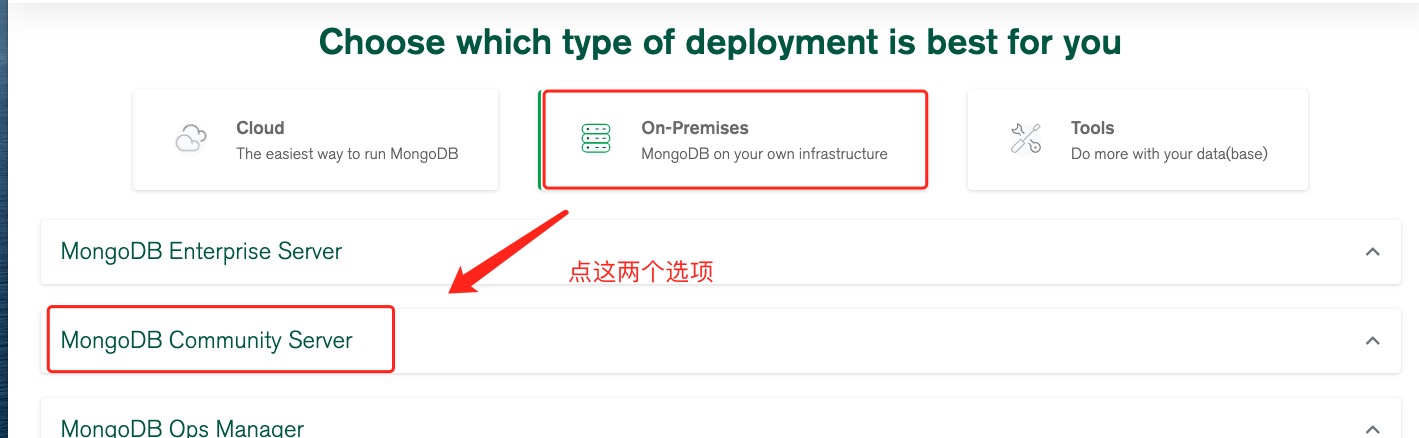
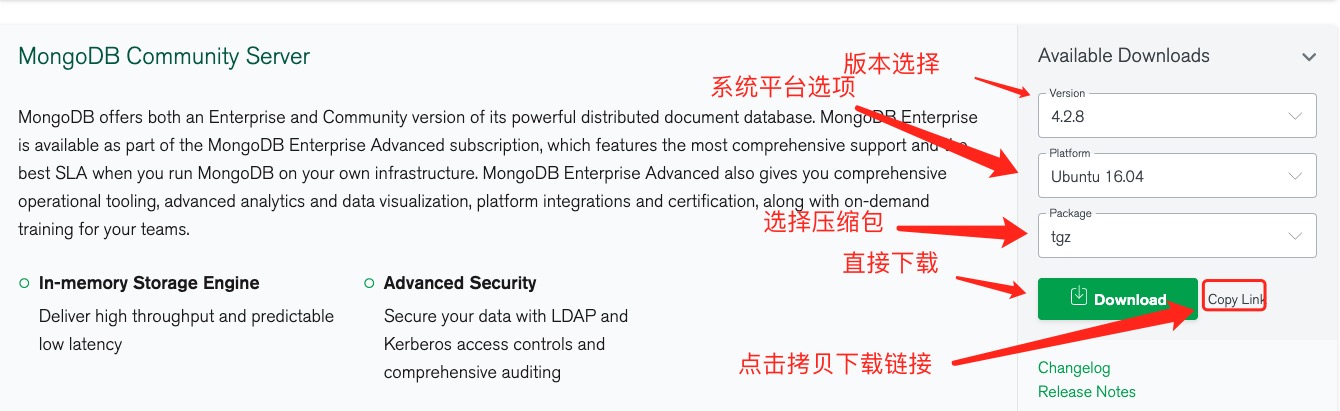
Here we choose tgz to download, download the installation package, and extract it. tgz (the installation on 64-bit Linux is demonstrated below).
wget https://fastdl.mongodb.org/linux/mongodb-linux-x86_64-ubuntu1604-4.2.8.tgz    # 下载
tar -zxvf mongodb-linux-x86_64-ubuntu1604-4.2.8.tgz                                    # 解压

mv mongodb-src-r4.2.8  /usr/local/mongodb4                          # 将解压包拷贝到指定目录
The executable file for MongoDB is located in the bin directory, so you can add it to the PATH In path:
export PATH=/bin:$PATH
The installation path for your MongoDB. As in this article /usr/local/mongodb4 . export PATH=/usr/local/mongodb4/bin:$PATH
3.5.1. Create a database directory 
By default, the following two directories are initialized when MongoDB starts:
-
Data storage directory: / var/lib/mongodb
-
Log file directory: / var/log/mongodb
Before starting, we can create these two directories and set the current user to have read and write permissions:
sudo mkdir -p /var/lib/mongo
sudo mkdir -p /var/log/mongodb
sudo chown `whoami` /var/lib/mongo # 设置权限
sudo chown `whoami` /var/log/mongodb # 设置权限
Next, start the Mongodb service:
mongod --dbpath /var/lib/mongo --logpath /var/log/mongodb/mongod.log --fork
Open the / var/log/mongodb/mongod.log file and see the following message indicating that the startup was successful.
# tail -10f /var/log/mongodb/mongod.log
2020-07-09T12:20:17.391+0800 I NETWORK [listener] Listening on /tmp/mongodb-27017.sock
2020-07-09T12:20:17.392+0800 I NETWORK [listener] Listening on 127.0.0.1
2020-07-09T12:20:17.392+0800 I NETWORK [listener] waiting for connections on port 27017
3.5.2. MongoDB backend manages Shell 
If you need to enter the mongodb background management, you need to first open the bin directory under the mongodb installation directory, and then execute the mongo command file.
MongoDB Shell is an interactive Javascript shell that comes with MongoDB, which is used to operate and manage MongoDB.
When you enter the mongoDB background, it will link to the test document (database) by default:
$ cd /usr/local/mongodb4/bin
$ ./mongo
MongoDB shell version v4.2.8
connecting to: mongodb://127.0.0.1:27017/?compressors=disabled&gssapiServiceName=mongodb
Implicit session: session { "id" : UUID("2cfdafc4-dd56-4cfc-933a-187b887119b3") }
MongoDB server version: 4.2.8
Welcome to the MongoDB shell.
……
Because it is a JavaScript shell, you can run some simple arithmetic operations:
> 2+2
4
> 3+6
9
Now let’s insert some simple data and retrieve the inserted data:
> db.runoob.insert({x:10})
WriteResult({ "nInserted" : 1 })
> db.runoob.find()
{ "_id" : ObjectId("5f069bdb4e02f8baf90f1184"), "x" : 10 }
>
The first command inserts the number 10 into the x field of the runoob collection.
To stop mongodb, you can use the following command:
mongod --dbpath /var/lib/mongo --logpath /var/log/mongodb/mongod.log --shutdown
It can also be found in mongo To implement in the command exit of
> use admin
switched to db admin
> db.shutdownServer()
More installation methods can be found on the official website: https://docs.mongodb.com/manual/administration/install-on-linux/
-
1. Sqlite
47
-
1. SVG tutorial
19
-
1. C# tutorial
61
-
1. Memcached
20
-
1. Angularjs2
8
-
2. Vue3
19
-
2. Go
43
-
2. Servlet
21
-
2. Docker
59
-
3. React
23
-
3. Kotlin
18
-
3. Mongodb
44
-
3. Android
18
-
3. SOAP tutorial
10
-
4. Lua
31
-
4. Appml
12
-
4. MySQL tutorial
34
-
5. Perl
45
-
web
15
-
5. Postgresql
41
-
6. Ruby
41
-
5. Web Services tutorial
6
-
6. Design-pattern
35
-
7. Rust
22
-
6. WSDL tutorial
8
-
7. Django
18
-
8. Foundation
39
-
9. Ios
43
-
9. Swift
43
-
8. Css3
26
-
11. HTML tutorial-(HTML5 Standard)
54
-
12. Http
6
-
13. Regex
6
-
14. Regexp
7
-
1. Geographical Information Systems in the World Wide Web Era
4
-
2. Basic technology of WebGIS
4
-
3. Geographic Web Services
5
-
4. aggregation of geographical information
4
-
5. mobile GIS
5
-
6. Geographic information portal
3
-
7. New generation national spatial data infrastructure and GIS
4
-
8. Application of WebGIS in E-Commerce
3
-
9. Application of WebGIS in E-government
3
-
10. Hotspots and frontiers of WebGIS
2
Principles, Technologies, and Methods of Geographic Information Systems
102
In recent years, Geographic Information Systems (GIS) have undergone rapid development in both theoretical and practical dimensions. GIS has been widely applied for modeling and decision-making support across various fields such as urban management, regional planning, and environmental remediation, establishing geographic information as a vital component of the information era. The introduction of the “Digital Earth” concept has further accelerated the advancement of GIS, which serves as its technical foundation. Concurrently, scholars have been dedicated to theoretical research in areas like spatial cognition, spatial data uncertainty, and the formalization of spatial relationships. This reflects the dual nature of GIS as both an applied technology and an academic discipline, with the two aspects forming a mutually reinforcing cycle of progress.
-
1. Introduction to Geographic Information Systems
6
-
2. From the Real World to the Bit World
3
-
3. Spatial Data Model
7
-
4. Spatial Reference Systems and Map Projections
5
-
5. Data in GIS
4
-
6. Spatial data acquisition
2
-
7. Spatial Data Management
6
-
8. Spatial analysis
8
-
9. Digital Terrain Model (DTM) and Terrain Analysis
5
-
10. Spatial modeling and spatial decision support
6
-
11. Spatial data representation and map making
6
-
12. 3S Integration Technology
5
-
13. Network Geographic Information System
4
-
14. Examples of Geographic Information System Application
8
-
15. Organization and Management of Geographic Information System Application Projects
10
-
16. Geographic Information system Software Engineering Technology
7
-
17. Geographic Information System Standards
3
-
18. Geographic Information System and Society
3
-
19. Earth Information Science and Digital Earth
4