最近几年来,地理信息系统无论是在理论上还是应用上都处在一个飞速发展的阶段。 GIS被应用于多个领域的建模和决策支持,如城市管理、区划、环境整治等等,地理信息成为信息时代重要的组成部分之一; “数字地球”概念的提出,更进一步推动了作为其技术支撑的GIS的发展。 与此同时,一些学者致力于相关的理论研究,如空间感知、空间数据误差、空间关系的形式化等等。 这恰好说明了地理信息系统作为应用技术和学科的两个方面,并且这两个方面构成了相互促进的发展过程。
Start and shut down the MySQL server 
Under the Windows system 
On Windows, open a command window (cmd) and go to the bin directory of the MySQL installation directory.
Start:
cd c:/mysql/bin mysqld --console Close:
cd c:/mysql/bin mysqladmin -uroot shutdown Under the Linux system 
First, we need to check whether the MySQL server is started with the following command:
ps -ef | grep mysqld If MySql is already started, the above command will output a list of mysql processes. If mysql is not started, you can use the following command to start the mysql server:
root@host# cd /usr/bin ./mysqld_safe & If you want to shut down the currently running MySQL server, you can execute the following command:
root@host# cd /usr/bin ./mysqladmin -u root -p shutdown Enter password: ****** MySQL user Settings 
If you need to add MySQL users, you only need to add new users in the user table in the mysql database.
The following is an instance of adding a user with a user name of guest and a password of guest123, and the user is authorized to operate SELECT, INSERT and UPDATE:
root@host# mysql -u root -p Enter password:******* mysql> use mysql; Database changed mysql> INSERT INTO user (host, user, password, select_priv, insert_priv, update_priv) VALUES ('localhost', 'guest', PASSWORD('guest123'), 'Y', 'Y', 'Y'); Query OK, 1 row affected (0.20 sec) mysql> FLUSH PRIVILEGES; Query OK, 1 row affected (0.01 sec) mysql> SELECT host, user, password FROM user WHERE user = 'guest'; +-----------+---------+------------------+ | host | user | password | +-----------+---------+------------------+ | localhost | guest | 6f8c114b58f2ce9e | +-----------+---------+------------------+ 1 row in set (0.00 sec) When adding users, be careful to use the PASSWORD () function provided by MySQL to encrypt the password. You can see in the above example that the encrypted user password is: 6f8c114b58f2ce9e.
注意: In MySQL5.7, the password of the user table has been changed to authentication_string .
注意: The password () encryption function has been removed in 8.0.11 and can be replaced by the MD5 () function.
注意: Pay attention to the need to execute FLUSH PRIVILEGES Statement. After this command is executed, the authorization table is reloaded.
If you do not use this command, you will not be able to use the newly created user to connect to the mysql server unless you restart the mysql server.
When you create a user, you can specify permissions for the user. In the corresponding permission column, set it to’Y’ in the insert statement. The list of user permissions is as follows:
Select_priv
Insert_priv
Update_priv
Delete_priv
Create_priv
Drop_priv
Reload_priv
Shutdown_priv
Process_priv
File_priv
Grant_priv
References_priv
Index_priv
Alter_priv
Another way to add a user is through the SQL GRANT command, which adds the user zara to the specified database TUTORIALS with a password of zara123.
root@host# mysql -u root -p Enter password:******* mysql> use mysql; Database changed mysql> GRANT SELECT,INSERT,UPDATE,DELETE,CREATE,DROP -> ON TUTORIALS.* -> TO 'zara'@'localhost' -> IDENTIFIED BY 'zara123'; The above command creates a user information record in the user table in the mysql database.
注意: The SQL statement of MySQL ends with a semicolon (;).
/ etc/my.cnf file configuration 
In general, you do not need to modify the configuration file, which is configured by default as follows:
[mysqld] datadir=/var/lib/mysql socket=/var/lib/mysql/mysql.sock [mysql.server] user=mysql basedir=/var/lib [safe_mysqld] err-log=/var/log/mysqld.log pid-file=/var/run/mysqld/mysqld.pid In the configuration file, you can specify different directories where the error log files are stored, and you generally do not need to change these configurations.
Commands for managing MySQL 
The following is a list of commands commonly used in working with the Mysql database:
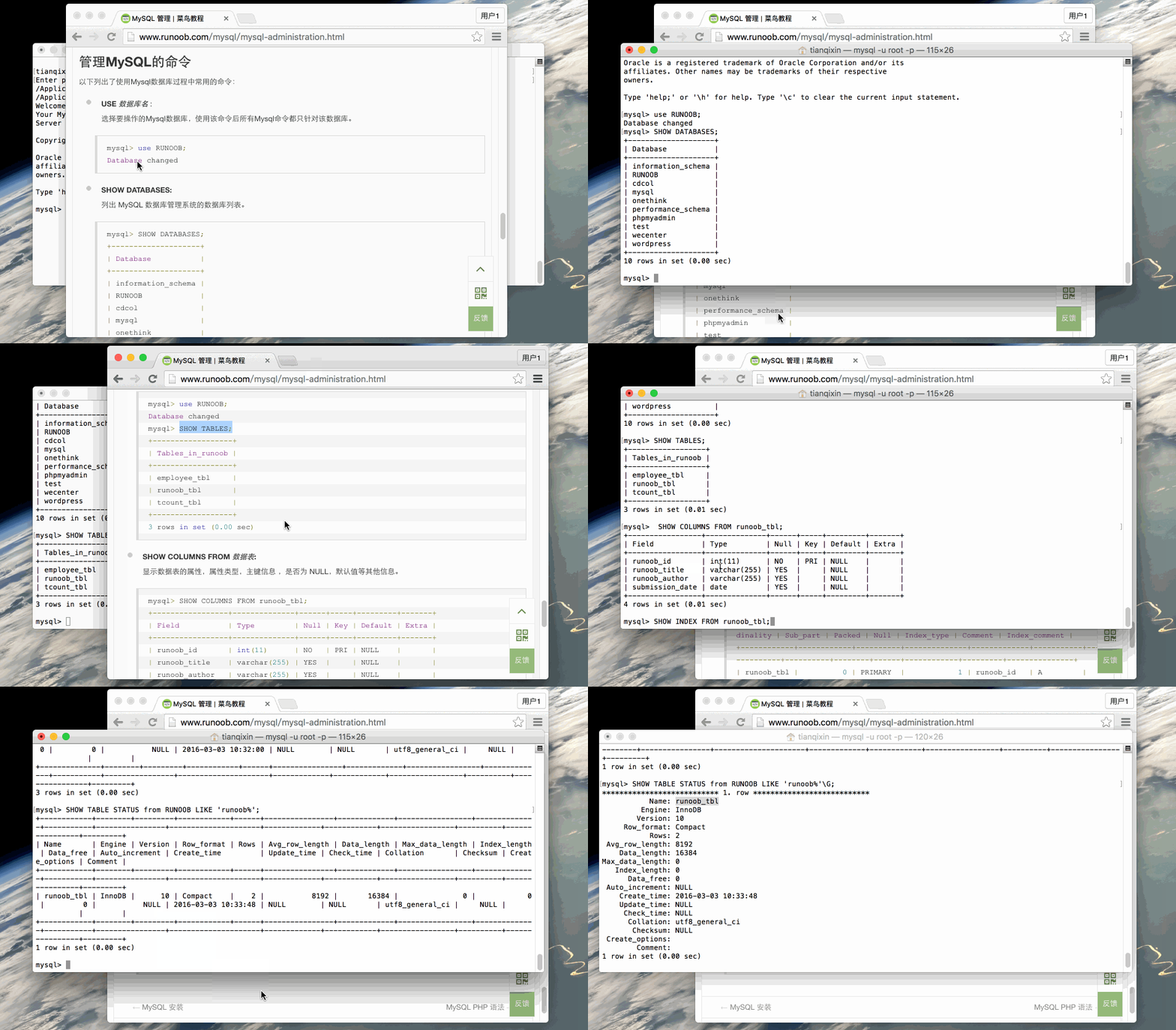
- USE 数据库名 :Select the Mysql database you want to operate on, and after using this command, all Mysql commands are directed only to that database.
mysql> use RUNOOB; Database changed
- SHOW DATABASES:Lists the databases for the MySQL database management system.
mysql> SHOW DATABASES; +--------------------+ | Database | +--------------------+ | information_schema | | RUNOOB | | cdcol | | mysql | | onethink | | performance_schema | | phpmyadmin | | test | | wecenter | | wordpress | +--------------------+ 10 rows in set (0.02 sec)
- SHOW TABLES:Displays all tables for the specified database, and you need to use the use command to select the database to operate on before using this command.
mysql> use RUNOOB; Database changed mysql> SHOW TABLES; +------------------+ | Tables_in_runoob | +------------------+ | employee_tbl | | runoob_tbl | | tcount_tbl | +------------------+ 3 rows in set (0.00 sec)
- SHOW COLUMNS FROM 数据表:Displays the properties of the data table, attribute type, primary key information, whether it is NULL, default value and other information.
mysql> SHOW COLUMNS FROM runoob_tbl; +-----------------+--------------+------+-----+---------+-------+ | Field | Type | Null | Key | Default | Extra | +-----------------+--------------+------+-----+---------+-------+ | runoob_id | int(11) | NO | PRI | NULL | | | runoob_title | varchar(255) | YES | | NULL | | | runoob_author | varchar(255) | YES | | NULL | | | submission_date | date | YES | | NULL | | +-----------------+--------------+------+-----+---------+-------+ 4 rows in set (0.01 sec)
- SHOW INDEX FROM 数据表:Displays detailed index information for the data table, including PRIMARY KEY (primary key).
mysql> SHOW INDEX FROM runoob_tbl; +------------+------------+----------+--------------+-------------+-----------+-------------+----------+--------+------+------------+---------+---------------+ | Table | Non_unique | Key_name | Seq_in_index | Column_name | Collation | Cardinality | Sub_part | Packed | Null | Index_type | Comment | Index_comment | +------------+------------+----------+--------------+-------------+-----------+-------------+----------+--------+------+------------+---------+---------------+ | runoob_tbl | 0 | PRIMARY | 1 | runoob_id | A | 2 | NULL | NULL | | BTREE | | | +------------+------------+----------+--------------+-------------+-----------+-------------+----------+--------+------+------------+---------+---------------+ 1 row in set (0.00 sec)
- SHOW TABLE STATUS [FROM db_name] [LIKE ‘pattern’] \G:This command outputs the performance and statistics of the Mysql database management system.
mysql> SHOW TABLE STATUS FROM RUNOOB; # 显示数据库 RUNOOB 中所有表的信息 mysql> SHOW TABLE STATUS from RUNOOB LIKE 'runoob%'; # 表名以runoob开头的表的信息 mysql> SHOW TABLE STATUS from RUNOOB LIKE 'runoob%'\G; # 加上 \G,查询结果按列打印
The Gif diagram shows: