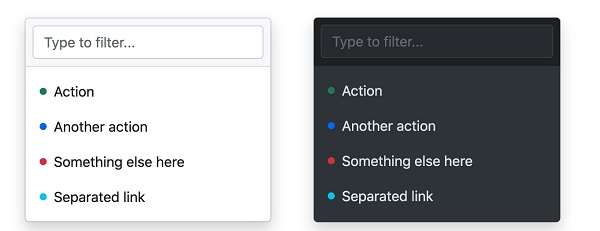
The drop-down menu is switchable and is a context menu that displays links in a list format. We can use a button or link to open the drop-down menu, which needs to be added If you want to disable the drop-down menu, you can use the If we want to align the drop-down menu to the right, we can use the The pop-up direction of the drop-down menu is down by default, but we can also set different directions. If you want the drop-down menu to pop up to the lower right, you can use the Example If you want to pull up the dish and pop it up in one way, you can use the Example If you want the drop-down menu to pop up, you can click Example We can add a drop-down menu to the button: Vertical button group with drop-down menu:
In recent years, Geographic Information Systems (GIS) have undergone rapid development in both theoretical and practical dimensions. GIS has been widely applied for modeling and decision-making support across various fields such as urban management, regional planning, and environmental remediation, establishing geographic information as a vital component of the information era. The introduction of the “Digital Earth” concept has further accelerated the advancement of GIS, which serves as its technical foundation. Concurrently, scholars have been dedicated to theoretical research in areas like spatial cognition, spatial data uncertainty, and the formalization of spatial relationships. This reflects the dual nature of GIS as both an applied technology and an academic discipline, with the two aspects forming a mutually reinforcing cycle of progress. 7.19.1. Example 
<div class="dropdown">
<button type="button" class="btn btn-primary dropdown-toggle" data-bs-toggle="dropdown">
Light colored cards
button>
<div class="dropdown-menu">
<a class="dropdown-item" href="#">link 1a>
<a class="dropdown-item" href="#">link 2a>
<a class="dropdown-item" href="#">link 3a>
div>
div>
7.19.2. Case analysis 
.dropdown class is used to specify a drop-down menu. .dropdown-toggle and data-toggle="dropdown" property. add on the element .dropdown-menu class to set the actual drop-down menu, and then add to the options in the drop-down menu .dropdown-item class. The split line in the drop-down menu 
.dropdown-divider class is used to create a horizontal split line in the drop-down menu 7.19.3. Example 
<li><hrclass="dropdown-divider">hr>li>
The title in the drop-down menu 
.dropdown-header class is used to add a title to the drop-down menu 7.19.4. Example 
<li><h5class="dropdown-header">title 1h5>li>
Available and prohibited items in drop-down menus 
.active class highlights the options of the drop-down menu (adding a blue background). .disabled class. 7.19.5. Example 
<a class="dropdown-item" href="#">General itemsa>
<a class="dropdown-item active" href="#">Activate itema>
<a class="dropdown-item disabled" href="#">Disabled itemsa>
Positioning of the drop-down menu 
.dropdown add after class .dropend or .dropstart class. .dropend is right aligned. .dropstart is left aligned. 7.19.6. Example 
...
...
Drop-down menu pop-up direction settin 
7.19.7. Specify the drop-down menu that pops up to the right 
div add on the element .dropdown-menu-end class:
7.19.8. Specify the pull-up menu that pops up 
div add the “dropup” class to the element:
7.19.9. Specify the drop-down menu that pops up to the left 
div add on the element dropstart class:
Add some content to test the effect of popping up to the left.
Drop-down menu setting text 
.dropdown-item-text class can set text items in the drop-down menu 7.19.10. Example 
<ul class="dropdown-menu">
<li><a class="dropdown-item" href="#">link 1a>li>
<li><a class="dropdown-item" href="#">link 2a>li>
<li><a class="dropdown-item" href="#">link 3a>li>
<li><a class="dropdown-item-text" href="#">text linka>li>
<li><span class="dropdown-item-text">Just textspan>li>
ul>
Set the drop-down menu in the button group 
7.19.11. Example 
<div class="btn-group">
<button type="button" class="btn btn-primary">Applebutton>
<button type="button" class="btn btn-primary">Samsungbutton>
<div class="btn-group">
<button type="button" class="btn btn-primary dropdown-toggle" data-bs-toggle="dropdown">Sonybutton>
<ul class="dropdown-menu">
<li><a class="dropdown-item" href="#">Tableta>li>
<li><a class="dropdown-item" href="#">Smartphonea>li>
ul>
div>
div>
7.19.12. Example 
<div class="btn-group-vertical">
<button type="button" class="btn btn-primary">Applebutton>
<button type="button" class="btn btn-primary">Samsungbutton>
<div class="btn-group">
<button type="button" class="btn btn-primary dropdown-toggle" data-bs-toggle="dropdown">Sonybutton>
<ul class="dropdown-menu">
<li><a class="dropdown-item" href="#">Tableta>li>
<li><a class="dropdown-item" href="#">Smartphonea>li>
ul>
div>
div>
Navigation bar case 
7.19.13. Example 
Principles, Technologies, and Methods of Geographic Information Systems
102
