最近几年来,地理信息系统无论是在理论上还是应用上都处在一个飞速发展的阶段。 GIS被应用于多个领域的建模和决策支持,如城市管理、区划、环境整治等等,地理信息成为信息时代重要的组成部分之一; “数字地球”概念的提出,更进一步推动了作为其技术支撑的GIS的发展。 与此同时,一些学者致力于相关的理论研究,如空间感知、空间数据误差、空间关系的形式化等等。 这恰好说明了地理信息系统作为应用技术和学科的两个方面,并且这两个方面构成了相互促进的发展过程。
The IOS table view consists of cells (generally reusable) that display views scrolling vertically.
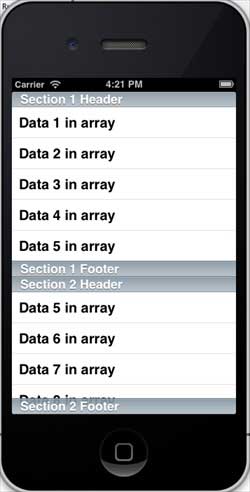
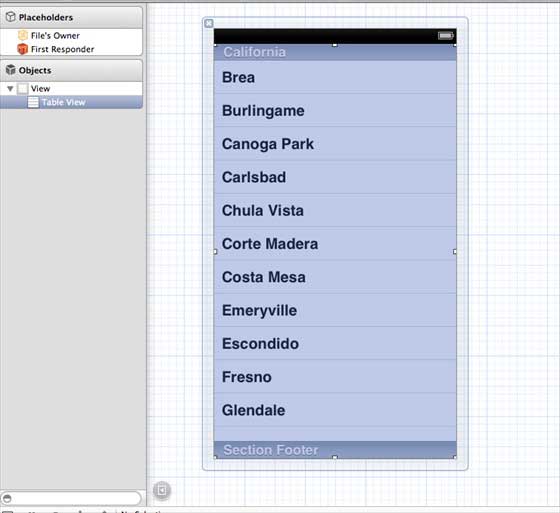
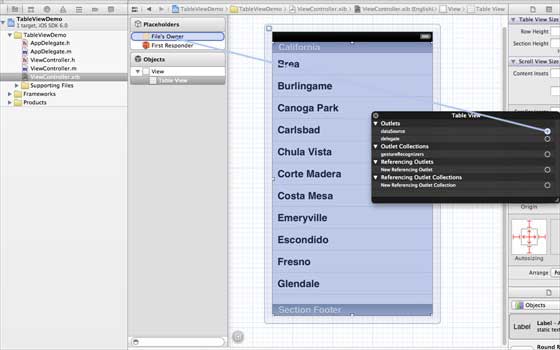
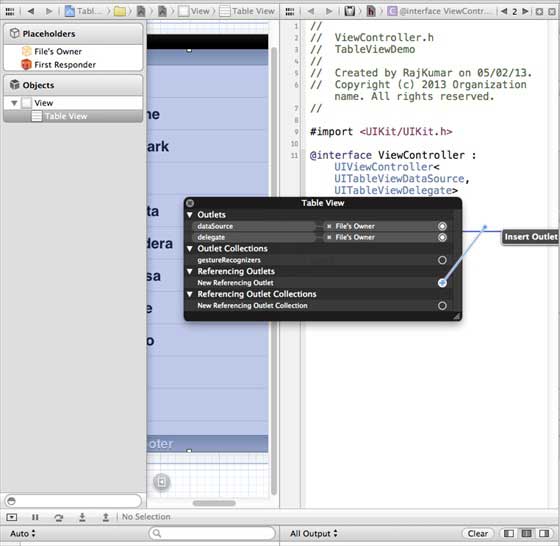
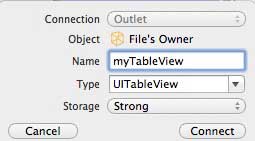
In iOS, the table view is used to display a list of data, such as a list of contacts, to-dos, or shopping items. Delegate DataSource RowHeight SectionFooterHeight SectionHeaderHeight SeparatorColor TableHeaderView TableFooterView 1.在ViewController.xib中添加表格视图,如下所示 two。 Set the delegate and data source to File’s Owner (owner of the file) by right-clicking and selecting the data source and delegate. Set up the data source as follows 3.为表格视图创建IBOutlet的并将其命名为myTableView。如以下图片中所示 To own the data, add a NSMutableArray so that it can be displayed in the list grid view 5.ViewController应采用的UITableViewDataSource和UITableViewDelegate协议。ViewController.h代码如下所示 6.执行所需的表格视图委托和数据源的方法。更新ViewController.m,如下所示 7.现在当我们运行应用程序时我们就会得到下面的输出 9.19.1. Important attribute 
An important method 
- (UITableViewCell *)cellForRowAtIndexPath:(NSIndexPath *)indexPath
- (void)deleteRowsAtIndexPaths:(NSArray *)indexPaths withRowAnimation:(UITableViewRowAnimation)animation
- (id)dequeueReusableCellWithIdentifier:(NSString *)identifier
- (id)dequeueReusableCellWithIdentifier:(NSString *)identifier forIndexPath:(NSIndexPath *)indexPath
- (void)reloadData
- (void)reloadRowsAtIndexPaths:(NSArray *)indexPaths withRowAnimation:(UITableViewRowAnimation)animation
- (NSArray *)visibleCells
9.19.2. Sample code and steps 
#import #import "ViewController.h" @interface ViewController () @end @implementation ViewController - (void)viewDidLoad { [super viewDidLoad]; // table view data is being set here myData = [[NSMutableArray alloc]initWithObjects: @"Data 1 in array",@"Data 2 in array",@"Data 3 in array", @"Data 4 in array",@"Data 5 in array",@"Data 5 in array", @"Data 6 in array",@"Data 7 in array",@"Data 8 in array", @"Data 9 in array", nil]; // Do any additional setup after loading the view, typically from a nib. } - (void)didReceiveMemoryWarning { [super didReceiveMemoryWarning]; // Dispose of any resources that can be recreated. } #pragma mark - Table View Data source - (NSInteger)tableView:(UITableView *)tableView numberOfRowsInSection: (NSInteger)section{ return [myData count]/2; } - (UITableViewCell *)tableView:(UITableView *)tableView cellForRowAtIndexPath: (NSIndexPath *)indexPath{ static NSString *cellIdentifier = @"cellID"; UITableViewCell *cell = [tableView dequeueReusableCellWithIdentifier: cellIdentifier]; if (cell == nil) { cell = [[UITableViewCell alloc]initWithStyle: UITableViewCellStyleDefault reuseIdentifier:cellIdentifier]; } NSString *stringForCell; if (indexPath.section == 0) { stringForCell= [myData objectAtIndex:indexPath.row]; } else if (indexPath.section == 1){ stringForCell= [myData objectAtIndex:indexPath.row+ [myData count]/2]; } [cell.textLabel setText:stringForCell]; return cell; } // Default is 1 if not implemented - (NSInteger)numberOfSectionsInTableView:(UITableView *)tableView{ return 2; } - (NSString *)tableView:(UITableView *)tableView titleForHeaderInSection: (NSInteger)section{ NSString *headerTitle; if (section==0) { headerTitle = @"Section 1 Header"; } else{ headerTitle = @"Section 2 Header"; } return headerTitle; } - (NSString *)tableView:(UITableView *)tableView titleForFooterInSection: (NSInteger)section{ NSString *footerTitle; if (section==0) { footerTitle = @"Section 1 Footer"; } else{ footerTitle = @"Section 2 Footer"; } return footerTitle; } #pragma mark - TableView delegate -(void)tableView:(UITableView *)tableView didSelectRowAtIndexPath: (NSIndexPath *)indexPath{ [tableView deselectRowAtIndexPath:indexPath animated:YES]; UITableViewCell *cell = [tableView cellForRowAtIndexPath:indexPath]; NSLog(@"Section:%d Row:%d selected and its data is %@", indexPath.section,indexPath.row,cell.textLabel.text); } @end