
5.44.1. What is CGI? #
CGI is currently maintained by NCSA. NCSA defines CGI as follows:
CGI (Common Gateway Interface), a universal gateway interface, is a program that runs on a server, such as a HTTP server, and provides an interface withclient HTML pages.
5.44.2. Web browsing #
To better understand how CGI works, we can start from clicking a link or URLprocess on a web page:
1.Use your browser to access URL and connect to the HTTP web server.
2.After receiving the request information, the Web server parses the URL and finds whether the accessed file exists on the server. If there is a content of the returned file, an error message is returned.
3.The browser receives information from the server and displays the received files or error messages.
CGI programs can be Python scripts, PERL scripts, SHELL scripts, C or C++ programs, etc.
5.44.3. CGI architecture diagram #
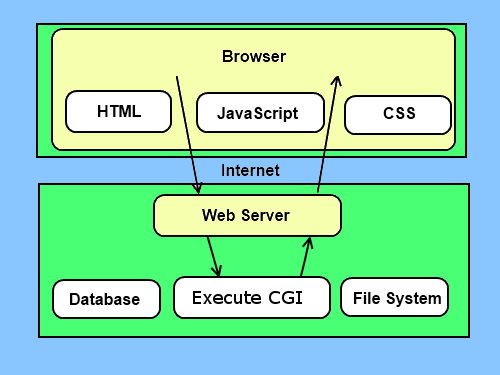
5.44.4. Web server support and configuration #
Before you do CGI programming, make sure your Web server supports CGI and isconfigured with CGI handlers.
Apache supports CGI configuration:
Set up the CGI directory:
ScriptAlias /cgi-bin/ /var/www/cgi-bin/
All HTTP server execution CGI programs are saved in a preconfigured directory. This directory is called the CGI directory, and by convention, itis named /var/www/cgi-bin catalogue.
The extension of the CGI file is .cgi Perl can also be used .pl extension name.
By default, the Linux server configures the cgi-bin in the directory for /var/www .
If you want to specify a different directory to run the CGI script, you can modify it httpd.conf configuration file, as follows:
<Directory "/var/www/cgi-bin">
AllowOverride None
Options +ExecCGI
Order allow,deny
Allow from all
Directory>
In AddHandler Add in .pl suffix so that we can access the .pl of the Perl script file at the end:
AddHandler cgi-script .cgi .pl .py
5.44.5. The first CGI program #
Let’s create a test.cgi file, the code is as follows:
Test.cgi code #
#/ Usr/bin/perlprint "Content type: text/html r n r n"; Print ''; Print ''; Print '
Charset="utf-8">'; Print '<title>Rookie Tutorial (runoob. com)title>'; Print 'head>'; Print '<body>'; Print '<h2>Hello
Word H2>'; From the first CGI in the rookie tutorial
Program p> '; Print 'body>'; Print 'html>'; 1;
Then open http://localhost/cgi-bin/test.cgi through a browser, and the output is as follows:
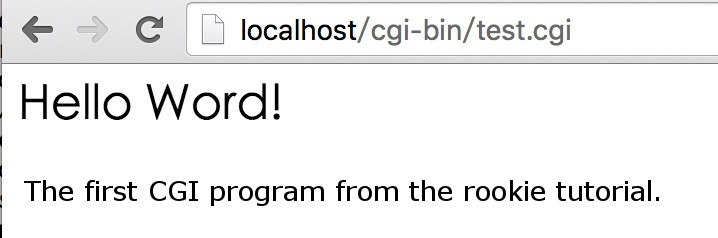
The output attribute of the first line of the script "Content-type:text/html\r\n\r\n" is sent to the browser, and the browser is informed that the displayed attribute type is text/html``
5.44.6. HTTP header #
In the attributes of the test.cgi file "Content-type:text/html" . That is, part of the HTTP header, which is sent to the browser to tell the browser the content type ofthe file.
The format of the HTTP header is as follows:
HTTP Field Name: Field Properties
For example:
Content-type:text/html\r\n\r\n
-
1. SVG tutorial
19
-
1. Angularjs2
8
-
1. Sqlite
47
-
1. Memcached
20
-
1. C# tutorial
61
-
2. Servlet
21
-
2. Go
43
-
2. Vue3
19
-
2. Docker
59
-
3. SOAP tutorial
10
-
3. Android
18
-
3. Kotlin
18
-
3. React
23
-
3. Mongodb
44
-
4. Appml
12
-
4. MySQL tutorial
34
-
4. Lua
31
-
5. Perl
45
-
5. Postgresql
41
-
web
15
-
5. Web Services tutorial
6
-
6. Ruby
41
-
6. Design-pattern
35
-
6. WSDL tutorial
8
-
7. Django
18
-
7. Rust
22
-
8. Foundation
39
-
8. Css3
26
-
9. Swift
43
-
9. Ios
43
-
11. HTML tutorial-(HTML5 Standard)
54
-
13. Regex
6
-
12. Http
6
-
14. Regexp
7
-
1. Geographical Information Systems in the World Wide Web Era
4
-
2. Basic technology of WebGIS
4
-
3. Geographic Web Services
5
-
4. aggregation of geographical information
4
-
5. mobile GIS
5
-
6. Geographic information portal
3
-
7. New generation national spatial data infrastructure and GIS
4
-
8. Application of WebGIS in E-Commerce
3
-
9. Application of WebGIS in E-government
3
-
10. Hotspots and frontiers of WebGIS
2
Principles, Technologies, and Methods of Geographic Information Systems
102
In recent years, Geographic Information Systems (GIS) have undergone rapid development in both theoretical and practical dimensions. GIS has been widely applied for modeling and decision-making support across various fields such as urban management, regional planning, and environmental remediation, establishing geographic information as a vital component of the information era. The introduction of the “Digital Earth” concept has further accelerated the advancement of GIS, which serves as its technical foundation. Concurrently, scholars have been dedicated to theoretical research in areas like spatial cognition, spatial data uncertainty, and the formalization of spatial relationships. This reflects the dual nature of GIS as both an applied technology and an academic discipline, with the two aspects forming a mutually reinforcing cycle of progress.
-
1. Introduction to Geographic Information Systems
6
-
2. From the Real World to the Bit World
3
-
3. Spatial Data Model
7
-
4. Spatial Reference Systems and Map Projections
5
-
5. Data in GIS
4
-
6. Spatial data acquisition
2
-
7. Spatial Data Management
6
-
8. Spatial analysis
8
-
9. Digital Terrain Model (DTM) and Terrain Analysis
5
-
10. Spatial modeling and spatial decision support
6
-
11. Spatial data representation and map making
6
-
12. 3S Integration Technology
5
-
13. Network Geographic Information System
4
-
14. Examples of Geographic Information System Application
8
-
15. Organization and Management of Geographic Information System Application Projects
10
-
16. Geographic Information system Software Engineering Technology
7
-
17. Geographic Information System Standards
3
-
18. Geographic Information System and Society
3
-
19. Earth Information Science and Digital Earth
4