
2.13.1. Vue.js Class 
class and style are attributes of the HTML element, which is used to style the element, and we can use the v-bind to set style properties.
v-bind Dealing with class and style the expression can be an object or an array in addition to a string.
v-bind:class can be abbreviated as :class .
2.13.2. class property binding 
We can do it for In the instance, the general The above examples We can also pass in more properties in the object to dynamically switch between multiple In addition When the We can also bind an object in the data directly: The rendering of instance 3 is the same as that of instance 2. In addition, we can bind a computational property of the returned object here. This is a common and powerful model: We can pass an array to The above examples We can also use ternary expressions to switch between the The above examples We can do it in The above examples You can also bind directly to a style object to make the template clearer: Note: When using CSS attributes that require a specific prefix, such as Can be used for Writing in this way only renders the last value in the array supported by the browser. In this example, if the browser supports a When you use on a custom component with a single root element The above examples For with data binding When If your component has multiple root elements, you need to define which parts will receive this class. Can be used Note: The above examples I like runoob!
In recent years, Geographic Information Systems (GIS) have undergone rapid development in both theoretical and practical dimensions. GIS has been widely applied for modeling and decision-making support across various fields such as urban management, regional planning, and environmental remediation, establishing geographic information as a vital component of the information era. The introduction of the “Digital Earth” concept has further accelerated the advancement of GIS, which serves as its technical foundation. Concurrently, scholars have been dedicated to theoretical research in areas like spatial cognition, spatial data uncertainty, and the formalization of spatial relationships. This reflects the dual nature of GIS as both an applied technology and an academic discipline, with the two aspects forming a mutually reinforcing cycle of progress. v-bind:class set an object to switch dynamically class :Example 1 
isActive set to true shows a green one. div block, if set to false does not display:<div:class="{ 'active': isActive }">div>
div class the rendering result is: <div class="active">div>
class . :class instructions can also be similar to ordinary class properties coexist. Example 2 
text-danger Class background color overrides the active class background color: <divclass="static":class="{ 'active' : isActive, 'text-danger' :
hasError }">
<p>
The above examples
<code class="docutils literal notranslate">
<span class="pre">
div
</span>
<span class="pre">
class
</span>
</code>
the rendering result is:
</p>
<div class="highlight-default notranslate">
<div class="highlight">
<pre><span></span><span class="o"><</span><span class="n">div</span> <span class="n">class</span><span class="o">=</span><span class="s2">"static text-danger"</span><span class="o">></</span><span class="n">div</span><span class="o">></span>
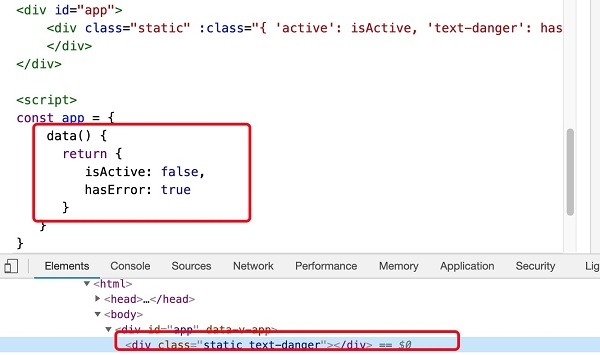
isActive or hasError changes, the class attribute value will also be updated accordingly. For example, if the value of active is true , the class list will become “static active text-danger”.
Example 3 
text-danger Class background color overrides the active class background color: <divid="app"><divclass="static":class="classObject">div>div>
Example 4 
data(){return{isActive:true,error:null}},computed:{classObject(){return{active:this.isActive&&
!this.error,'text-danger':this.error&&this.error.type==='fatal'}}}
2.13.3. Array syntax 
v-bind:class the example is as follows: Example 5 
<divclass="static":class="[activeClass, errorClass]">div>
div class the rendering result is: <div class="static active text-danger">div>
class : Example 6 
errorClass is always there. isActive for true add when activeClass class: <divid="app"><divclass="static":class="[isActive ? activeClass : '',
errorClass]">
div class the rendering result is: <div class="static text-danger">div>
2.13.4.
Vue.js style (inline style) ¶ v-bind:style set the style directly, which can be abbreviated to :style : Example 7 
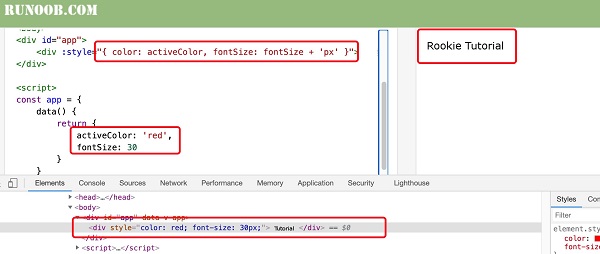
<divid="app"><div:style="{ color: activeColor, fontSize: fontSize + 'px'
}">Rookie Tutorial
div style the rendering result is: <div style="color: red; font-size: 30px;">Rookie Tutorialdiv>
Example 8 
<divid="app"><div:style="styleObject">Rookie Tutorialdiv>div>
v-bind:style can use an array to apply multiple style objects to an element: Example 9 
<divid="app"><div:style="[baseStyles,
overridingStyles]">Rookie Tutorial
transform and Vue.js , the v-bind:style will automatically detect and add the corresponding prefix.”. 2.13.5. Multiple value 
style in binding property provides an array of multiple values, often used to provide multiple prefixed values, such as: <div :style="{ display: ['-webkit-box', '-ms-flexbox', 'flex'] }">div>
flexbox then itwill only render display: flex . 2.13.6. Used on the component
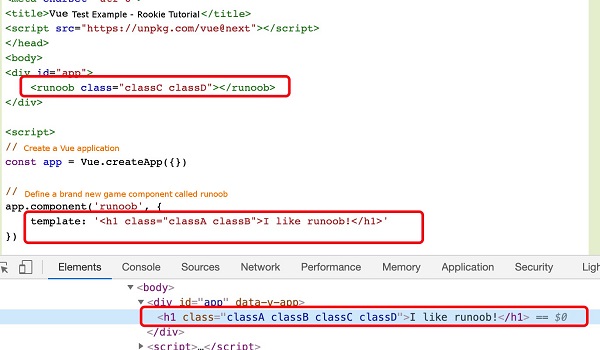
class attribute ¶ class property, these class will be added to the element. Existing on this element class will not be overwritten. Example 10 
<divid="app"><runoobclass="classC classD">runoob>div><script>//
Create a Vue application const app=Vue. createApp ({})//Define a name called
The new global component of runoob app.component('runoob', { template: '
div class the rendering result is: I like runoob!
class the same applies: <my-component :class="{ active: isActive }">my-component>
isActive for true the HTML is rendered as: <p class="active">Hip>
$attrs the component property does this: Example 11 
template is a backquotation mark, not a single quotation mark. div class the rendering result is: 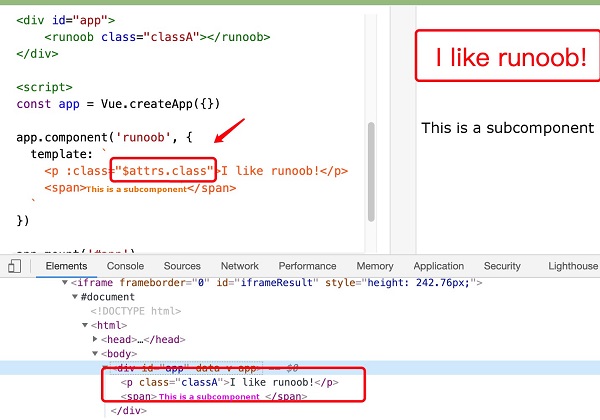
Principles, Technologies, and Methods of Geographic Information Systems
102