
As discussed in the previous section, when an Web server responds to an HTTPrequest, the response usually includes a status line, some response headers, a blank line, and a document. A typical response is as follows:
HTTP/1.1 200 OK
Content-Type: text/html
Header2: ...
...
HeaderN: ...
  (Blank Line)


...

...
The status line includes the HTTP version (HTTP/1.1 in this case), a status code (200 in this case), and a short message corresponding to the status code (OK in this case).
The following table summarizes the most useful HTTP 1.1 response headers returned to the browser from the Web server side, which you use frequently in Web programming:
Header information | Description |
|---|---|
| This header information specifies the request method supported by the server(GET, POST, and so on). |
| This header information specifies the circumstances under which the responsedocument can be safely cached. Possible values are: public, private, no-cache, etc. Public means that the document is cacheable, Private means that the document is private to a single user and can only be stored in a private(non-shared) cache, and no-cache means that the document should not be cached. |
| This header indicates whether the browser uses a persistent HTTP connection.The value close indicates that the browser does not use a persistent HTTP connection, and the value keep-alive means that a persistent connection is used. |
| This header information allows you to request the browser to ask the user tosave the response to disk with a file with a given name. |
| During transmission, this header information specifies how the page is encoded. |
| This header information represents the language in which the document is written. For example, en, en-us, ru, and so on. |
| This header information indicates the number of bytes in the response. This information is needed only if the browser uses a persistent (keep-alive) HTTP connection. |
| This header information provides the MIME (Multipurpose Internet Mail Extension) type of the response document. |
| This header information specifies when the content expires, after which the content is no longer cached. |
| This header information indicates when the document was last modified. The client can then cache the file and provide a date through the If-Modified-Since request header information in subsequent requests. |
| This header information should be included in all responses with status codes. Within 300s, this notifies the browser of the address of the document. The browser will automatically reconnect to this location and get the new document. |
| This header information specifies how the browser should request an updated page as soon as possible. You can specify the number of seconds to refresh the page. |
| This header information can be used in conjunction with the 503 (Service Unavailable service unavailable) response, which tells the client how long it takes to repeat its request. |
| This header information specifies a cookie associated with the page. |
2.8.1. The method of setting the HTTP response header 
The following method can be used to set the HTTP response header in a Servlet program. These methods are passed through HttpServletResponse object is available.
Serial number | Method & description |
|---|---|
1 |
|
2 |
|
3 |
|
4 |
|
5 |
|
6 |
|
7 |
|
8 |
|
9 |
|
10 |
|
11 |
|
12 |
|
13 |
|
14 |
|
15 |
|
16 |
|
17 |
|
18 |
|
19 |
|
20 |
|
21 |
|
22 |
|
23 |
|
2.8.2. HTTP Header response instance 
You have seen in the previous example setContentType() method, the following example uses the same method, in addition, we will use the setIntHeader() method to set the Refresh head.
//Import necessary Java libraries
import java.io.IOException;
import java.io.PrintWriter;
import java.text.SimpleDateFormat;
import java.util.Calendar;
import java.util.Date;
import javax.servlet.ServletException;
import javax.servlet.annotation.WebServlet;
import javax.servlet.http.HttpServlet;
import javax.servlet.http.HttpServletRequest;
import javax.servlet.http.HttpServletResponse;
@WebServlet("/Refresh")
//Extend HttpServlet Class
public class Refresh extends HttpServlet {
// Method for handling GET method requests
public void doGet(HttpServletRequest request,
HttpServletResponse response)
throws ServletException, IOException
{
// Set the refresh auto load time to 5 seconds
response.setIntHeader("Refresh", 5);
// Set response content type
response.setContentType("text/html;charset=UTF-8");
//Obtain a calendar using default time zone and language environment
Calendar cale = Calendar.getInstance();
//Convert Calendar type to Date type
Date tasktime=cale.getTime();
//Format date output
SimpleDateFormat df=new SimpleDateFormat("yyyy-MM-dd HH:mm:ss");
//Format output
String nowTime = df.format(tasktime);
PrintWriter out = response.getWriter();
String title = "Automatic Refresh Header Settings - Rookie Tutorial Example";
String docType =
"\n";
out.println(docType +
"\n" +
""</span> <span class="o">+</span> <span class="n">title</span> <span class="o">+</span> <span class="s2">" \n"+
"\"#f0f0f0\">\n" +
"\"center\">" + title + "\n" +
"The current time is:"
+ nowTime + "\n");
}
// Method for handling POST method requests
public void doPost(HttpServletRequest request,
HttpServletResponse response)
throws ServletException, IOException {
doGet(request, response);
}
}
The above test examples are located under the TomcatTest project, and the corresponding web.xml configured to:
Refresh
com.runoob.test.Refresh
Refresh
/TomcatTest/Refresh
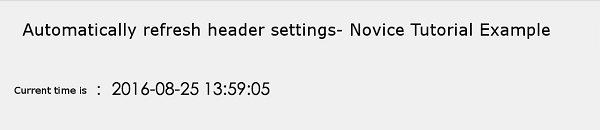
Now, call the Servlet above, and the current system time will be displayed every 5 seconds. Just run Servlet and wait a moment, and you will see the following result:
-
1. SVG tutorial
19
-
1. Angularjs2
8
-
1. Sqlite
47
-
1. Memcached
20
-
1. C# tutorial
61
-
2. Servlet
21
-
2. Go
43
-
2. Vue3
19
-
2. Docker
59
-
3. SOAP tutorial
10
-
3. Android
18
-
3. Kotlin
18
-
3. React
23
-
3. Mongodb
44
-
4. Appml
12
-
4. MySQL tutorial
34
-
4. Lua
31
-
5. Perl
45
-
5. Postgresql
41
-
web
15
-
5. Web Services tutorial
6
-
6. Ruby
41
-
6. Design-pattern
35
-
6. WSDL tutorial
8
-
7. Django
18
-
7. Rust
22
-
8. Foundation
39
-
8. Css3
26
-
9. Swift
43
-
9. Ios
43
-
11. HTML tutorial-(HTML5 Standard)
54
-
13. Regex
6
-
12. Http
6
-
14. Regexp
7
-
1. Geographical Information Systems in the World Wide Web Era
4
-
2. Basic technology of WebGIS
4
-
3. Geographic Web Services
5
-
4. aggregation of geographical information
4
-
5. mobile GIS
5
-
6. Geographic information portal
3
-
7. New generation national spatial data infrastructure and GIS
4
-
8. Application of WebGIS in E-Commerce
3
-
9. Application of WebGIS in E-government
3
-
10. Hotspots and frontiers of WebGIS
2
Principles, Technologies, and Methods of Geographic Information Systems
102
In recent years, Geographic Information Systems (GIS) have undergone rapid development in both theoretical and practical dimensions. GIS has been widely applied for modeling and decision-making support across various fields such as urban management, regional planning, and environmental remediation, establishing geographic information as a vital component of the information era. The introduction of the “Digital Earth” concept has further accelerated the advancement of GIS, which serves as its technical foundation. Concurrently, scholars have been dedicated to theoretical research in areas like spatial cognition, spatial data uncertainty, and the formalization of spatial relationships. This reflects the dual nature of GIS as both an applied technology and an academic discipline, with the two aspects forming a mutually reinforcing cycle of progress.
-
1. Introduction to Geographic Information Systems
6
-
2. From the Real World to the Bit World
3
-
3. Spatial Data Model
7
-
4. Spatial Reference Systems and Map Projections
5
-
5. Data in GIS
4
-
6. Spatial data acquisition
2
-
7. Spatial Data Management
6
-
8. Spatial analysis
8
-
9. Digital Terrain Model (DTM) and Terrain Analysis
5
-
10. Spatial modeling and spatial decision support
6
-
11. Spatial data representation and map making
6
-
12. 3S Integration Technology
5
-
13. Network Geographic Information System
4
-
14. Examples of Geographic Information System Application
8
-
15. Organization and Management of Geographic Information System Application Projects
10
-
16. Geographic Information system Software Engineering Technology
7
-
17. Geographic Information System Standards
3
-
18. Geographic Information System and Society
3
-
19. Earth Information Science and Digital Earth
4