最近几年来,地理信息系统无论是在理论上还是应用上都处在一个飞速发展的阶段。 GIS被应用于多个领域的建模和决策支持,如城市管理、区划、环境整治等等,地理信息成为信息时代重要的组成部分之一; “数字地球”概念的提出,更进一步推动了作为其技术支撑的GIS的发展。 与此同时,一些学者致力于相关的理论研究,如空间感知、空间数据误差、空间关系的形式化等等。 这恰好说明了地理信息系统作为应用技术和学科的两个方面,并且这两个方面构成了相互促进的发展过程。
3.24.1. Slice 
There is another kind of cluster in Mongodb, that is, sharding technology, which can meet the needs of the massive growth of MongoDB data.
When MongoDB stores large amounts of data, one machine may not be enough to store data, or it may not be enough to provide acceptable read and write throughput. At this time, we can split the data on multiple machines, so that the database system can store and process more data.
3.24.2. Why do you use fragmentation? 
Copy all writes to the primary node
Delay-sensitive data will be queried at the primary node
A single replica set is limited to 12 nodes
Running out of memory occurs when the number of requests is large.
Insufficient local disk
Vertical expansion is expensive
3.24.3. MongoDB fragmentation 
The following figure shows the distribution using the sharding cluster structure in MongoDB:
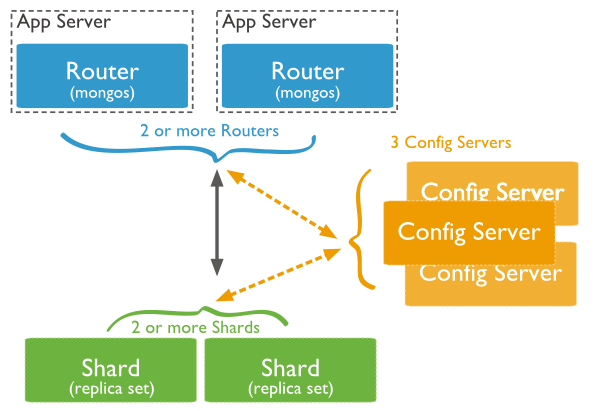
There are three main components in the above figure as follows:
Shard: It is used to store actual data blocks. In the actual production environment, a shard server role can be assumed by several machines grouped into a replica set to prevent a single point of failure of the host.
Config Server: Mongod instance, which stores the entire ClusterMetadata, including chunk information.
Query Routers: The front-end routing allows the client to access, and makes the whole cluster look like a single database, and the front-end applications can be used transparently.
3.24.4. Sharding instance 
The port distribution of the sharding structure is as follows:
Shard Server 1:27020 Shard Server 2:27021 Shard Server 3:27022 Shard Server 4:27023 Config Server :27100 Route Process:40000 Step 1: start Shard Server
[root@100 /]# mkdir -p /www/mongoDB/shard/s0 [root@100 /]# mkdir -p /www/mongoDB/shard/s1 [root@100 /]# mkdir -p /www/mongoDB/shard/s2 [root@100 /]# mkdir -p /www/mongoDB/shard/s3 [root@100 /]# mkdir -p /www/mongoDB/shard/log [root@100 /]# /usr/local/mongoDB/bin/mongod --port 27020 --dbpath=/www/mongoDB/shard/s0 --logpath=/www/mongoDB/shard/log/s0.log --logappend --fork .... [root@100 /]# /usr/local/mongoDB/bin/mongod --port 27023 --dbpath=/www/mongoDB/shard/s3 --logpath=/www/mongoDB/shard/log/s3.log --logappend --fork Step 2: start Config Server
[root@100 /]# mkdir -p /www/mongoDB/shard/config [root@100 /]# /usr/local/mongoDB/bin/mongod --port 27100 --dbpath=/www/mongoDB/shard/config --logpath=/www/mongoDB/shard/log/config.log --logappend --fork 注意: Here we can start like a normal mongodb service without adding the-shardsvr and configsvr parameters. Because the function of these two parameters is to change the startup port, we can specify the port ourselves.
Step 3: start Route Process
/usr/local/mongoDB/bin/mongos --port 40000 --configdb localhost:27100 --fork --logpath=/www/mongoDB/shard/log/route.log --chunkSize 500 Among the mongos startup parameters, chunkSize is used to specify the size of the chunk (in MB). The default size is 200MB.
Step 4: configure Sharding
Next, we use MongoDB Shell to log in to mongos and add the Shard node
[root@100 shard]# /usr/local/mongoDB/bin/mongo admin --port 40000 MongoDB shell version: 2.0.7 connecting to: 127.0.0.1:40000/admin mongos> db.runCommand({ addshard:"localhost:27020" }) { "shardAdded" : "shard0000", "ok" : 1 } ...... mongos> db.runCommand({ addshard:"localhost:27029" }) { "shardAdded" : "shard0009", "ok" : 1 } mongos> db.runCommand({ enablesharding:"test" }) #设置分片存储的数据库 { "ok" : 1 } mongos> db.runCommand({ shardcollection: "test.log", key: { id:1,time:1}}) { "collectionsharded" : "test.log", "ok" : 1 } Step 5: connect the database to interface 40000 without much change in the program code, just like connecting to an ordinary mongo database.