最近几年来,地理信息系统无论是在理论上还是应用上都处在一个飞速发展的阶段。 GIS被应用于多个领域的建模和决策支持,如城市管理、区划、环境整治等等,地理信息成为信息时代重要的组成部分之一; “数字地球”概念的提出,更进一步推动了作为其技术支撑的GIS的发展。 与此同时,一些学者致力于相关的理论研究,如空间感知、空间数据误差、空间关系的形式化等等。 这恰好说明了地理信息系统作为应用技术和学科的两个方面,并且这两个方面构成了相互促进的发展过程。
Calculation attribute keywords: computed .
Computational attributes are useful when dealing with some complex logic.
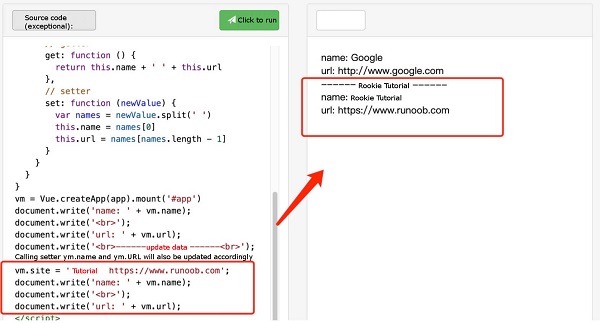
Take a look at the following example of reversing a string: In example 1, the template becomes very complex and not easy to understand. Next, let’s take a look at an example that uses calculated properties: Original String: {{ message }} Invert string after calculation: {{ reversedMessage }} A calculation property is declared in example 2 The function provided will be used as a property We can use It can be said to use Judging from the running results of the instance, when running vm.site = ‘rookie tutorial http://www.runoob.com ’; 2.11.1. Example 1 
<divid="app">{{ message.split('').reverse().join('') }}div>
2.11.2. Example 2 
reversedMessage . vm.reversedMessage of getter . vm.reversedMessage depend on vm.message in vm.message when there is a change vm.reversedMessage will also be updated. Computed vs methods 
methods to replace computed both of them are the same in effect, but computed is based on its dependency cache and will only be re-valued when the dependency changes. And use methods when re-rendering, the function is always called again to execute
2.11.3. Example 3 
methods:{reversedMessage2:function(){returnthis.message.split('').reverse().join('')}}
computed performance will be better, but if you don’t want caching, you can use the methods property. Computed setter 
computed property defaults to only getter but you can also provide one when needed setter : 2.11.4. Example 4 
varvm=newVue({el:'#app',data:{name:'Google',url:'http://www.google.com'},computed:{site:{//getterget:function(){returnthis.name+''+this.url},//setterset:function(newValue){varnames=newValue.split('')this.name=names[0]this.url=names[names.length-1]}}}})//call setter, vm.name and vm.url will also be updated accordingly with vm. site='Rookie Tutorial' http://www.runoob.com';document.write('name:'+vm.name);document.write('
');document.write('url:'+vm.url); setter will be called. vm.name and vm.url will also be updated accordingly.