最近几年来,地理信息系统无论是在理论上还是应用上都处在一个飞速发展的阶段。 GIS被应用于多个领域的建模和决策支持,如城市管理、区划、环境整治等等,地理信息成为信息时代重要的组成部分之一; “数字地球”概念的提出,更进一步推动了作为其技术支撑的GIS的发展。 与此同时,一些学者致力于相关的理论研究,如空间感知、空间数据误差、空间关系的形式化等等。 这恰好说明了地理信息系统作为应用技术和学科的两个方面,并且这两个方面构成了相互促进的发展过程。
MongoDB provides a 64-bit installation package on the OSX platform, which you can download from the official website.
Download address: https://www.mongodb.com/download-center#community
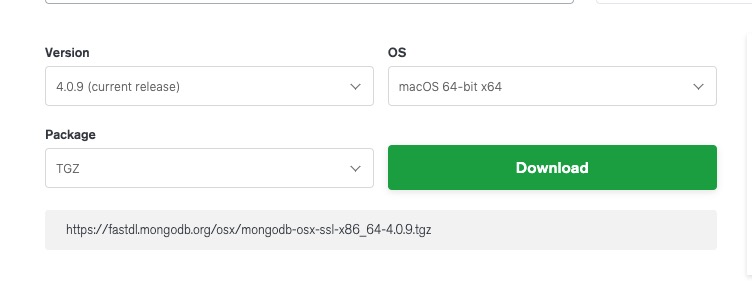
Starting with MongoDB 3.0, only OS X 10.7 (Lion) and newer systems are supported.
Next we use the curl command to download the installation:
# 进入 /usr/local cd /usr/local # 下载 sudo curl -O https://fastdl.mongodb.org/osx/mongodb-osx-ssl-x86_64-4.0.9.tgz # 解压 sudo tar -zxvf mongodb-osx-ssl-x86_64-4.0.9.tgz # 重命名为 mongodb 目录 sudo mv mongodb-osx-x86_64-4.0.9/ mongodb After the installation is complete, we can add the MongoDB binary command file directory (installation directory / bin) to the PATH path:
export PATH=/usr/local/mongodb/bin:$PATH Create a directory for logs and data storage:
Data storage path:
sudo mkdir -p /usr/local/var/mongodb Log file path:
sudo mkdir -p /usr/local/var/log/mongodb Next, make sure that the current user has read and write permissions to the above two directories:
sudo chown runoob /usr/local/var/mongodb sudo chown runoob /usr/local/var/log/mongodb Above runoob It is a user on my computer. You need to modify it according to your current user name.
Next, let’s start mongodb in the background using the following command:
mongod --dbpath /usr/local/var/mongodb --logpath /usr/local/var/log/mongodb/mongo.log --fork –dbpath Set up the data storage directory
–logpath Set the log storage directory
–fork Run in the background
If you do not want to run on the backend, but view the running process on the console, you can directly set up the configuration file to start:
mongod --config /usr/local/etc/mongod.conf Check to see if the mongod service starts:
ps aux | grep -v grep | grep mongod Using the above command, if you see a record of mongod, the operation is successful.
After startup, we can use the mongo Command to open a terminal:
$ cd /usr/local/mongodb/bin $ ./mongo MongoDB shell version v4.0.9 connecting to: mongodb://127.0.0.1:27017/?gssapiServiceName=mongodb Implicit session: session { "id" : UUID("3c12bf4f-695c-48b2-b160-8420110ccdcf") } MongoDB server version: 4.0.9 …… > 1 + 1 2 > 3.6.1. Install using brew 
You can also use OSX’s brew to install mongodb:
brew tap mongodb/brew brew install mongodb-community@4.4 After the @ symbol 4.4 It’s the latest version number.
Installation information:
Configuration file: /usr/local/etc/mongod.conf
Log file path: /usr/local/var/log/mongodb
Data storage path: /usr/local/var/mongodb
Run MongoDB 
We can use the brew command or the mongod command to start the service.
Brew launch:
brew services start mongodb-community@4.4 Brew stop:
brew services stop mongodb-community@4.4 Mongod command background process method:
mongod --config /usr/local/etc/mongod.conf --fork To enable and shut down in this way, you can enter the mongo shell console to achieve:
> db.adminCommand({ "shutdown" : 1 })