最近几年来,地理信息系统无论是在理论上还是应用上都处在一个飞速发展的阶段。 GIS被应用于多个领域的建模和决策支持,如城市管理、区划、环境整治等等,地理信息成为信息时代重要的组成部分之一; “数字地球”概念的提出,更进一步推动了作为其技术支撑的GIS的发展。 与此同时,一些学者致力于相关的理论研究,如空间感知、空间数据误差、空间关系的形式化等等。 这恰好说明了地理信息系统作为应用技术和学科的两个方面,并且这两个方面构成了相互促进的发展过程。
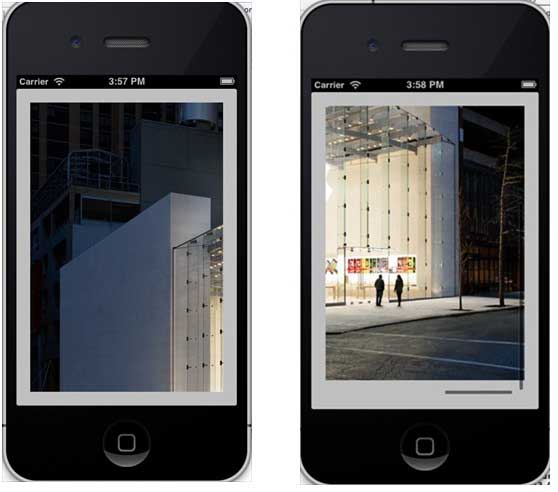
If the content exceeds the size of the screen, the scrolling view is used to show the hidden part.
It can contain all other user interface elements such as image views, tags, text views, or even another scrolling view. ContentSize ContentInset ContentOffset Delegate In ViewController.h, add a scroll view and declare a scroll view to make the class conform to the delegate agreement, as shown below: Add a custom method addScrollView 注意: 我们必须添加一个命名为”AppleUSA1.jpg”到我们的项目,可以通过将图像拖到我们导航区域,其中列出了我们的项目文件所做的图像。图像应高于设备的高度。 Now when we run the application, we will see the following output. Once you scroll the view, you will be able to view the rest of the image: 9.18.1. Important attribute 
An important method 
- (void)scrollRectToVisible:(CGRect)rect animated:(BOOL)animated
- (void)setContentOffset:(CGPoint)contentOffset animated:(BOOL)animated
9.18.2. An important delegation method 
#import -(void)addScrollView{ myScrollView = [[UIScrollView alloc]initWithFrame: CGRectMake(20, 20, 280, 420)]; myScrollView.accessibilityActivationPoint = CGPointMake(100, 100); imgView = [[UIImageView alloc]initWithImage: [UIImage imageNamed:@"AppleUSA.jpg"]]; [myScrollView addSubview:imgView]; myScrollView.minimumZoomScale = 0.5; myScrollView.maximumZoomScale = 3; myScrollView.contentSize = CGSizeMake(imgView.frame.size.width, imgView.frame.size.height); myScrollView.delegate = self; [self.view addSubview:myScrollView]; }
Implementing scrollView delegation in ViewController.m 
-(UIView *)viewForZoomingInScrollView:(UIScrollView *)scrollView{ return imgView; } -(void)scrollViewDidEndDecelerating:(UIScrollView *)scrollView{ NSLog(@"Did end decelerating"); } -(void)scrollViewDidScroll:(UIScrollView *)scrollView{ // NSLog(@"Did scroll"); } -(void)scrollViewDidEndDragging:(UIScrollView *)scrollView willDecelerate:(BOOL)decelerate{ NSLog(@"Did end dragging"); } -(void)scrollViewWillBeginDecelerating:(UIScrollView *)scrollView{ NSLog(@"Did begin decelerating"); } -(void)scrollViewWillBeginDragging:(UIScrollView *)scrollView{ NSLog(@"Did begin dragging"); }
Update viewDidLoad in ViewController.m, as shown below 
(void)viewDidLoad { [super viewDidLoad]; [self addScrollView]; //Do any additional setup after loading the view, typically from a nib }
9.18.3. Output