
3.27.1. Environment configuration 
If you want to use MongoDB in the Java program, you need to make sure that the Java environment and the MongoDB JDBC driver are installed.
The example of this chapter is suitable for Mongo version 3.x or above.
You can refer to this site. Java教程 To install the Java program. Now let’s check to see if you have a MongoDB JDBC driver installed.
First you must download the mongo jar package, download address: https://mongodb.github.io/mongo-java-driver/ , please make sure to download the latest version.
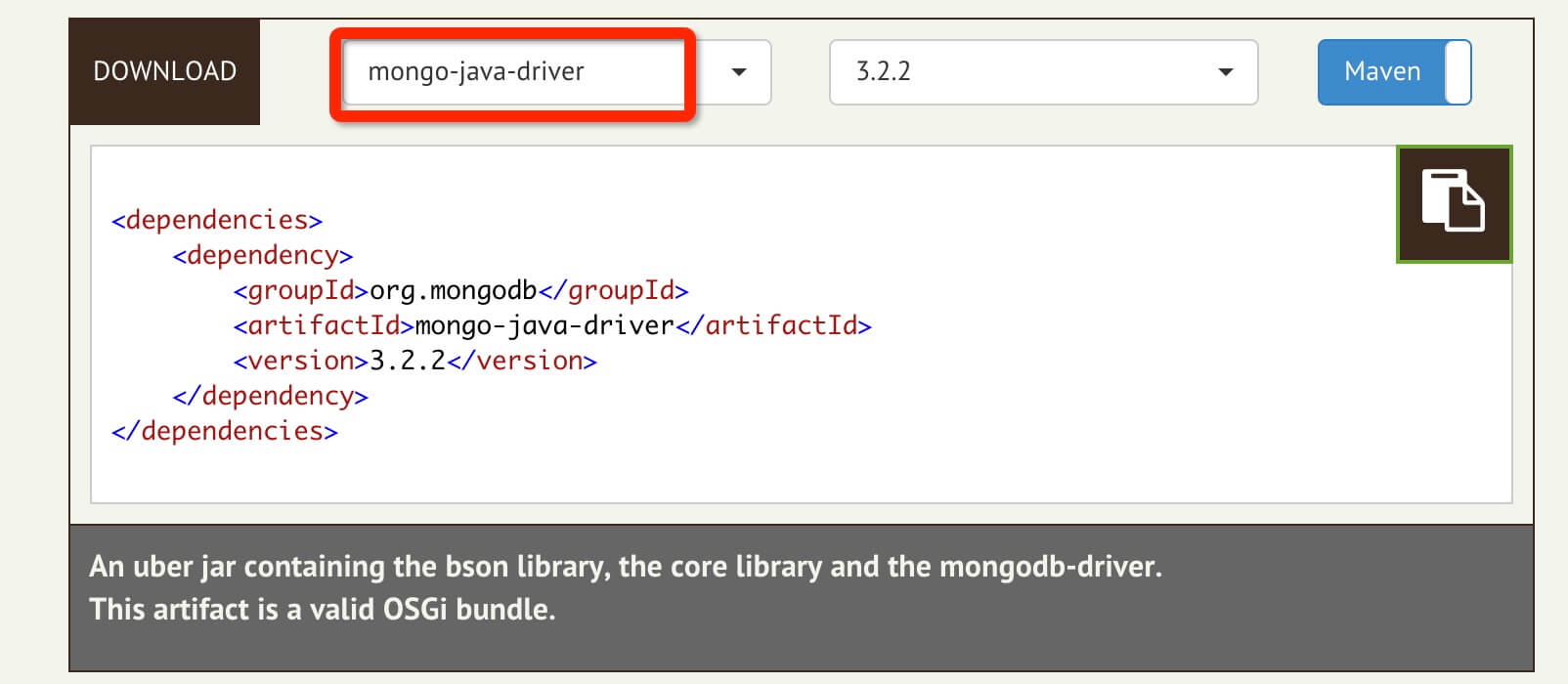
You need to include mongo-java-driver-3.2.2.jar (find the right version) in your classpath.
Domestic mongodb-driver jar download address: http://central.maven.org/maven2/org/mongodb/mongo-java-driver/
3.27.2. Connect to the database 
To connect to a database, you need to specify a database name. If the specified database does not exist, mongo will automatically create the database.
The Java code to connect to the database is as follows:
import com.mongodb.MongoClient;
import com.mongodb.client.MongoDatabase;

public class MongoDBJDBC{
   public static void main( String args[] ){
      try{
       // 连接到 mongodb 服务
         MongoClient mongoClient = new MongoClient( "localhost" , 27017 );

         // 连接到数据库
         MongoDatabase mongoDatabase = mongoClient.getDatabase("mycol");
       System.out.println("Connect to database successfully");

      }catch(Exception e){
        System.err.println( e.getClass().getName() + ": " + e.getMessage() );
     }
   }
}
Now let’s compile and run the program and connect to the database mycol.
You can change the path of the MongoDB JDBC driver according to your actual environment.
This example places the MongoDB JDBC startup package mongo-java-driver-3.2.2.jar in the local directory:
$ javac -cp .:mongo-java-driver-3.2.2.jar MongoDBJDBC.java
$ java -cp .:mongo-java-driver-3.2.2.jar MongoDBJDBC
Connect to database successfully
Authentication: true
In this example, the Mongo database does not require username and password verification. If your Mongo needs to verify your user name and password, you can use the following code:
import java.util.ArrayList;
import java.util.List;
import com.mongodb.MongoClient;
import com.mongodb.MongoCredential;
import com.mongodb.ServerAddress;
import com.mongodb.client.MongoDatabase;
public class MongoDBJDBC {
public static void main(String[] args){
try {
//连接到MongoDB服务 如果是远程连接可以替换“localhost”为服务器所在IP地址
//ServerAddress()两个参数分别为 服务器地址 和 端口
ServerAddress serverAddress = new ServerAddress("localhost",27017);
List addrs = new ArrayList();
addrs.add(serverAddress);
//MongoCredential.createScramSha1Credential()三个参数分别为 用户名 数据库名称 密码
MongoCredential credential = MongoCredential.createScramSha1Credential("username", "databaseName", "password".toCharArray());
List credentials = new ArrayList();
credentials.add(credential);
//通过连接认证获取MongoDB连接
MongoClient mongoClient = new MongoClient(addrs,credentials);
//连接到数据库
MongoDatabase mongoDatabase = mongoClient.getDatabase("databaseName");
System.out.println("Connect to database successfully");
} catch (Exception e) {
System.err.println( e.getClass().getName() + ": " + e.getMessage() );
}
}
}
3.27.3. Create a collection 
We can use it. com.mongodb.client.MongoDatabase In the class createCollection() To create a collection
The code snippet is as follows:
import com.mongodb.MongoClient;
import com.mongodb.client.MongoDatabase;
public class MongoDBJDBC{
public static void main( String args[] ){
try{
// 连接到 mongodb 服务
MongoClient mongoClient = new MongoClient( "localhost" , 27017 );
// 连接到数据库
MongoDatabase mongoDatabase = mongoClient.getDatabase("mycol");
System.out.println("Connect to database successfully");
mongoDatabase.createCollection("test");
System.out.println("集合创建成功");
}catch(Exception e){
System.err.println( e.getClass().getName() + ": " + e.getMessage() );
}
}
}
Compile and run the above program, and the output is as follows:
Connect to database successfully
集合创建成功
3.27.4. Get collection 
We can use it. com.mongodb.client.MongoDatabase Analogous getCollection() Method to get a collection
The code snippet is as follows:
import org.bson.Document;
import com.mongodb.MongoClient;
import com.mongodb.client.MongoCollection;
import com.mongodb.client.MongoDatabase;
public class MongoDBJDBC{
public static void main( String args[] ){
try{
// 连接到 mongodb 服务
MongoClient mongoClient = new MongoClient( "localhost" , 27017 );
// 连接到数据库
MongoDatabase mongoDatabase = mongoClient.getDatabase("mycol");
System.out.println("Connect to database successfully");
MongoCollection<Document> collection = mongoDatabase.getCollection("test");
System.out.println("集合 test 选择成功");
}catch(Exception e){
System.err.println( e.getClass().getName() + ": " + e.getMessage() );
}
}
}
Compile and run the above program, and the output is as follows:
Connect to database successfully
集合 test 选择成功
3.27.5. Insert document 
We can use it. com.mongodb.client.MongoCollection Analogous insertMany() Method to insert a document
The code snippet is as follows:
import java.util.ArrayList;
import java.util.List;
import org.bson.Document;
import com.mongodb.MongoClient;
import com.mongodb.client.MongoCollection;
import com.mongodb.client.MongoDatabase;
public class MongoDBJDBC{
public static void main( String args[] ){
try{
// 连接到 mongodb 服务
MongoClient mongoClient = new MongoClient( "localhost" , 27017 );
// 连接到数据库
MongoDatabase mongoDatabase = mongoClient.getDatabase("mycol");
System.out.println("Connect to database successfully");
MongoCollection<Document> collection = mongoDatabase.getCollection("test");
System.out.println("集合 test 选择成功");
//插入文档
/**
* 1. 创建文档 org.bson.Document 参数为key-value的格式
* 2. 创建文档集合List<Document>
* 3. 将文档集合插入数据库集合中 mongoCollection.insertMany(List<Document>) 插入单个文档可以用 mongoCollection.insertOne(Document)
* */
Document document = new Document("title", "MongoDB").
append("description", "database").
append("likes", 100).
append("by", "Fly");
List<Document> documents = new ArrayList<Document>();
documents.add(document);
collection.insertMany(documents);
System.out.println("文档插入成功");
}catch(Exception e){
System.err.println( e.getClass().getName() + ": " + e.getMessage() );
}
}
}
Compile and run the above program, and the output is as follows:
Connect to database successfully
集合 test 选择成功
文档插入成功
3.27.6. Retrieve all documents 
We can use it. com.mongodb.client.MongoCollection In the class find() Method to get all the documents in the collection.
This method returns a cursor, so you need to traverse the cursor.
The code snippet is as follows:
import org.bson.Document;
import com.mongodb.MongoClient;
import com.mongodb.client.FindIterable;
import com.mongodb.client.MongoCollection;
import com.mongodb.client.MongoCursor;
import com.mongodb.client.MongoDatabase;
public class MongoDBJDBC{
public static void main( String args[] ){
try{
// 连接到 mongodb 服务
MongoClient mongoClient = new MongoClient( "localhost" , 27017 );
// 连接到数据库
MongoDatabase mongoDatabase = mongoClient.getDatabase("mycol");
System.out.println("Connect to database successfully");
MongoCollection<Document> collection = mongoDatabase.getCollection("test");
System.out.println("集合 test 选择成功");
//检索所有文档
/**
* 1. 获取迭代器FindIterable<Document>
* 2. 获取游标MongoCursor<Document>
* 3. 通过游标遍历检索出的文档集合
* */
FindIterable<Document> findIterable = collection.find();
MongoCursor<Document> mongoCursor = findIterable.iterator();
while(mongoCursor.hasNext()){
System.out.println(mongoCursor.next());
}
}catch(Exception e){
System.err.println( e.getClass().getName() + ": " + e.getMessage() );
}
}
}
Compile and run the above program, and the output is as follows:
Connect to database successfully
集合 test 选择成功
Document{{_id=56e65fb1fd57a86304fe2692, title=MongoDB, description=database, likes=100, by=Fly}}
3.27.7. Update document 
You can use it. com.mongodb.client.MongoCollection In the class updateMany() Method to update the documents in the collection.
The code snippet is as follows:
import org.bson.Document;
import com.mongodb.MongoClient;
import com.mongodb.client.FindIterable;
import com.mongodb.client.MongoCollection;
import com.mongodb.client.MongoCursor;
import com.mongodb.client.MongoDatabase;
import com.mongodb.client.model.Filters;
public class MongoDBJDBC{
public static void main( String args[] ){
try{
// 连接到 mongodb 服务
MongoClient mongoClient = new MongoClient( "localhost" , 27017 );
// 连接到数据库
MongoDatabase mongoDatabase = mongoClient.getDatabase("mycol");
System.out.println("Connect to database successfully");
MongoCollection<Document> collection = mongoDatabase.getCollection("test");
System.out.println("集合 test 选择成功");
//更新文档 将文档中likes=100的文档修改为likes=200
collection.updateMany(Filters.eq("likes", 100), new Document("$set",new Document("likes",200)));
//检索查看结果
FindIterable<Document> findIterable = collection.find();
MongoCursor<Document> mongoCursor = findIterable.iterator();
while(mongoCursor.hasNext()){
System.out.println(mongoCursor.next());
}
}catch(Exception e){
System.err.println( e.getClass().getName() + ": " + e.getMessage() );
}
}
}
Compile and run the above program, and the output is as follows:
Connect to database successfully
集合 test 选择成功
Document{{_id=56e65fb1fd57a86304fe2692, title=MongoDB, description=database, likes=200, by=Fly}}
3.27.8. Delete the first document 
To delete the first document in the collection, you first need to use the com.mongodb.DBCollection In the class findOne() Method to get the first document and then use the remove Method to delete.
The code snippet is as follows:
import org.bson.Document;
import com.mongodb.MongoClient;
import com.mongodb.client.FindIterable;
import com.mongodb.client.MongoCollection;
import com.mongodb.client.MongoCursor;
import com.mongodb.client.MongoDatabase;
import com.mongodb.client.model.Filters;
public class MongoDBJDBC{
public static void main( String args[] ){
try{
// 连接到 mongodb 服务
MongoClient mongoClient = new MongoClient( "localhost" , 27017 );
// 连接到数据库
MongoDatabase mongoDatabase = mongoClient.getDatabase("mycol");
System.out.println("Connect to database successfully");
MongoCollection<Document> collection = mongoDatabase.getCollection("test");
System.out.println("集合 test 选择成功");
//删除符合条件的第一个文档
collection.deleteOne(Filters.eq("likes", 200));
//删除所有符合条件的文档
collection.deleteMany (Filters.eq("likes", 200));
//检索查看结果
FindIterable<Document> findIterable = collection.find();
MongoCursor<Document> mongoCursor = findIterable.iterator();
while(mongoCursor.hasNext()){
System.out.println(mongoCursor.next());
}
}catch(Exception e){
System.err.println( e.getClass().getName() + ": " + e.getMessage() );
}
}
}
Compile and run the above program, and the output is as follows:
Connect to database successfully
集合 test 选择成功
For more operations, please see: http://mongodb.github.io/mongo-java-driver/3.0/driver/getting-started/quick-tour/
Reference document: http://blog.csdn.net/ererfei/article/details/50857103
-
1. Sqlite
47
-
1. SVG tutorial
19
-
1. C# tutorial
61
-
1. Memcached
20
-
1. Angularjs2
8
-
2. Vue3
19
-
2. Go
43
-
2. Servlet
21
-
2. Docker
59
-
3. React
23
-
3. Kotlin
18
-
3. Mongodb
44
-
3. Android
18
-
3. SOAP tutorial
10
-
4. Lua
31
-
4. Appml
12
-
4. MySQL tutorial
34
-
5. Perl
45
-
web
15
-
5. Postgresql
41
-
6. Ruby
41
-
5. Web Services tutorial
6
-
6. Design-pattern
35
-
7. Rust
22
-
6. WSDL tutorial
8
-
7. Django
18
-
8. Foundation
39
-
9. Ios
43
-
9. Swift
43
-
8. Css3
26
-
11. HTML tutorial-(HTML5 Standard)
54
-
12. Http
6
-
13. Regex
6
-
14. Regexp
7
-
1. Geographical Information Systems in the World Wide Web Era
4
-
2. Basic technology of WebGIS
4
-
3. Geographic Web Services
5
-
4. aggregation of geographical information
4
-
5. mobile GIS
5
-
6. Geographic information portal
3
-
7. New generation national spatial data infrastructure and GIS
4
-
8. Application of WebGIS in E-Commerce
3
-
9. Application of WebGIS in E-government
3
-
10. Hotspots and frontiers of WebGIS
2
Principles, Technologies, and Methods of Geographic Information Systems
102
In recent years, Geographic Information Systems (GIS) have undergone rapid development in both theoretical and practical dimensions. GIS has been widely applied for modeling and decision-making support across various fields such as urban management, regional planning, and environmental remediation, establishing geographic information as a vital component of the information era. The introduction of the “Digital Earth” concept has further accelerated the advancement of GIS, which serves as its technical foundation. Concurrently, scholars have been dedicated to theoretical research in areas like spatial cognition, spatial data uncertainty, and the formalization of spatial relationships. This reflects the dual nature of GIS as both an applied technology and an academic discipline, with the two aspects forming a mutually reinforcing cycle of progress.
-
1. Introduction to Geographic Information Systems
6
-
2. From the Real World to the Bit World
3
-
3. Spatial Data Model
7
-
4. Spatial Reference Systems and Map Projections
5
-
5. Data in GIS
4
-
6. Spatial data acquisition
2
-
7. Spatial Data Management
6
-
8. Spatial analysis
8
-
9. Digital Terrain Model (DTM) and Terrain Analysis
5
-
10. Spatial modeling and spatial decision support
6
-
11. Spatial data representation and map making
6
-
12. 3S Integration Technology
5
-
13. Network Geographic Information System
4
-
14. Examples of Geographic Information System Application
8
-
15. Organization and Management of Geographic Information System Application Projects
10
-
16. Geographic Information system Software Engineering Technology
7
-
17. Geographic Information System Standards
3
-
18. Geographic Information System and Society
3
-
19. Earth Information Science and Digital Earth
4