
We can use it. .input-group class to add more styles, such as icons, text, or buttons, to the form input box.
.input-group-text class to style the text.
Use Text information can be replaced with check boxes and radio boxes: There is no need to add a drop-down menu to the input box In the input box group, through the
In recent years, Geographic Information Systems (GIS) have undergone rapid development in both theoretical and practical dimensions. GIS has been widely applied for modeling and decision-making support across various fields such as urban management, regional planning, and environmental remediation, establishing geographic information as a vital component of the information era. The introduction of the “Digital Earth” concept has further accelerated the advancement of GIS, which serves as its technical foundation. Concurrently, scholars have been dedicated to theoretical research in areas like spatial cognition, spatial data uncertainty, and the formalization of spatial relationships. This reflects the dual nature of GIS as both an applied technology and an academic discipline, with the two aspects forming a mutually reinforcing cycle of progress. 
7.35.1. Bootstrap instance 
<form>
<div class="input-group mb-3">
<span class="input-group-text">@span>
<input type="text" class="form-control" placeholder="Username">
div>
<div class="input-group">
<input type="text" class="form-control" placeholder="Your Email">
<span class="input-group-text">@runoob.comspan>
div>
form>
Input box size 
.input-group-sm class to set a small input box .input-group-lg ,class sets a large input box: 7.35.2. Bootstrap instance 
<div class="input-group mb-3 input-group-sm">
<span class="input-group-text">Smallspan>
<input type="text" class="form-control">
div>
<div class="input-group mb-3">
<span class="input-group-text">Defaultspan>
<input type="text" class="form-control">>
div>
<div class="input-group mb-3 input-group-lg">
<span class="input-group-text">Largespan>
<input type="text" class="form-control">
div>
Multiple input boxes and text 
7.35.3. Bootstrap instance 
Person
One
Two
Three
Check boxes and checkboxes 
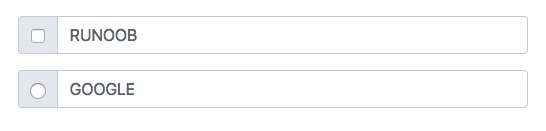
7.35.4. Bootstrap instance 
<div class="input-group mb-3">
<div class="input-group-text">
<input type="checkbox">
div>
<input type="text" class="form-control" placeholder="RUNOOB">
div>
<div class="input-group mb-3">
<div class="input-group-text">
<input type="radio">
div>
<input type="text" class="form-control" placeholder="GOOGLE">
div>
Input box to add button group 
7.35.5. Bootstrap instance 
<div class="input-group mb-3">
<button class="btn btn-outline-primary" type="button">Basic Buttonbutton>
<input type="text" class="form-control" placeholder="Some text">
div>
<div class="input-group mb-3">
<input type="text" class="form-control" placeholder="Search">
<button class="btn btn-success" type="submit">Gobutton>
div>
<div class="input-group mb-3">
<input type="text" class="form-control" placeholder="Something clever..">
<button class="btn btn-primary" type="button">OKbutton>
<button class="btn btn-danger" type="button">Cancelbutton>
div>
Set the drop-down menu 
.dropdown class. 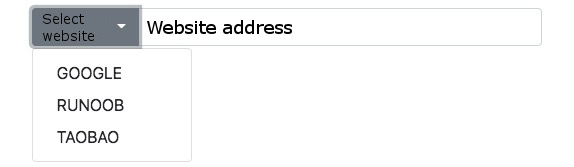
7.35.6. Bootstrap instance 
<div class="input-group mt-3 mb-3">
<button type="button" class="btn btn-primary dropdown-toggle" data-bs-toggle="dropdown">
Select website
button>
<ul class="dropdown-menu">
<li><a class="dropdown-item" href="https://www.google.com">GOOGLEa>li>
<li><a class="dropdown-item" href="https://www.runoob.com">RUNOOBa>li>
<li><a class="dropdown-item" href="https://www.taobao.com">TAOBAOa>li>
ul>
<input type="text" class="form-control" placeholder="Website address">
div>
Input box group label 
label to set the label, the label for the attribute needs to correspond to the id of the input box group. Click the label to focus on the input box: 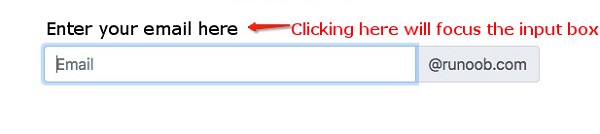
7.35.7. Bootstrap instance 
<form>
<label for="demo">Enter your email here:label>
<div class="input-group mb-3">
<input type="text" class="form-control" placeholder="Email" id="demo" name="email">
<span class="input-group-text">@runoob.comspan>
div>
form>
Principles, Technologies, and Methods of Geographic Information Systems
102