最近几年来,地理信息系统无论是在理论上还是应用上都处在一个飞速发展的阶段。 GIS被应用于多个领域的建模和决策支持,如城市管理、区划、环境整治等等,地理信息成为信息时代重要的组成部分之一; “数字地球”概念的提出,更进一步推动了作为其技术支撑的GIS的发展。 与此同时,一些学者致力于相关的理论研究,如空间感知、空间数据误差、空间关系的形式化等等。 这恰好说明了地理信息系统作为应用技术和学科的两个方面,并且这两个方面构成了相互促进的发展过程。
We can use it. .input-group class to add more styles, such as icons, text, or buttons, to the form input box.
.input-group-text class to style the text.
Use Text information can be replaced with check boxes and radio boxes: There is no need to add a drop-down menu to the input box In the input box group, through the 
7.35.1. Bootstrap instance 
<form> <div class="input-group mb-3"> <span class="input-group-text">@span> <input type="text" class="form-control" placeholder="Username"> div> <div class="input-group"> <input type="text" class="form-control" placeholder="Your Email"> <span class="input-group-text">@runoob.comspan> div> form>
Input box size 
.input-group-sm class to set a small input box .input-group-lg ,class sets a large input box: 7.35.2. Bootstrap instance 
<div class="input-group mb-3 input-group-sm"> <span class="input-group-text">Smallspan> <input type="text" class="form-control"> div> <div class="input-group mb-3"> <span class="input-group-text">Defaultspan> <input type="text" class="form-control">> div> <div class="input-group mb-3 input-group-lg"> <span class="input-group-text">Largespan> <input type="text" class="form-control"> div>
Multiple input boxes and text 
7.35.3. Bootstrap instance 
Person One Two Three Check boxes and checkboxes 
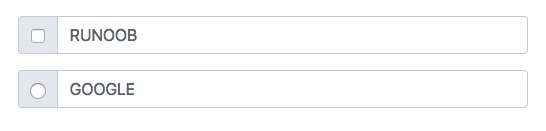
7.35.4. Bootstrap instance 
<div class="input-group mb-3"> <div class="input-group-text"> <input type="checkbox"> div> <input type="text" class="form-control" placeholder="RUNOOB"> div> <div class="input-group mb-3"> <div class="input-group-text"> <input type="radio"> div> <input type="text" class="form-control" placeholder="GOOGLE"> div>
Input box to add button group 
7.35.5. Bootstrap instance 
<div class="input-group mb-3"> <button class="btn btn-outline-primary" type="button">Basic Buttonbutton> <input type="text" class="form-control" placeholder="Some text"> div> <div class="input-group mb-3"> <input type="text" class="form-control" placeholder="Search"> <button class="btn btn-success" type="submit">Gobutton> div> <div class="input-group mb-3"> <input type="text" class="form-control" placeholder="Something clever.."> <button class="btn btn-primary" type="button">OKbutton> <button class="btn btn-danger" type="button">Cancelbutton> div>
Set the drop-down menu 
.dropdown class. 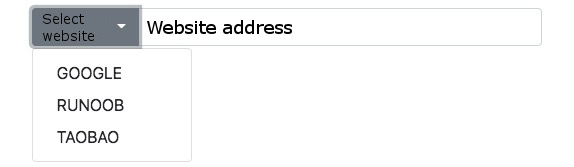
7.35.6. Bootstrap instance 
<div class="input-group mt-3 mb-3"> <button type="button" class="btn btn-primary dropdown-toggle" data-bs-toggle="dropdown"> Select website button> <ul class="dropdown-menu"> <li><a class="dropdown-item" href="https://www.google.com">GOOGLEa>li> <li><a class="dropdown-item" href="https://www.runoob.com">RUNOOBa>li> <li><a class="dropdown-item" href="https://www.taobao.com">TAOBAOa>li> ul> <input type="text" class="form-control" placeholder="Website address"> div>
Input box group label 
label to set the label, the label for the attribute needs to correspond to the id of the input box group. Click the label to focus on the input box: 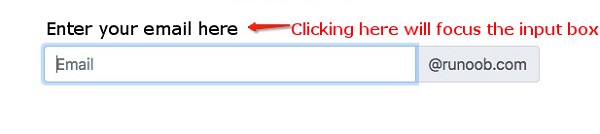
7.35.7. Bootstrap instance 
<form> <label for="demo">Enter your email here:label> <div class="input-group mb-3"> <input type="text" class="form-control" placeholder="Email" id="demo" name="email"> <span class="input-group-text">@runoob.comspan> div> form>