
Component (Component) is Vue.js one of the most powerful functions.
Components can extend HTML elements to encapsulate reusable code.
The component system allows us to build large applications with independently reusable widgets, and the interface of almost any type of application can be abstracted into a component tree:
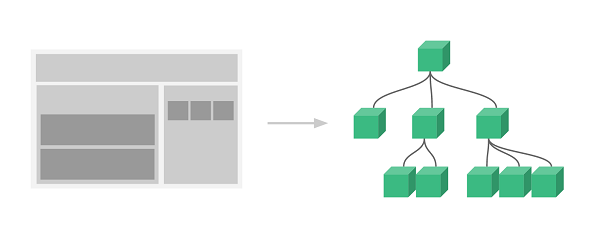
Every one of them. Vue applications are all done by using the createApp function, passed to the createApp is used to configure the root component When we mount the application, this component is used as the starting point for rendering.
An application needs to be mounted into a DOM element.
For the following example, we will Vue the application is mounted to < div id= “app” > < / div > and should be passed in #app :
const RootComponent = { /* option */ }
const app = Vue.createApp(RootComponent)
const vm = app.mount('#app')
The syntax for registering a global component is as follows:
const app = Vue.createApp({...})

app.component('my-component-name', {
  /* ... */
})
my-component-name is the component name /\* ... \*/ the part is the configuration options. After registration, we can invoke the component in the following ways:
<my-component-name>my-component-name>
A simple Vue an example of a component:
2.10.1. Global component instance 
Register a simple global component runoob and use it:
<divid="app"><runoob>runoob>div><script>// Create a Vue application const
app = Vue.createApp({}) // Define a new global component called runoob
app.component('runoob', { template: 'Custom Components!
' })
app.mount('#app')script>
Next, let’s register another one. button-counter component, after each click, the counter will be added by 1:
Example 
// Create a Vue application
const app = Vue.createApp({})
// Define a new global component called button counter
app.component('button-counter', {
data() {
return {
count: 0
}
},
template: \`
\`
})
app.mount('#app')
Note: template is a back quotation mark, not just a quote’.
2.10.2. Reuse of components 
You can reuse the component any number of times:
Example 
<div id="components-demo">
<button-counter>button-counter>
<button-counter>button-counter>
<button-counter>button-counter>
div>
2.10.3. Global component 
In the above examples, our components only pass through the component globally registered.
Globally registered components can be created later in the app used in the instance template, and also in the templates of all subcomponents in theroot instance component tree.
2.10.4. Global component instance 
Register a simple global component runoob and use it:
<divid="app"><runoob>runoob>div><script>// Create a Vue application const
app = Vue.createApp({}) // Define a new global component called runoob
app.component('runoob', { template: 'Custom Components!
' })
app.mount('#app')script>
2.10.5. Local component 
Global registration is often not ideal. For example, if you use something like webpack in such a build system, registering all components globally means that even if you no longer use a component, it will still be included in your final build result. This has resulted in an unnecessary increase in the number of JavaScript downloaded by users.
In these cases, you can define components through a normal JavaScript object:
const ComponentA = {
/* ... */
}
const ComponentB = {
/* ... */
}
const ComponentC = {
/* ... */
}
And then in components option to define the components you want to use:
const app = Vue.createApp({
components: {
'component-a': ComponentA,
'component-b': ComponentB
}
})
For components each attribute in the object, the attribute name is the name of the custom element (component-a, component-b), and the attributevalue is the component’s option object (ComponentA, ComponentB).
We can also register the local component in the instance option so that the component can only be used in this instance:
2.10.6. Local component instance 
Register a simple local component runoobA and use it:
<divid="app"><runoob-a>runoob-a>div><script>var runoobA = {
template: 'Custom Components!
' } const app = Vue.createApp({
components: { 'runoob-a': runoobA } }) app.mount('#app')script>
2.10.7. Prop 
prop is a custom property that the child component uses to accept the data passed by the parent component.
The data of the parent component needs to be passed through the props pass data to the subcomponent, which needs to explicitly use the props option declaration “prop”:
Prop instance 
<p>
By default, a component can have any number of
<code class="docutils literal notranslate">
<span class="pre">
prop
</span>
</code>
any value can be passed to any
<code class="docutils literal notranslate">
<span class="pre">
prop
</span>
</code>
.
</p>
2.10.8. Dynamic Prop 
Similar to using the v-bind bind the HTML attribute to an expression, or you can use the v-bind dynamic binding props into the data of the parent component Whenever the data of the parent component changes, the change is also transmitted to the child component:
Prop instance 
2.10.9. Prop verification 
Component can be a props specify validation requirements.
In order to customize prop can use the verification method for props provides an object with validation requirements rather than an array of strings. For example:
Vue.component('my-component', {
props: {
// Basic type check (`null` and `undefined` will pass any type of verification)
propA: Number,
// Multiple possible types
propB: [String, Number],
// Required string
propC: {
type: String,
required: true
},
// Numbers with default values
propD: {
type: Number,
default: 100
},
// Objects with default values
propE: {
type: Object,
// The default value of an object or array must be obtained from a factory function
default: function () {
return { message: 'hello' }
}
},
// Custom validation function
propF: {
validator: function (value) {
// This value must match one of the following strings
return ['success', 'warning', 'danger'].indexOf(value) !== -1
}
}
}
})
When prop validation fails, Vue (the build of the development environment) will generate a console warning.
type can be the following native constructor:
-
String
-
Number
-
Boolean
-
Array
-
Object
-
Date
-
Function
-
Symbol
type can also be a custom constructor, using the instanceof test.
-
1. SVG tutorial
19
-
1. Angularjs2
8
-
1. Sqlite
47
-
1. Memcached
20
-
1. C# tutorial
61
-
2. Servlet
21
-
2. Go
43
-
2. Vue3
19
-
2. Docker
59
-
3. SOAP tutorial
10
-
3. Android
18
-
3. Kotlin
18
-
3. React
23
-
3. Mongodb
44
-
4. Appml
12
-
4. MySQL tutorial
34
-
4. Lua
31
-
5. Perl
45
-
5. Postgresql
41
-
web
15
-
5. Web Services tutorial
6
-
6. Ruby
41
-
6. Design-pattern
35
-
6. WSDL tutorial
8
-
7. Django
18
-
7. Rust
22
-
8. Foundation
39
-
8. Css3
26
-
9. Swift
43
-
9. Ios
43
-
11. HTML tutorial-(HTML5 Standard)
54
-
13. Regex
6
-
12. Http
6
-
14. Regexp
7
-
1. Geographical Information Systems in the World Wide Web Era
4
-
2. Basic technology of WebGIS
4
-
3. Geographic Web Services
5
-
4. aggregation of geographical information
4
-
5. mobile GIS
5
-
6. Geographic information portal
3
-
7. New generation national spatial data infrastructure and GIS
4
-
8. Application of WebGIS in E-Commerce
3
-
9. Application of WebGIS in E-government
3
-
10. Hotspots and frontiers of WebGIS
2
Principles, Technologies, and Methods of Geographic Information Systems
102
In recent years, Geographic Information Systems (GIS) have undergone rapid development in both theoretical and practical dimensions. GIS has been widely applied for modeling and decision-making support across various fields such as urban management, regional planning, and environmental remediation, establishing geographic information as a vital component of the information era. The introduction of the “Digital Earth” concept has further accelerated the advancement of GIS, which serves as its technical foundation. Concurrently, scholars have been dedicated to theoretical research in areas like spatial cognition, spatial data uncertainty, and the formalization of spatial relationships. This reflects the dual nature of GIS as both an applied technology and an academic discipline, with the two aspects forming a mutually reinforcing cycle of progress.
-
1. Introduction to Geographic Information Systems
6
-
2. From the Real World to the Bit World
3
-
3. Spatial Data Model
7
-
4. Spatial Reference Systems and Map Projections
5
-
5. Data in GIS
4
-
6. Spatial data acquisition
2
-
7. Spatial Data Management
6
-
8. Spatial analysis
8
-
9. Digital Terrain Model (DTM) and Terrain Analysis
5
-
10. Spatial modeling and spatial decision support
6
-
11. Spatial data representation and map making
6
-
12. 3S Integration Technology
5
-
13. Network Geographic Information System
4
-
14. Examples of Geographic Information System Application
8
-
15. Organization and Management of Geographic Information System Application Projects
10
-
16. Geographic Information system Software Engineering Technology
7
-
17. Geographic Information System Standards
3
-
18. Geographic Information System and Society
3
-
19. Earth Information Science and Digital Earth
4