最近几年来,地理信息系统无论是在理论上还是应用上都处在一个飞速发展的阶段。 GIS被应用于多个领域的建模和决策支持,如城市管理、区划、环境整治等等,地理信息成为信息时代重要的组成部分之一; “数字地球”概念的提出,更进一步推动了作为其技术支撑的GIS的发展。 与此同时,一些学者致力于相关的理论研究,如空间感知、空间数据误差、空间关系的形式化等等。 这恰好说明了地理信息系统作为应用技术和学科的两个方面,并且这两个方面构成了相互促进的发展过程。
The activity represents a single screen with a user interface, such as a Java window or frame. Android’s activities are ContextThemeWrapper A subclass of the.
If you have ever programmed in the CJR Cobb + or Java language, you should know that these programs are derived from main() The function begins. Similarly, the Android system initializes its program through the active onCreate() The call to the callback starts. There is a sequence of callback methods to start an activity and a sequence of methods to close the activity, as shown in the following activity declaration cycle diagram:
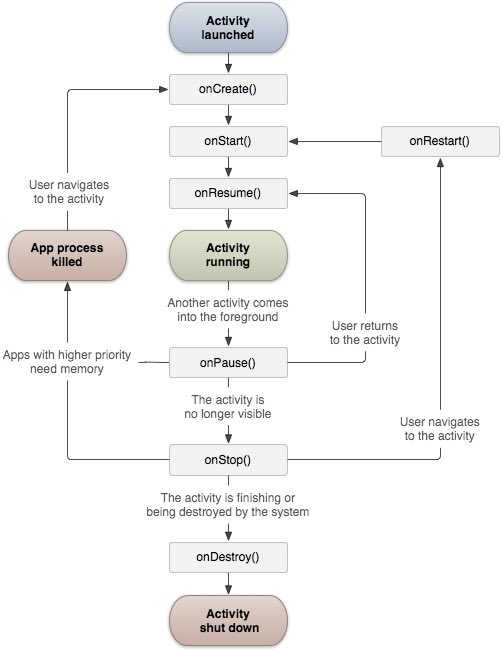
The Activity class defines the following callback. You don’t have to implement all callback methods. But it’s important to understand each of them, and implementing them ensures that your application behaves as users expect.
Callback | Description |
|---|---|
| This is the first callback, which is called when the activity is first created |
| This callback is called when the activity is visible to the user |
| This callback is called when the application begins to interact with the user |
| The suspended activity cannot accept user input and cannot execute any code. The current activity is about to be paused and called when the last activity is about to be resumed |
| Called when the activity is not visible |
| Called before the activity is destroyed by the system |
| Called when the activity is stopped and reopened |
3.10.1. Example 
This example shows the lifecycle of Android application activities in simple steps. Follow the steps below to modify the Android application we created in the Hello World instance section.
Steps | Description |
|---|---|
1 | Use eclipse IDE to create an Android application and name it HelloWorld and put it under the com.example.helloworld package. As described in the previous Hello World Example chapter. |
2 | 按照下面修改主要活动文件MainActivity.java。保持其他部分不变。 |
3 | Run the application to open the Android emulator and check for changes to the application. |
Here are the main active files src/com.example.helloworld/MainActivity.java The content of the modification. It contains every basic lifecycle approach. Log.d() Method is used to generate log information:
package com.example.helloworld; import android.os.Bundle; import android.app.Activity; import android.util.Log; public class MainActivity extends Activity { String msg = "Android : "; /** 当活动第一次被创建时调用 */ @Override public void onCreate(Bundle savedInstanceState) { super.onCreate(savedInstanceState); setContentView(R.layout.activity_main); Log.d(msg, "The onCreate() event"); } /** 当活动即将可见时调用 */ @Override protected void onStart() { super.onStart(); Log.d(msg, "The onStart() event"); } /** 当活动可见时调用 */ @Override protected void onResume() { super.onResume(); Log.d(msg, "The onResume() event"); } /** 当其他活动获得焦点时调用 */ @Override protected void onPause() { super.onPause(); Log.d(msg, "The onPause() event"); } /** 当活动不再可见时调用 */ @Override protected void onStop() { super.onStop(); Log.d(msg, "The onStop() event"); } /** 当活动将被销毁时调用 */ @Override public void onDestroy() { super.onDestroy(); Log.d(msg, "The onDestroy() event"); } } Activity classes are derived from the project’s res/layout The XML file in the loads all UI components. The following statement starts from the res/layout/activity_main.xml Load the UI component in the file:
setContentView(R.layout.activity_main); An application can have one or more activities without any restrictions. Each activity defined for the application needs to be specified in the AndroidManifest.xml Declare in. The main activities of the application need to be declared in the list, and the intention filter tag needs to include MAIN Action and LAUNCHER Category. As follows:
<manifest xmlns:android="http://schemas.android.com/apk/res/android" package="com.example.helloworld" android:versionCode="1" android:versionName="1.0" > <uses-sdk android:minSdkVersion="8" android:targetSdkVersion="22" /> <application android:icon="@drawable/ic_launcher" android:label="@string/app_name" android:theme="@style/AppTheme" > <activity android:name=".MainActivity" android:label="@string/title_activity_main" > <intent-filter> <action android:name="android.intent.action.MAIN" /> <category android:name="android.intent.category.LAUNCHER"/> intent-filter> activity> application> manifest> Whether it is MAIN The action is still LAUNCHER If the category is not declared in the activity, the application icon will not appear in the application list on the home screen.
Let’s run the modified “Hellow World!” Applications. Suppose you have already created AVD when the environment is set up. Run the application from Eclipse, open the active file in a project, and click the run icon from the toolbar. Eclipse installs the application on AVD and starts it. If all goes well, the simulator screen will be displayed as follows, and you can see the log message in the LogCat window of Eclipse IDE:
07-19 15:00:43.405: D/Android :(866): The onCreate() event 07-19 15:00:43.405: D/Android :(866): The onStart() event 07-19 15:00:43.415: D/Android :(866): The onResume() event
Let’s click the red button on the Android simulator, which will produce the following event message in the LogCat window of Eclipse IDE:
<code>07-19 15:01:10.995: D/Android :(866): The onPause() event 07-19 15:01:12.705: D/Android :(866): The onStop() event code> Let’s click the menu button on the Android simulator again, which will produce the following event message in the LogCat window of Eclipse IDE:
<code>07-19 15:01:13.995: D/Android :(866): The onStart() event 07-19 15:01:14.705: D/Android :(866): The onResume() event code> Next, let’s click the back button on the Android simulator, which will generate the following event message in the LogCat window of Eclipse IDE, which completes the entire life cycle of the activity on the Android application.
07-19 15:33:15.687: D/Android :(992): The onPause() event 07-19 15:33:15.525: D/Android :(992): The onStop() event 07-19 15:33:15.525: D/Android :(992): The onDestroy() event
-
1. Angularjs2
8
-
1. SVG tutorial
19
-
1. Memcached
20
-
1. C# tutorial
61
-
1. Sqlite
47
-
2. Go
43
-
2. Docker
59
-
2. Vue3
19
-
2. Servlet
21
-
3. React
23
-
3. SOAP tutorial
10
-
3. Android
18
-
3.2. Overview of Android
-
3.17. Android fragment transition
-
3.11. Android Service (Service)
-
3.4. Android Studio installation
-
3.18. Android intent (Intent) and filter (Filter)
-
3.6. Android architecture
-
3.13. Android-content provider (Content Provider)
-
>
3.10. Android activity (Activity)
-
3.9. Android Resource (Resources) access
-
3.12. Android broadcast receiver (Broadcast Receivers)
-
3. Mongodb
44
-
3. Kotlin
18
-
4. Lua
31
-
4. MySQL tutorial
35
-
4. Appml
12
-
5. Perl
45
-
5. Postgresql
41
-
web
15
-
5. Web Services tutorial
6
-
6. Ruby
42
-
6. Design-pattern
35
-
7. Django
18
-
7. Rust
22
-
6. WSDL tutorial
8
-
8. Foundation
39
-
9. Ios
43
-
8. Css3
26
-
9. Swift
44
-
11. HTML tutorial-(HTML5 Standard)
54
-
12. Http
6
-
13. Regex
6
-
14. Regexp
8
-
1. Introduction to geographic information system
6
-
2. From the Real World to the Bit World
3
-
3. Spatial Data Model
7
-
4. 空间参照系统和 地图投影
5
-
5. Data in GIS
3
-
6. Spatial data acquisition
2
-
7. Spatial Data Management
6
-
8. Spatial analysis
8
-
9. 数字地形模型( DTM )与地形分析
5
-
10. 空间建模与 空间决策支持
6
-
11. Spatial data representation and map making
6
-
12. 3S Integration Technology
5
-
13. 网络地理信息系统
3
-
14. Examples of Geographic Information System Application
8
-
15. Organization and Management of Geographic Information System Application Projects
9
-
16. Geographic Information system Software Engineering Technology
6
-
17. Geographic Information System Standards
3
-
18. Geographic Information System and Society
3
-
19. Earth Information Science and Digital Earth
3