Namespaces are designed to provide a way to separate one set of names from others. The name of a class declared in one namespace does not conflict withthe name of the same class declared in another namespace.
Let’s take an example in a computer system, a folder (directory) can containmultiple folders, each folder cannot have the same file name, but files in different folders can be renamed.
Namespaces are defined by keywords In order to call a function or variable that supports the namespace version,the name of the namespace is preceded, as follows: The following program demonstrates the use of namespaces: When the above code is compiled and executed, it produces the following results: We can write a fully qualified name as follows: You can also use the Let’s use When the above code is compiled and executed, it produces the following results: Namespaces can be nested, that is, you can define one namespace within another, as follows: You can use dots ( When the above code is compiled and executed, it produces the following results: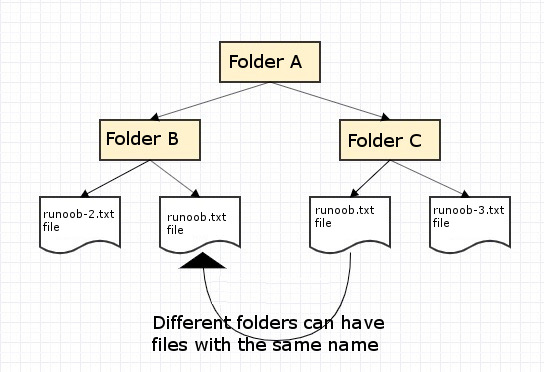
1.39.1. Define namespaces #
namespace start, followed by the name of the namespace, as follows:namespace namespace_name { // Code declaration }
namespace_name.item_name;
Example #
using System; namespace first_space { class namespace_cl { public void func() { Console.WriteLine("Inside first_space"); } } } namespace second_space { class namespace_cl { public void func() { Console.WriteLine("Inside second_space"); } } } class TestClass { static void Main(string[] args) { first_space.namespace_cl fc = new first_space.namespace_cl(); second_space.namespace_cl sc = new second_space.namespace_cl(); fc.func(); sc.func(); Console.ReadKey(); } }
Inside first_space Inside second_space
1.39.2. Using keyword #
using keyword indicates that the program is using a name from a given namespace. For example, we use the System namespace, where classes are defined Console . We can just write:Console.WriteLine ("Hello there");
System.Console.WriteLine("Hello there");
using namespace directive so that you do not have to precede the namespace name when using it. This directive tells the compiler that the subsequent code uses the name in the specified namespace. The following code demonstrates the application of namespaces. using specify to override the above instance:Example #
using System; using first_space; using second_space; namespace first_space { class abc { public void func() { Console.WriteLine("Inside first_space"); } } } namespace second_space { class efg { public void func() { Console.WriteLine("Inside second_space"); } } } class TestClass { static void Main(string[] args) { abc fc = new abc(); efg sc = new efg(); fc.func(); sc.func(); Console.ReadKey(); } }
Inside first_space Inside second_space
1.39.3. Nested namespace #
namespace namespace_name1 { // Code declaration namespace namespace_name2 { // Code declaration } }
. ) operator to access the members of the nested namespace, as follows 1.39.4. Example #
using System; using SomeNameSpace; using SomeNameSpace.Nested; namespace SomeNameSpace { public class MyClass { static void Main() { Console.WriteLine("In SomeNameSpace"); Nested.NestedNameSpaceClass.SayHello(); } } // Embedded namespace namespace Nested { public class NestedNameSpaceClass { public static void SayHello() { Console.WriteLine("In Nested"); } } } }
In SomeNameSpace In Nested