This section will show you how to access a database using Ruby. Ruby DBI The module provides a database-independent interface for Ruby scripts similar to the Perl DBI module.
DBI, or Database independent interface, represents Ruby’s database-independent interface. DBI provides an abstraction layer between the Ruby code and the underlying database, allowing you to simply implement database switching. It defines a series of methods, variables, and specifications, and provides a consistent database interface independent of the database.
DBI can interact with the following:
ADO (ActiveX Data Objects)
DB2
Frontbase
MSQL
MySQL
ODBC
Oracle
OCI8 (Oracle)
PostgreSQL
Proxy/Server
SQLite
SQLRelay
6.33.1. DBI application architecture #
DBI is independent of any database available in the background. Whether you are using Oracle, MySQL, or Informix, you can use DBI. The following architecture diagram clearly illustrates this.
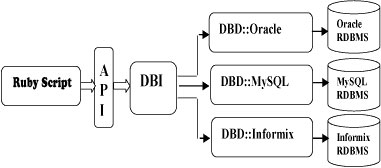
The general architecture of Ruby DBI uses two layers:
Database Interface (DBI) layer. This layer is independent of the database and provides a series of public access methods, regardless of the type of database server.
Database driven (DBD) layer. This layer is dependent on the database, and different drivers provide access to different database engines. MySQL, PostgreSQL, InterBase, Oracle and so on use different drivers. Each driver is responsible for interpreting requests from the DBI layer and mapping themto requests applicable to a given type of database server.
6.33.2. Installation #
If you want to write a Ruby script to access the MySQL database, you need to install the Ruby MySQL module first. Mac OS system needs to be modified Or use a soft connection: RubyGems was founded around November 2003 and has been part of the Ruby standard library since Ruby version 1.9. More details can be found at Ruby RubyGems Use This module is a DBD and can be downloaded from http://tmtm.org/downloads/mysql/ruby/ . After downloading the latest package, unzip it into the directory and execute the following command to install it: Then compile: Get and install Ruby/DBI You can download and install the Ruby DBI module from the link below: Before you begin the installation, make sure that you have root permissions.Now, install the following steps to install: Step 1 Or directly download and zip the package and decompress it. Step 2 Enter the directory More specifically, you can use the Step 3 The final step is to set up the drive and install it using the following command:Install the Mysql package #
# Ubuntusudoapt-getinstallmysql-clientsudoapt-getinstalllibmysqlclient15-dev# Centosyuminstallmysql-devel
~/.bash_profile or ~/.profile File, add the following code:MYSQL=/usr/local/mysql/binexportPATH=$PATH:$MYSQLexportDYLD_LIBRARY_PATH=/usr/local/mysql/lib:$DYLD_LIBRARY_PATH
sudoln-s/usr/local/mysql/lib/libmysqlclient.18.dylib/usr/lib/libmysqlclient.18.dylib
Install DBI using RubyGems (recommended) #
gem installation dbi and dbd-mysql :sudo gem install dbi sudo gem install mysql sudo gem install dbd-mysql
Install using source code (this method is used for Ruby version less than 1.9) #
ruby extconf.rb or ruby extconf.rb --with-mysql-dir=/usr/local/mysql or ruby extconf.rb --with-mysql-config
make git clone https://github.com/erikh/ruby-dbi.git
ruby-dbi-master using the setup.rb script in the directory for configuration The most commonly used configuration commands are config parameters are not followed by any parameters. This command is configured to install all drivers by default.ruby setup.rb config
--with option to list the specific parts you want to use. For example, if you want to configure only the main DBI modules and MySQL DBD layer drivers, enter the following command:ruby setup.rb config --with=dbi,dbd_mysql
ruby setup.rb setup ruby setup.rb install
6.33.3. Database connection #
Assuming we are using a MySQL database, before connecting to the database, make sure that:
You have created a database TESTDB.
You have created the table EMPLOYEE in TESTDB.
The table has fields
FIRST_NAME、LAST_NAME, AGE, SEX and INCOME.Set the user ID “testuser” and password “test123” to access TESTDB
The Ruby module DBI has been installed correctly on your machine.
You have seen the MySQL tutorials and understood the basics of MySQL.
Here is an example of connecting to the MySQL database “TESTDB”:
Example
#!/usr/bin/ruby -w require "dbi" begin # Connect to MySQL server dbh = DBI.connect("DBI:Mysql:TESTDB:localhost", "testuser", "test123") # Obtain the server version string and display it row = dbh.select_one("SELECT VERSION()") puts "Server version: " + row[0] rescue DBI::DatabaseError => e puts "An error occurred" puts "Error code: #{e.err}" puts "Error message: #{e.errstr}" ensure # server disconnect dbh.disconnect if dbh end When you run this script, the following results will be produced on the Linux machine.
Server version: 5.0.45 If the connection is established with a data source, the database handle (Database Handle) is returned and saved to dbh for later use, otherwise``dbh`` will be set to nil value e.err and e::errstr returns the error code and the error string, respectively.
Finally, before quitting the program, be sure to close the database connection and release resources.
6.33.4. INSERT operation #
The INSERT operation is needed when you want to create a record in a database table.
Once we have established a database connection, we are ready to use the Statements that do not return rows can be made by calling the Similarly, you can execute SQL Example You can use DBI’s The steps to create a record are as follows: Prepare with Execute a SQL query to select all the results from the database. This will be done by using the Release the statement handle. This will be done by using finish API. If all goes well, then Here is the syntax for using these two methods: Example These two methods can be used to transmit. The following example is found in the Example If you use multiple at the same time do method or prepare and execute method to create a table or create a record that is inserted into a data table.Use the do statement #
do database processing method. The method takes a statement string parameter and returns the number of rows affected by the statement.dbh.do("DROP TABLE IF EXISTS EMPLOYEE") dbh.do("CREATE TABLE EMPLOYEE ( FIRST_NAME CHAR(20) NOT NULL, LAST_NAME CHAR(20), AGE INT, SEX CHAR(1), INCOME FLOAT )" );
INSERT statement to create a record insert EMPLOYEE in the table.#!/usr/bin/ruby -w require "dbi" begin # Connect to MySQL server dbh = DBI.connect("DBI:Mysql:TESTDB:localhost", "testuser", "test123") dbh.do( "INSERT INTO EMPLOYEE(FIRST_NAME, LAST_NAME, AGE, SEX, INCOME) VALUES ('Mac', 'Mohan', 20, 'M', 2000)" ) puts "Record has been created" dbh.commit rescue DBI::DatabaseError => e puts "An error occurred" puts "Error code: #{e.err}" puts "Error message: #{e.errstr}" dbh.rollback ensure # server disconnect dbh.disconnect if dbh end
Use
prepare and execute # prepare and execute method to execute the SQL statement in the Ruby code. INSERT the SQL statement of the statement. This will be done by using the prepare method to do it. execute method to do it. commit this operation, otherwise you can rollback close the deal.sth = dbh.prepare(statement) sth.execute ... zero or more SQL operations ... sth.finish
bind value to the SQL statement. Sometimes the value entered may not be given in advance, in whichcase the bound value is used. Replace the actual value with a question mark(?), which is passed through the execute() API to deliver. EMPLOYEE two records are created in the table:#!/usr/bin/ruby -w require "dbi" begin # Connect to MySQL server dbh = DBI.connect("DBI:Mysql:TESTDB:localhost", "testuser", "test123") sth = dbh.prepare( "INSERT INTO EMPLOYEE(FIRST_NAME, LAST_NAME, AGE, SEX, INCOME) VALUES (?, ?, ?, ?, ?)" ) sth.execute('John', 'Poul', 25, 'M', 2300) sth.execute('Zara', 'Ali', 17, 'F', 1000) sth.finish dbh.commit puts "Record has been created" rescue DBI::DatabaseError => e puts "An error occurred" puts "Error code: #{e.err}" puts "Error message: #{e.errstr}" dbh.rollback ensure # server disconnect dbh.disconnect if dbh end INSERT so it is better to prepare a statement and then execute it multiple times in a loop than to call it each time through the loop do much more efficient.
6.33.5. READ operation #
For any database READ operation refers to getting useful information from the database.
Once the database connection is established, we can prepare to query the database. We can use it. do method or prepare and execute method to get the value from the database table.
The steps to obtain a record are as follows:
Prepare the SQL query based on the required conditions. This will be done byusing the
preparemethod to do it.Execute a SQL query to select all the results from the database. This will be done by using the
executemethod to do it.Get the results one by one and output them. This will be done by using the
fetchmethod to do it.Release the statement handle. This will be done by using the
finishmethod to do it.
The following example is derived from EMPLOYEE query all the records with salary over 1000 in the table.
Example
#!/usr/bin/ruby -w require "dbi" begin # Connect to MySQL server dbh = DBI.connect("DBI:Mysql:TESTDB:localhost", "testuser", "test123") sth = dbh.prepare("SELECT * FROM EMPLOYEE WHERE INCOME > ?") sth.execute(1000) sth.fetch do |row| printf "First Name: %s, Last Name : %s\n", row[0], row[1] printf "Age: %d, Sex : %s\n", row[2], row[3] printf "Salary :%d \n\n", row[4] end sth.finish rescue DBI::DatabaseError => e puts "An error occurred" puts "Error code: #{e.err}" puts "Error message: #{e.errstr}" ensure # server disconnect dbh.disconnect if dbh end This will produce the following results:
First Name: Mac, Last Name : Mohan Age: 20, Sex : M Salary :2000 First Name: John, Last Name : Poul Age: 25, Sex : M Salary :2300 There are also many ways to get records from the database, and if you are interested, you can check the Ruby DBI Read operation.
6.33.6. Update operation #
For any database UPDATE an operation refers to updating one or more existing records in the database. The following example updates all records with a SEX of’M’. Here, we will increase the AGE of all men by one year. This will be divided into three steps:
Prepare the SQL query based on the required conditions. This will be done byusing the
preparemethod to do it.Execute a SQL query to select all the results from the database. This will be done by using the
executemethod to do it.Release the statement handle. This will be done by using the
finishmethod to do it.If all goes well, then
committhis operation, otherwise you canrollbackclose the deal.
Example
#!/usr/bin/ruby -w require "dbi" begin # Connect to MySQL server dbh = DBI.connect("DBI:Mysql:TESTDB:localhost", "testuser", "test123") sth = dbh.prepare("UPDATE EMPLOYEE SET AGE = AGE + 1 WHERE SEX = ?") sth.execute('M') sth.finish dbh.commit rescue DBI::DatabaseError => e puts "An error occurred" puts "Error code: #{e.err}" puts "Error message: #{e.errstr}" dbh.rollback ensure # server disconnect dbh.disconnect if dbh end 6.33.7. DELETE operation #
When you want to delete records from the database, you need to use DELETE operation. The following example is derived from EMPLOYEE delete all records with an AGE greater than 20 in. The steps for this operation are as follows:
Prepare the SQL query based on the required conditions. This will be done byusing the
preparemethod to do it.Execute a SQL query to delete the required records from the database. This will be done by using the
executemethod to do it.Release the statement handle. This will be done by using the
finishmethod to do it.If all goes well, then
committhis operation, otherwise you canrollbackclose the deal.
Example
#!/usr/bin/ruby -w require "dbi" begin # Connect to MySQL server dbh = DBI.connect("DBI:Mysql:TESTDB:localhost", "testuser", "test123") sth = dbh.prepare("DELETE FROM EMPLOYEE WHERE AGE > ?") sth.execute(20) sth.finish dbh.commit rescue DBI::DatabaseError => e puts "An error occurred" puts "Error code: #{e.err}" puts "Error message: #{e.errstr}" dbh.rollback ensure # server disconnect dbh.disconnect if dbh end 6.33.8. Execute a transaction #
A transaction is a mechanism that ensures transaction consistency. A transaction should have the following four attributes:
Atomicity: the atomicity of a transaction means that the program contained in the transaction, as the logical unit of work of the database, either performs all or no modifications to the data.
Consistency: the consistency of a transaction means that the database must be in a consistent state before and after the execution of a transaction. Ifthe state of the database satisfies all integrity constraints, the databaseis said to be consistent.
Isolation: transaction isolation means that concurrent transactions are isolated from each other, that is, operations within a transaction and data being operated must be blocked from being seen by other transactions that attempt to modify.
Durability: transaction persistence means ensuring that updates to committedtransactions are not lost in the event of a system or media failure. That is, once a transaction is committed, its change to the data in the database should be permanent and can withstand any database system failure. Persistence is guaranteed by database backup and recovery.
The first method uses DBI’s Example The second method uses Example DBI provides two ways to perform transactions. One is commit or rollback method to commit or roll back the transaction. And the other is``transaction`` method that can be used to implement a transaction. Next, let’s introduce these two simple ways to implement transactions:Method I #
commit and rollback method to explicitly commit or cancel the transactiondbh['AutoCommit'] = false # Set automatic submission to false. begin dbh.do("UPDATE EMPLOYEE SET AGE = AGE+1 WHERE FIRST_NAME = 'John'") dbh.do("UPDATE EMPLOYEE SET AGE = AGE+1 WHERE FIRST_NAME = 'Zara'") dbh.commit rescue puts "transaction failed" dbh.rollback end dbh['AutoCommit'] = true
Method II #
transaction method. This method is relatively simple because it requires a block of code that makes up the transaction statement. transaction method executes the block, and then automatically calls the commit or rollback :dbh['AutoCommit'] = false # Set automatic submission to false dbh.transaction do |dbh| dbh.do("UPDATE EMPLOYEE SET AGE = AGE+1 WHERE FIRST_NAME = 'John'") dbh.do("UPDATE EMPLOYEE SET AGE = AGE+1 WHERE FIRST_NAME = 'Zara'") end dbh['AutoCommit'] = true
6.33.9. COMMIT operation #
Commit is an operation that identifies that the database has completed changes, after which all changes are unrecoverable.
Here is a call to commit a simple example of the.
dbh.commit 6.33.10. ROLLBACK operation #
If you are not satisfied with one or more changes and you want to fully restore them, use the rollback method.
Here is a call to rollback a simple example of the.
dbh.rollback 6.33.11. Disconnect the database #
To disconnect the database, use the disconnect API .
dbh.disconnect If the user passes the disconnect method closes the database connection, and DBI rolls back all outstanding transactions. However, without relying on any implementation details of DBI, your application can explicitly call commit or rollback .
6.33.12. Handling error #
There are many different sources of errors. Such as a syntax error when executing a SQL statement, or a connection failure, or a call to a cancelledor completed statement handle fetch method.
If a DBI method fails, DBI throws an exception. The DBI method throws any type of exception, but the two most important exception classes are DBI::InterfaceError and DBI::DatabaseError .
The Exception objects of these classes include err 、 errstr and state the sub table represents the error number, a descriptive error string, and a standard error code. The attributes are described as follows:
errreturns the integer representation of the error that occurred, or ifDBD does not support itnil. For example, Oracle DBD returnsORA-XXXXthe numeric part of the error message.errstr: Returns a string representation of the error that occurredstate: Returns the error that occurredSQLSTATEthe code.SQLSTATEis a five-character string. Most DBD do not support it, so it returnsnil.
In the above example, you have seen the following code:
rescue DBI::DatabaseError => e puts "An error occurred" puts "Error code: #{e.err}" puts "Error message: #{e.errstr}" dbh.rollback ensure # server disconnect dbh.disconnect if dbh end To get debugging information about what the script is executing when it is executed, you can enable tracing. To do this, you must first download dbi/trace module, and then call the trace methods:
require "dbi/trace" .............. trace(mode, destination) mode can be 0 (off), 1, 2, or 3 destination should be an IO object The default values are 2 and 2 respectively STDERR .
6.33.13. Code block for method #
There are some ways to create handles. These methods are called through the code block. The advantage of using code blocks with methods is that they provide a handle to the code block as a parameter, and the handle is automatically cleared when the block terminates. Here are some examples to help you understand this concept.
DBI.connect:This method generates a database handle, which is recommended to be called at the end of the blockdisconnectto disconnect the database.dbh.prepare:This method generates a statement handle, which is recommended to be called at the end of the blockfinish. Within the block, you must call theexecutemethod to execute the statement.dbh.execute:This method is similar to that ofdbh.preparesimilar, butdbh.execute. There is no need to call within the blockexecutemethod. The statement handle executes automatically.
Example 1 #
DBI.connect can have a code block that passes the database handle to, and will automatically disconnect the handle at the end of the block.
dbh = DBI.connect("DBI:Mysql:TESTDB:localhost", "testuser", "test123") do |dbh| Example 2 #
dbh.prepare can have a code block, pass a statement handle to it, and automatically call at the end of the block finish .
dbh.prepare("SHOW DATABASES") do |sth| sth.execute puts "Databases: " + sth.fetch_all.join(", ") end Example 3 #
dbh.execute can have a code block, pass a statement handle to it, and automatically call at the end of the block finish .
dbh.execute("SHOW DATABASES") do |sth| puts "Databases: " + sth.fetch_all.join(", ") end DBI transaction method can also come with a code block, which is explained in the above chapter.
6.33.14. Functions and properties of a specific driver #
DBI allows the database driver to provide additional database-specific functions that can be used by the user through any Handle object’s func method is called.
Use []= or [] method can set or get the properties of a specific driver.
The following DBD::Mysql driver-specific functions are implemented:
Serial number | Function & description |
|---|---|
1 |
|
2 |
|
3 |
|
4 |
|
5 |
|
6 |
|
7 |
|
8 |
|
9 |
|
10 |
|
11 |
|
12 |
|
#!/usr/bin/ruby require "dbi" begin # Connect to MySQL server dbh = DBI.connect("DBI:Mysql:TESTDB:localhost", "testuser", "test123") puts dbh.func(:client_info) puts dbh.func(:client_version) puts dbh.func(:host_info) puts dbh.func(:proto_info) puts dbh.func(:server_info) puts dbh.func(:thread_id) puts dbh.func(:stat) rescue DBI::DatabaseError => e puts "An error occurred" puts "Error code: #{e.err}" puts "Error message: #{e.errstr}" ensure dbh.disconnect if dbh end This will produce the following results:
5.0.45 50045 Localhost via UNIX socket 10 5.0.45 150621 Uptime: 384981 Threads: 1 Questions: 1101078 Slow queries: 4 \ Opens: 324 Flush tables: 1 Open tables: 64 \ Queries per second avg: 2.860