最近几年来,地理信息系统无论是在理论上还是应用上都处在一个飞速发展的阶段。 GIS被应用于多个领域的建模和决策支持,如城市管理、区划、环境整治等等,地理信息成为信息时代重要的组成部分之一; “数字地球”概念的提出,更进一步推动了作为其技术支撑的GIS的发展。 与此同时,一些学者致力于相关的理论研究,如空间感知、空间数据误差、空间关系的形式化等等。 这恰好说明了地理信息系统作为应用技术和学科的两个方面,并且这两个方面构成了相互促进的发展过程。
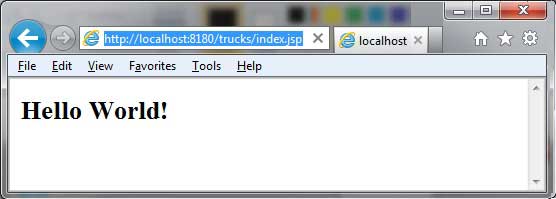
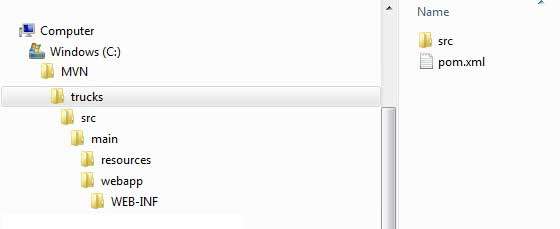
In this section we will learn how to use the version control system Maven to manage a web-based project and how to create, build, and deploy an already running web application. We can use the maven-archetype-webapp plug-in to create a simple Java web application. Open the command console, go to the C:MVN folder, and execute the following mvn command: After execution, Maven will start processing and create a complete directory structure for the Java Web project. After execution, we can see the trucks project under the C:/MVN folder and view the directory structure of the project: The Maven directory structure is standard, and the functions of each directory are shown in the following table: Folder structure Description Trucks Contains the src folder and the pom.xml file. Src/main/webapp Contains index.jsp files and WEB-INF folders. Src/main/webapp/WEB-INF Include web.xml files Src/main/resources Contains pictures and properties resource files. The pom.xml file code is as follows: Next, open the C:> MVN > trucks > src > main > webapp > folder, and you can see a created index.jsp file with the following code: Open the command console, change to the C:MVNtrucks directory, and execute the following mvn command: Maven will begin to build the project: Open the C:< MVN < trucks < target < folder, locate the trucks.war file, copy it to your web server’s web application directory, and restart the web server. Visit the following URL to run the web application: Verification results: 11.17.1. Create a Web application 
C:\MVN>mvn archetype:generate -DgroupId=com.companyname.automobile -DartifactId=trucks -DarchetypeArtifactId=maven-archetype-webapp -DinteractiveMode=false
[INFO] Scanning for projects... [INFO] Searching repository for plugin with prefix: 'archetype'. [INFO] ------------------------------------------------------------------- [INFO] Building Maven Default Project [INFO] task-segment: [archetype:generate] (aggregator-style) [INFO] ------------------------------------------------------------------- [INFO] Preparing archetype:generate [INFO] No goals needed for project - skipping [INFO] [archetype:generate {execution: default-cli}] [INFO] Generating project in Batch mode [INFO] -------------------------------------------------------------------- [INFO] Using following parameters for creating project from Old (1.x) Archetype: maven-archetype-webapp:1.0 [INFO] -------------------------------------------------------------------- [INFO] Parameter: groupId, Value: com.companyname.automobile [INFO] Parameter: packageName, Value: com.companyname.automobile [INFO] Parameter: package, Value: com.companyname.automobile [INFO] Parameter: artifactId, Value: trucks [INFO] Parameter: basedir, Value: C:\MVN [INFO] Parameter: version, Value: 1.0-SNAPSHOT [INFO] project created from Old (1.x) Archetype in dir: C:\MVN\trucks [INFO] ------------------------------------------------------------------- [INFO] BUILD SUCCESSFUL [INFO] ------------------------------------------------------------------- [INFO] Total time: 16 seconds [INFO] Finished at: Tue Jul 17 11:00:00 IST 2012 [INFO] Final Memory: 20M/89M [INFO] -------------------------------------------------------------------
<projectxmlns="http://maven.apache.org/POM/4.0.0"xmlns:xsi="http://www.w3.org/2001/XMLSchema-instance"xsi:schemaLocation="http://maven.apache.org/POM/4.0.0 http://maven.apache.org/maven-v4_0_0.xsd">
Hello World!
11.17.2. Build Web application 
C:\MVN\trucks>mvn clean package
[INFO] Scanning for projects... [INFO] ------------------------------------------------------------------- [INFO] Building trucks Maven Webapp [INFO] task-segment: [clean, package] [INFO] ------------------------------------------------------------------- [INFO] [clean:clean {execution: default-clean}] [INFO] [resources:resources {execution: default-resources}] [WARNING] Using platform encoding (Cp1252 actually) to copy filtered resources,i.e. build is platform dependent! [INFO] Copying 0 resource [INFO] [compiler:compile {execution: default-compile}] [INFO] No sources to compile [INFO] [resources:testResources {execution: default-testResources}] [WARNING] Using platform encoding (Cp1252 actually) to copy filtered resources,i.e. build is platform dependent! [INFO] skip non existing resourceDirectory C:\MVN\trucks\src\test\resources [INFO] [compiler:testCompile {execution: default-testCompile}] [INFO] No sources to compile [INFO] [surefire:test {execution: default-test}] [INFO] No tests to run. [INFO] [war:war {execution: default-war}] [INFO] Packaging webapp [INFO] Assembling webapp[trucks] in [C:\MVN\trucks\target\trucks] [INFO] Processing war project [INFO] Copying webapp resources[C:\MVN\trucks\src\main\webapp] [INFO] Webapp assembled in[77 msecs] [INFO] Building war: C:\MVN\trucks\target\trucks.war [INFO] ------------------------------------------------------------------- [INFO] BUILD SUCCESSFUL [INFO] ------------------------------------------------------------------- [INFO] Total time: 3 seconds [INFO] Finished at: Tue Jul 17 11:22:45 IST 2012 [INFO] Final Memory: 11M/85M [INFO] ------------------------------------------------------------------- 11.17.3. Deploy Web applications 
11.17.4. Test the Web application 
http://:/trucks/index.jsp