
Maven has been built into NetBeans 6.7 and later. For previous versions, the Maven plug-in is available in the plug-in Administration Center. In this example, we are using NetBeans 6.9. Some features about NetBeans are as follows:
You can run the Maven target through NetBeans.
You can view the output of the Maven command using NetBeans’s own console.
Maven and IDE dependencies can be updated.
You can start the build of Maven in NetBeans.
NetBeans is based on Maven’s pom.xml to automate dependency management.
NetBeans can solve the Maven dependency problem through its own workspace without having to install to the local Maven repository, although the dependent project is in the same workspace.
NetBeans can automatically download the required dependencies and source code from the remote Moven library.
NetBeans provides wizards to create Maven projects and pom.xml files.
NetBeans provides browsers for Maven repositories that allow you to view local repositories and Maven repositories registered externally.
11.19.1. Open a Maven project in NetBeans 
Open NetBeans
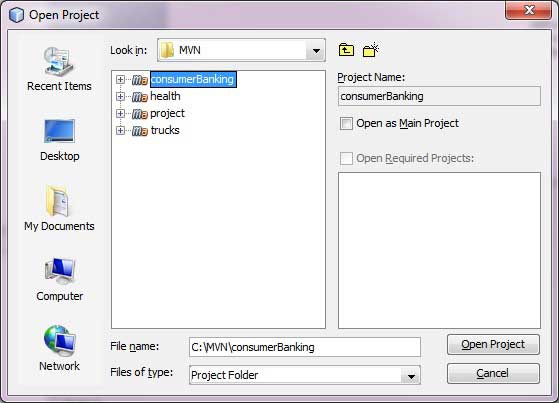
Choice File Menu > Open Project Option
Select the path to the project, that is, the storage path when you create a project using Maven. Suppose we create a project: consumerBanking. Pass through Maven 构建 Java 项目 See how to create a project using Maven.
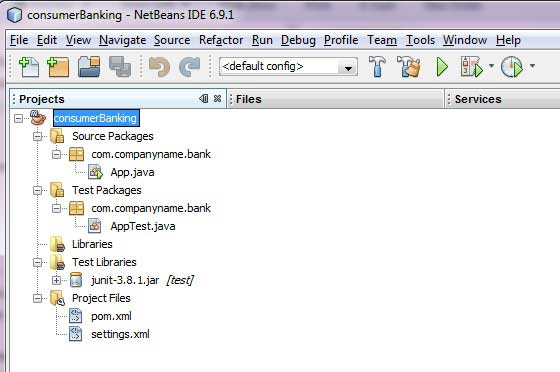
So far, you can see the Maven project in NetBeans. Take a look at Libraries and Test Libraries of the consumerBanking project. You can see that NetBeans has added everything that Maven depends on to its build path.
11.19.2. Build a Maven project in NetBeans 
All right, let’s use NetBeans’s compilation function to build this Maven project.
Right-click the consumerBanking project to open the context menu.
Select the “Clean and Build” option
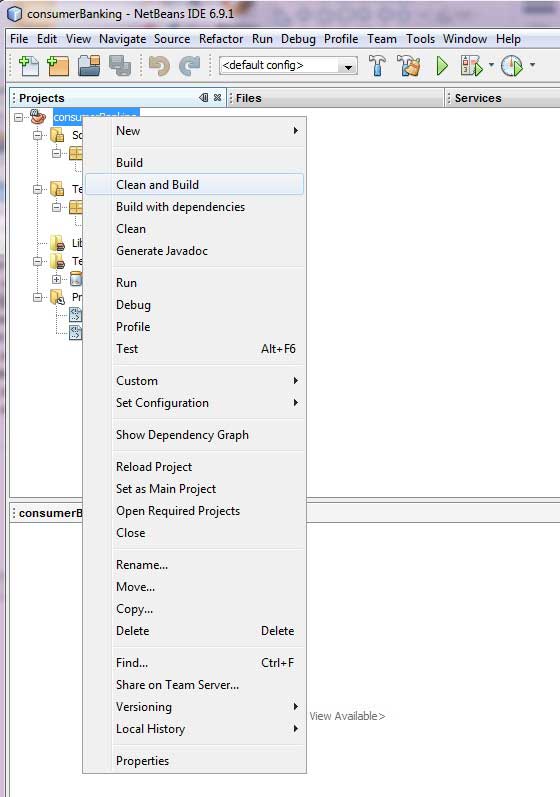
Maven will start building the project. You can view the output log information in the NetBeans terminal:
NetBeans: Executing 'mvn.bat -Dnetbeans.execution=true clean install'
NetBeans:      JAVA_HOME=C:\Program Files\Java\jdk1.6.0_21
Scanning for projects...
------------------------------------------------------------------------
Building consumerBanking
   task-segment: [clean, install]
------------------------------------------------------------------------
[clean:clean]
[resources:resources]
[WARNING] Using platform encoding (Cp1252 actually)
to copy filtered resources, i.e. build is platform dependent!
skip non existing resourceDirectory C:\MVN\consumerBanking\src\main\resources
[compiler:compile]
Compiling 2 source files to C:\MVN\consumerBanking\target\classes
[resources:testResources]
[WARNING] Using platform encoding (Cp1252 actually)
to copy filtered resources, i.e. build is platform dependent!
skip non existing resourceDirectory C:\MVN\consumerBanking\src\test\resources
[compiler:testCompile]
Compiling 1 source file to C:\MVN\consumerBanking\target\test-classes
[surefire:test]
Surefire report directory: C:\MVN\consumerBanking\target\surefire-reports

-------------------------------------------------------
 T E S T S
-------------------------------------------------------
Running com.companyname.bank.AppTest
Tests run: 1, Failures: 0, Errors: 0, Skipped: 0, Time elapsed: 0.023 sec

Results :

Tests run: 1, Failures: 0, Errors: 0, Skipped: 0

[jar:jar]
Building jar: C:\MVN\consumerBanking\target\consumerBanking-1.0-SNAPSHOT.jar
[install:install]
Installing C:\MVN\consumerBanking\target\consumerBanking-1.0-SNAPSHOT.jar
to C:\Users\GB3824\.m2\repository\com\companyname\bank\consumerBanking\
1.0-SNAPSHOT\consumerBanking-1.0-SNAPSHOT.jar
------------------------------------------------------------------------
BUILD SUCCESSFUL
------------------------------------------------------------------------
Total time: 9 seconds
Finished at: Thu Jul 19 12:57:28 IST 2012
Final Memory: 16M/85M
------------------------------------------------------------------------
11.19.3. Run the application in NetBeans 
Now, right-click the App.java file. Select the Run File option. You can see the following results on the terminal:
NetBeans: Executing 'mvn.bat -Dexec.classpathScope=runtime
-Dexec.args=-classpath %classpath com.companyname.bank.App
-Dexec.executable=C:\Program Files\Java\jdk1.6.0_21\bin\java.exe
-Dnetbeans.execution=true process-classes
org.codehaus.mojo:exec-maven-plugin:1.1.1:exec'
NetBeans:      JAVA_HOME=C:\Program Files\Java\jdk1.6.0_21
Scanning for projects...
------------------------------------------------------------------------
Building consumerBanking
   task-segment: [process-classes,
   org.codehaus.mojo:exec-maven-plugin:1.1.1:exec]
------------------------------------------------------------------------
[resources:resources]
[WARNING] Using platform encoding (Cp1252 actually)
to copy filtered resources, i.e. build is platform dependent!
skip non existing resourceDirectory C:\MVN\consumerBanking\src\main\resources
[compiler:compile]
Nothing to compile - all classes are up to date
[exec:exec]
Hello World!
------------------------------------------------------------------------
BUILD SUCCESSFUL
------------------------------------------------------------------------
Total time: 1 second
Finished at: Thu Jul 19 14:18:13 IST 2012
Final Memory: 7M/64M
------------------------------------------------------------------------