最近几年来,地理信息系统无论是在理论上还是应用上都处在一个飞速发展的阶段。 GIS被应用于多个领域的建模和决策支持,如城市管理、区划、环境整治等等,地理信息成为信息时代重要的组成部分之一; “数字地球”概念的提出,更进一步推动了作为其技术支撑的GIS的发展。 与此同时,一些学者致力于相关的理论研究,如空间感知、空间数据误差、空间关系的形式化等等。 这恰好说明了地理信息系统作为应用技术和学科的两个方面,并且这两个方面构成了相互促进的发展过程。
8.11.1. 3D conversion 
CSS3 allows you to use 3D transformations to format elements.
In this chapter, you will learn some of these 3D conversion methods:
rotateX()rotateY()
Click on the following elements to see the difference between 2D and 3D transformations:
2D rotate
3D rotate
8.11.2. Browser support 
The number in the table represents the first browser version number that supports the property.
The number immediately preceding -webkit- , -ms- , or -moz- is the first browser version number that supports the prefix attribute.
Attribute | |||||
|---|---|---|---|---|---|
Transform | 36.0 12.0-webkit- | 10.0 | 16.010.0-moz- | 4.0-webkit- | 23.0 15.0-webkit- |
Transform-origin (three-value syntax) | 36.0 12.0-webkit- | 10.0 | 16.010.0-moz- | 4.0-webkit- | 23.0 15.0-webkit- |
Transform-style | 36.0 12.0-webkit- | 11.0 | 16.010.0-moz- | 4.0-webkit- | 23.0 15.0-webkit- |
Perspective | 36.0 12.0-webkit- | 10.0 | 16.010.0-moz- | 4.0-webkit- | 23.0 15.0-webkit- |
Perspective-origin | 36.0 12.0-webkit- | 10.0 | 16.010.0-moz- | 4.0-webkit- | 23.0 15.0-webkit- |
Backface-visibility | 36.0 12.0-webkit- | 10.0 | 16.010.0-moz- | 4.0-webkit- | 23.0 15.0-webkit- |
8.11.3. rotateX() method 
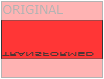
rotateX() method around which the element rotates on the X axis of a given degree.
Example
div { transform: rotateX(120deg); -webkit-transform: rotateX(120deg); /* Safari and Chrome */ } 8.11.4. rotateY() method 
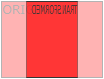
rotateY() method around which the element rotates on the Y axis of a given degree.
Example
div { transform: rotateY(130deg); -webkit-transform: rotateY(130deg); /* Safari and Chrome */ } 8.11.5. Conversion attribute 
The following table lists all the transformation properties:
Attribute | Description | CSS |
|---|---|---|
Transform | Apply a 2D or 3D transformation to an element. | 3 |
Transform-origin | Allows you to change the position of the converted element. | 3 |
Transform-style | Specifies how nested elements are displayed in 3D space. | 3 |
Perspective | Specifies the perspective of 3D elements. | 3 |
Perspective-origin | Specifies the bottom position of the 3D element. | 3 |
Backface-visibility | Defines whether the element is visible when not facing the screen. | 3 |
3D conversion method 
Function | Description |
|---|---|
Matrix3d (n ~ () ~ n ~ n | Define a 3D transformation, using a 16-value 4x4 matrix. |
N ~ (th). | |
Translate3d (xmeme yjinz) | Define 3D conversion. |
TranslateX (x) | Define 3D conversions, using only the values used for the X axis. |
TranslateY (y) | Define 3D conversions, using only the values used for the Y axis. |
TranslateZ (z) | Define 3D conversions, using only the values used for the Z axis. |
Scale3d (xmeme yjinz) | Define 3D scaling transformations. |
ScaleX (x) | Defines a 3D scaling transformation, given an X-axis value. |
ScaleY (y) | Defines a 3D scaling transformation, given a value of the Y axis. |
ScaleZ (z) | Defines a 3D scaling transformation, given a value of the Z axis. |
Rotate3d (xpencil ypencil angle) | Define 3D rotation. |
RotateX (angle) | Defines a 3D rotation along the X axis. |
RotateY (angle) | Defines the 3D rotation along the Y axis. |
RotateZ (angle) | Defines a 3D rotation along the Z axis. |
Perspective (n) | Defines a perspective view of a 3D transformation element. |