最近几年来,地理信息系统无论是在理论上还是应用上都处在一个飞速发展的阶段。 GIS被应用于多个领域的建模和决策支持,如城市管理、区划、环境整治等等,地理信息成为信息时代重要的组成部分之一; “数字地球”概念的提出,更进一步推动了作为其技术支撑的GIS的发展。 与此同时,一些学者致力于相关的理论研究,如空间感知、空间数据误差、空间关系的形式化等等。 这恰好说明了地理信息系统作为应用技术和学科的两个方面,并且这两个方面构成了相互促进的发展过程。
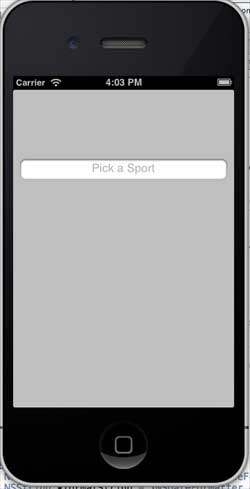
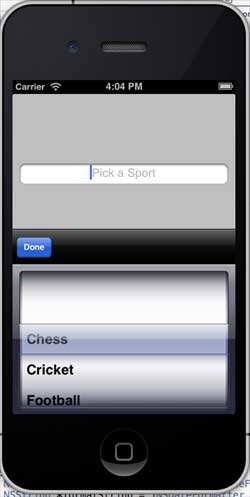
A selector is a scrollable view that selects values in a list item. Delegate DataSource We will add a text field, a selector view, and an array. 我们将采用UITextFieldDelegate、UIPickerViewDataSource、UIPickerViewDelegate的协议。ViewController.h文件代码如下所示: Modify the viewDidLoad in ViewController.m as follows: Now when we run the application, we will see the following output: The text selector view is shown below, and we can choose the value we need: 9.23.1. Important attribute 
An important method 
- (void)reloadAllComponents
- (void)reloadComponent:(NSInteger)component
- (NSInteger)selectedRowInComponent:(NSInteger)component
- (void)selectRow:(NSInteger)row inComponent:(NSInteger)component animated:(BOOL)animated
9.23.2. Modify ViewController.h 
#import Add a custom method addPickerView 
-(void)addPickerView{ pickerArray = [[NSArray alloc]initWithObjects:@"Chess", @"Cricket",@"Football",@"Tennis",@"Volleyball", nil]; myTextField = [[UITextField alloc]initWithFrame: CGRectMake(10, 100, 300, 30)]; myTextField.borderStyle = UITextBorderStyleRoundedRect; myTextField.textAlignment = UITextAlignmentCenter; myTextField.delegate = self; [self.view addSubview:myTextField]; [myTextField setPlaceholder:@"Pick a Sport"]; myPickerView = [[UIPickerView alloc]init]; myPickerView.dataSource = self; myPickerView.delegate = self; myPickerView.showsSelectionIndicator = YES; UIBarButtonItem *doneButton = [[UIBarButtonItem alloc] initWithTitle:@"Done" style:UIBarButtonItemStyleDone target:self action:@selector(done:)]; UIToolbar *toolBar = [[UIToolbar alloc]initWithFrame: CGRectMake(0, self.view.frame.size.height- myPickerView.frame.size.height-50, 320, 50)]; [toolBar setBarStyle:UIBarStyleBlackOpaque]; NSArray *toolbarItems = [NSArray arrayWithObjects: doneButton, nil]; [toolBar setItems:toolbarItems]; myTextField.inputView = myPickerView; myTextField.inputAccessoryView = toolBar; }
Perform the delegate, as follows: 
#pragma mark - Text field delegates -(void)textFieldDidBeginEditing:(UITextField *)textField{ if ([textField.text isEqualToString:@""]) { [self dateChanged:nil]; } } #pragma mark - Picker View Data source -(NSInteger)numberOfComponentsInPickerView:(UIPickerView *)pickerView{ return 1; } -(NSInteger)pickerView:(UIPickerView *)pickerView numberOfRowsInComponent:(NSInteger)component{ return [pickerArray count]; } #pragma mark- Picker View Delegate -(void)pickerView:(UIPickerView *)pickerView didSelectRow: (NSInteger)row inComponent:(NSInteger)component{ [myTextField setText:[pickerArray objectAtIndex:row]]; } - (NSString *)pickerView:(UIPickerView *)pickerView titleForRow: (NSInteger)row forComponent:(NSInteger)component{ return [pickerArray objectAtIndex:row]; }
(void)viewDidLoad { [super viewDidLoad]; [self addPickerView]; }
9.23.3. Output