最近几年来,地理信息系统无论是在理论上还是应用上都处在一个飞速发展的阶段。 GIS被应用于多个领域的建模和决策支持,如城市管理、区划、环境整治等等,地理信息成为信息时代重要的组成部分之一; “数字地球”概念的提出,更进一步推动了作为其技术支撑的GIS的发展。 与此同时,一些学者致力于相关的理论研究,如空间感知、空间数据误差、空间关系的形式化等等。 这恰好说明了地理信息系统作为应用技术和学科的两个方面,并且这两个方面构成了相互促进的发展过程。
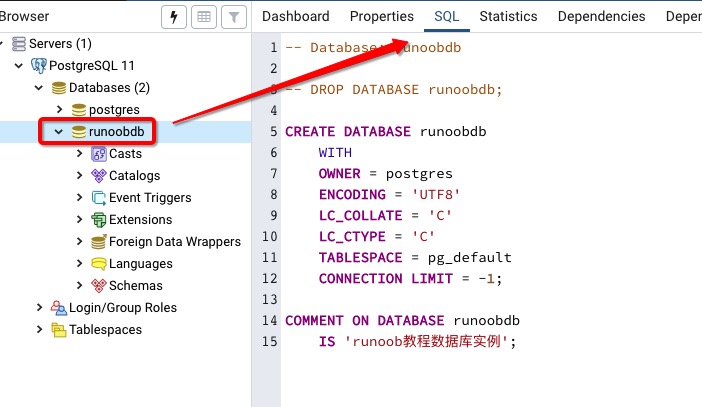
In the previous section, we talked about how to create a database, and then we discussed how to select the database we created. In the PostgreSQL command window, we can enter the SQL statement at the command prompt: Usel to view existing databases: Next we can usec + database name to enter the database: From the command line of the system, we can add the database name after the connection to the database to select the database: The pgAdmin tool is easier. Just click on the database to select it. You can also view some additional information about the database: 5.8.1. The command window of the database 
postgres=#
postgres=# \l List of databases Name | Owner | Encoding | Collate | Ctype | Access privileges -----------+----------+----------+---------+-------+----------------------- postgres | postgres | UTF8 | C | C | runoobdb | postgres | UTF8 | C | C | template0 | postgres | UTF8 | C | C | =c/postgres + | | | | | postgres=CTc/postgres template1 | postgres | UTF8 | C | C | =c/postgres + | | | | | postgres=CTc/postgres (4 rows)
postgres=# \c runoobdb You are now connected to database "runoobdb" as user "postgres". runoobdb=#
5.8.2. System command line window 
$ psql -h localhost -p 5432 -U postgres runoobdb Password for user postgres: **** psql (11.3) Type "help" for help. You are now connected to database "runoobdb" as user "postgres". runoobdb=#
5.8.3. PgAdmin tool