最近几年来,地理信息系统无论是在理论上还是应用上都处在一个飞速发展的阶段。 GIS被应用于多个领域的建模和决策支持,如城市管理、区划、环境整治等等,地理信息成为信息时代重要的组成部分之一; “数字地球”概念的提出,更进一步推动了作为其技术支撑的GIS的发展。 与此同时,一些学者致力于相关的理论研究,如空间感知、空间数据误差、空间关系的形式化等等。 这恰好说明了地理信息系统作为应用技术和学科的两个方面,并且这两个方面构成了相互促进的发展过程。
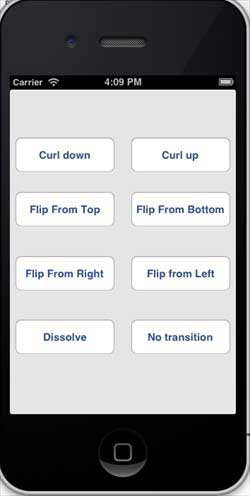
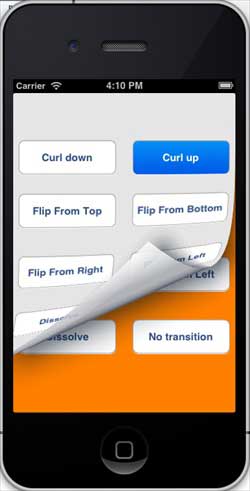
View switching is achieved through a series of animation effects, including folding switching, explosion switching, card switching, and so on. The operation of creating a button in xib Declare instances of the two views in the ViewController class. The ViewController.h file code is as follows: We will add a custom method setUpView to initialize the view. We will also create another method, doTransitionWithType: implement view1 to switch to view2, and vice versa. Later, we will perform the method of the operation created earlier, that is, call the doTransitionWithType: method and switch types. The ViewController.m code is as follows: Now when we run the application, we will see the following output You can select different buttons to see how the switch works. Select the curl switch and the effect is as follows 9.22.1. Modify the ViewController.xib as follows 
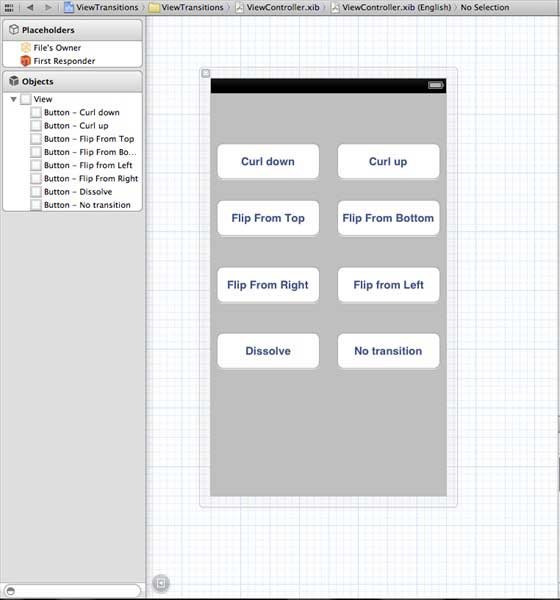
Modify ViewController.h 
#import 9.22.2. Modify ViewController.m 
#import "ViewController.h" @interface ViewController () @end @implementation ViewController - (void)viewDidLoad { [super viewDidLoad]; [self setUpView]; // Do any additional setup after loading the view, typically from a nib. } -(void)setUpView{ view1 = [[UIView alloc]initWithFrame:self.view.frame]; view1.backgroundColor = [UIColor lightTextColor]; view2 = [[UIView alloc]initWithFrame:self.view.frame]; view2.backgroundColor = [UIColor orangeColor]; [self.view addSubview:view1]; [self.view sendSubviewToBack:view1]; } -(void)doTransitionWithType:(UIViewAnimationTransition)animationTransitionType{ if ([[self.view subviews] containsObject:view2 ]) { [UIView transitionFromView:view2 toView:view1 duration:2 options:animationTransitionType completion:^(BOOL finished){ [view2 removeFromSuperview]; }]; [self.view addSubview:view1]; [self.view sendSubviewToBack:view1]; } else{ [UIView transitionFromView:view1 toView:view2 duration:2 options:animationTransitionType completion:^(BOOL finished){ [view1 removeFromSuperview]; }]; [self.view addSubview:view2]; [self.view sendSubviewToBack:view2]; } } -(IBAction)flipFromLeft:(id)sender { [self doTransitionWithType:UIViewAnimationOptionTransitionFlipFromLeft]; } -(IBAction)flipFromRight:(id)sender{ [self doTransitionWithType:UIViewAnimationOptionTransitionFlipFromRight]; } -(IBAction)flipFromTop:(id)sender{ [self doTransitionWithType:UIViewAnimationOptionTransitionFlipFromTop]; } -(IBAction)flipFromBottom:(id)sender{ [self doTransitionWithType:UIViewAnimationOptionTransitionFlipFromBottom]; } -(IBAction)curlUp:(id)sender{ [self doTransitionWithType:UIViewAnimationOptionTransitionCurlUp]; } -(IBAction)curlDown:(id)sender{ [self doTransitionWithType:UIViewAnimationOptionTransitionCurlDown]; } -(IBAction)dissolve:(id)sender{ [self doTransitionWithType:UIViewAnimationOptionTransitionCrossDissolve]; } -(IBAction)noTransition:(id)sender{ [self doTransitionWithType:UIViewAnimationOptionTransitionNone]; } - (void)didReceiveMemoryWarning { [super didReceiveMemoryWarning]; // Dispose of any resources that can be recreated. } @end
9.22.3. Output