最近几年来,地理信息系统无论是在理论上还是应用上都处在一个飞速发展的阶段。 GIS被应用于多个领域的建模和决策支持,如城市管理、区划、环境整治等等,地理信息成为信息时代重要的组成部分之一; “数字地球”概念的提出,更进一步推动了作为其技术支撑的GIS的发展。 与此同时,一些学者致力于相关的理论研究,如空间感知、空间数据误差、空间关系的形式化等等。 这恰好说明了地理信息系统作为应用技术和学科的两个方面,并且这两个方面构成了相互促进的发展过程。
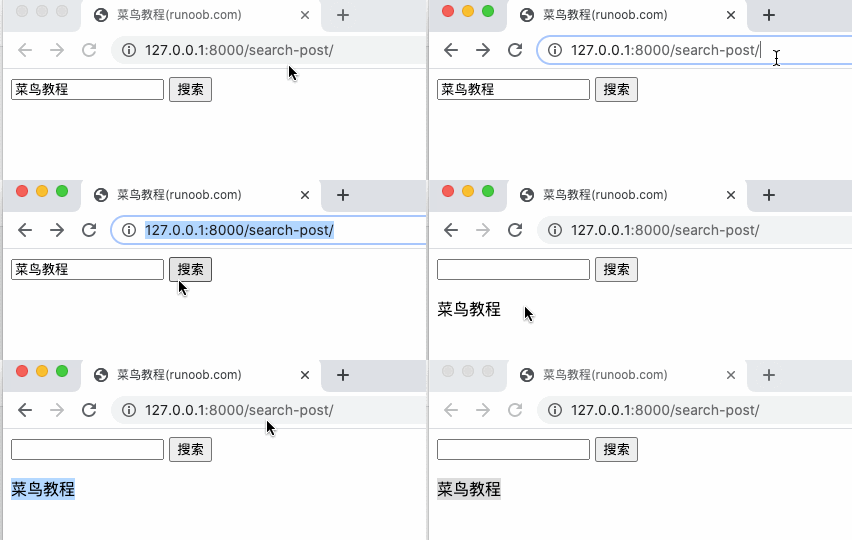
HTML forms are a classic way to interact with a website. This chapter describes how to use Django to process form data submitted by users. The HTTP protocol works in a request-reply manner. When a customer sends a request, data can be attached to the request. By parsing the request, the server can get the data sent by the customer and provide specific services according to the URL. We created a search.py file in the previous project to receive user requests: Add the search_form.html form to the template directory templates: The urls.py rule is modified to the following form: Access address http://127.0.0.1:8000/search-form/ And search, the results are as follows: We used the GET method above. View display and request processing are divided into two functions. The POST method is more commonly used when submitting data. Let’s use this method and use a URL and handler to display the view and process the request at the same time. We create a post.html in templates: {{ rlt }} At the end of the template, we add a rlt token to reserve a place for the table processing result. There is a label at the end of the table for {% csrf_token%}. Csrf’s full name is Cross Site Request Forgery. This is a feature provided by Django to prevent masquerading requests from being submitted. The form submitted by the POST method must have this label. Create a new search2.py file in the HelloWorld directory and use the search_post function to process the POST request: The urls.py rule is modified to the following form: Visit http://127.0.0.1:8000/search-post/ The display results are as follows: After completing the above example, our directory structure is as follows: The first argument to each view function is a HttpRequest object, like the following runoob () function: The HttpRequest object contains some information about the current request URL: Attribute Description Path The full path to the request page, excluding the domain name-for example Method A string representation of the HTTP method used in the request. All uppercase means. For example: GET A class dictionary object that contains all HTTP GET parameters. See the QueryDict documentation. POST A class dictionary object that contains all HTTP POST parameters. See the QueryDict documentation. It is also possible that the server receives an empty POST request. That is, the form form submits the request through the HTTP POST method, but there can be no data in the form. Therefore, you cannot use statements Note: POST does not include REQUEST For convenience, this attribute is a collection of POST and GET attributes, but with particularity, look for the POST attribute first, and then the GET attribute. Draw lessons from For example, if GET and POST is strongly recommended because these two attributes are more explicit and the written code is easier to understand. COOKIES A standard Python dictionary object that contains all cookies. Both Keys and values are strings. FILES Contains class dictionary objects for all uploaded files. Every Key in FILES is Filename: upload file name, represented by Python string Content-type: Content type for uploading files Content: the original content of the uploaded file Note: only if the request method is POST and < form > has META A dictionary containing all available HTTP header information. For example: CONTENT_LENGTH CONTENT_TYPE QUERY_STRING: unparsed original query string REMOTE_ADDR: client IP address REMOTE_HOST: client hostname SERVER_NAME: server hostname SERVER_PORT: server port These headers in META are prefixed. HTTP_ACCEPT_ENCODING HTTP_ACCEPT_LANGUAGE HTTP_HOST: HTTP host header information sent by the customer HTTP_REFERER: referring page HTTP_USER_AGENT: client’s user-agent string HTTP_X_BENDER: X-Bender header information User If the visiting user is not currently logged in, the user will be initialized to You can tell whether a user is logged in or not through the is_authenticated () method of user: This property is available only when AuthenticationMiddleware in Django is activated 7.7.1. HTTP request 
7.7.2. GET method 
/ HelloWorld/HelloWorld/search.py file code: 
fromdjango.httpimportHttpResponsefromdjango.shortcutsimportrender# 表单defsearch_form(request):returnrender(request,'search_form.html')# 接收请求数据defsearch(request):request.encoding='utf-8'if'q'inrequest.GETandrequest.GET['q']:message='你搜索的内容为:'+request.GET['q']else:message='你提交了空表单'returnHttpResponse(message)
/ HelloWorld/templates/search_form.html file code: 
/ HelloWorld/HelloWorld/urls.py file code: 
fromdjango.conf.urlsimporturlfrom.importviews,testdb,searchurlpatterns=[url(r'^hello/$',views.runoob),url(r'^testdb/$',testdb.testdb),url(r'^search-form/$',search.search_form),url(r'^search/$',search.search),]
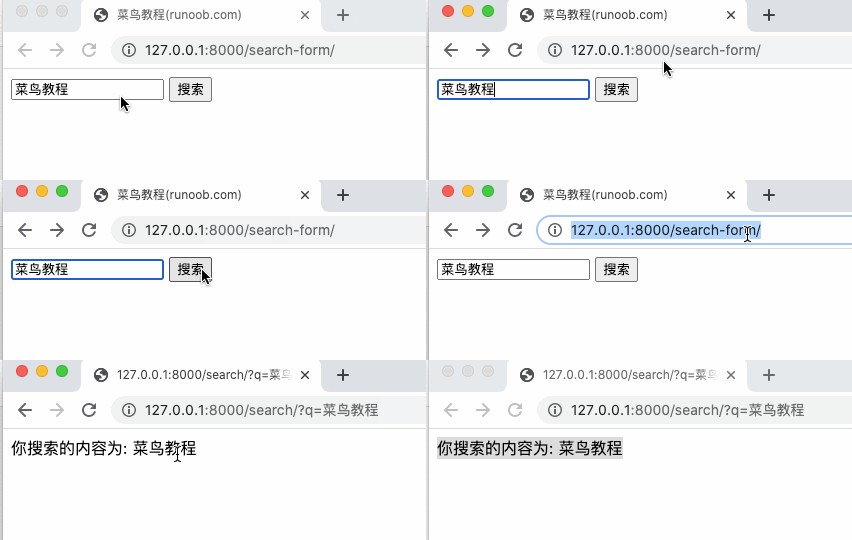
7.7.3. POST method 
/ HelloWorld/templates/post.html file code: 
/ HelloWorld/HelloWorld/search2.py file code: 
# -*- coding: utf-8 -*-fromdjango.shortcutsimportrenderfromdjango.views.decoratorsimportcsrf# 接收POST请求数据defsearch_post(request):ctx={}ifrequest.POST:ctx['rlt']=request.POST['q']returnrender(request,"post.html",ctx)
/ HelloWorld/HelloWorld/urls.py file code: 
fromdjango.conf.urlsimporturlfrom.importviews,testdb,search,search2urlpatterns=[url(r'^hello/$',views.hello),url(r'^testdb/$',testdb.testdb),url(r'^search-form/$',search.search_form),url(r'^search/$',search.search),url(r'^search-post/$',search2.search_post),]
HelloWorld |-- HelloWorld | |-- __init__.py | |-- __init__.pyc | |-- search.py | |-- search.pyc | |-- search2.py | |-- search2.pyc | |-- settings.py | |-- settings.pyc | |-- testdb.py | |-- testdb.pyc | |-- urls.py | |-- urls.pyc | |-- views.py | |-- views.pyc | |-- wsgi.py | `-- wsgi.pyc |-- TestModel | |-- __init__.py | |-- __init__.pyc | |-- admin.py | |-- admin.pyc | |-- apps.py | |-- migrations | | |-- 0001_initial.py | | |-- 0001_initial.pyc | | |-- __init__.py | | `-- __init__.pyc | |-- models.py | |-- models.pyc | |-- tests.py | `-- views.py |-- db.sqlite3 |-- manage.py `-- templates |-- base.html |-- hello.html |-- post.html `-- search_form.html
7.7.4. Request object 
from django.http import HttpResponse def runoob(request): return HttpResponse("Hello world")
"/hello/" . if request.method == 'GET': do_something() elif request.method == 'POST': do_something_else()
if request.POST To determine whether to use the HTTP POST method; you should use the if request.method == "POST" (see the method property of this table). file-upload information. See FILES property. PHP's $_REQUEST . GET = {"name": "john"} And POST = {"age": '34'} , then REQUEST["name"] The value of "john", REQUEST["age"] The value is 34. type="file" name="" /> The value of the name attribute in the tag. Each value in FILES is also a standard Python dictionary object that contains the following three Keys:
enctype="multipart/form-data" The FILES owns the data only when the. Otherwise, FILES is an empty dictionary.
HTTP_ Is Key, followed by Value after the colon (:), for example:
django.contrib.auth.models.AnonymousUser An example of. if request.user.is_authenticated(): # Do something for logged-in users. else: # Do something for anonymous users.