最近几年来,地理信息系统无论是在理论上还是应用上都处在一个飞速发展的阶段。 GIS被应用于多个领域的建模和决策支持,如城市管理、区划、环境整治等等,地理信息成为信息时代重要的组成部分之一; “数字地球”概念的提出,更进一步推动了作为其技术支撑的GIS的发展。 与此同时,一些学者致力于相关的理论研究,如空间感知、空间数据误差、空间关系的形式化等等。 这恰好说明了地理信息系统作为应用技术和学科的两个方面,并且这两个方面构成了相互促进的发展过程。
2.22.1. Install the PHP image 
Method 1. Docker pull php 
Find Docker Hub Php image on:
` <../wp-content/uploads/2016/06/0D34717D-1D07-4655-8559-A8661BCB4A3D.jpg>` __
You can view other versions of php through Sort by. The default is the latest version. php:latest .
In addition, we can use the docker search php command to view the available versions:
runoob@runoob:~/php-fpm$ docker search php NAME DESCRIPTION STARS OFFICIAL AUTOMATED php While designed for web development, the PH... 1232 [OK] richarvey/nginx-php-fpm Container running Nginx + PHP-FPM capable ... 207 [OK] phpmyadmin/phpmyadmin A web interface for MySQL and MariaDB. 123 [OK] eboraas/apache-php PHP5 on Apache (with SSL support), built o... 69 [OK] php-zendserver Zend Server - the integrated PHP applicati... 69 [OK] million12/nginx-php Nginx + PHP-FPM 5.5, 5.6, 7.0 (NG), CentOS... 67 [OK] webdevops/php-nginx Nginx with PHP-FPM 39 [OK] webdevops/php-apache Apache with PHP-FPM (based on webdevops/php) 14 [OK] phpunit/phpunit PHPUnit is a programmer-oriented testing f... 14 [OK] tetraweb/php PHP 5.3, 5.4, 5.5, 5.6, 7.0 for CI and run... 12 [OK] webdevops/php PHP (FPM and CLI) service container 10 [OK] ... Here we pull the official image, labeled 5.6-fpm
runoob@runoob:~/php-fpm$ docker pull php:5.6-fpm After waiting for the download to be completed, we can look up the image whose REPOSITORY is php and labeled 5.6-fpm in the list of local images.
runoob@runoob:~/php-fpm$ docker images REPOSITORY TAG IMAGE ID CREATED SIZE php 5.6-fpm 025041cd3aa5 6 days ago 456.3 MB 2.22.2. Nginx + PHP deployment 
Nginx deployments can be viewed: Docker 安装 Nginx Some configuration of Nginx refer to this article.
Start PHP:
$ docker run --name myphp-fpm -v ~/nginx/www:/www -d php:5.6-fpm Command description:
–name myphp-fpm Name the container myphp-fpm
-v ~/nginx/www:/www Mount the directory www of the project in the host to the / www of the container
Create a ~ / nginx/conf/conf.d directory:
mkdir ~/nginx/conf/conf.d Add under this directory ~/nginx/conf/conf.d/runoob-test-php.conf File, the contents are as follows:
server { listen 80; server_name localhost; location / { root /usr/share/nginx/html; index index.html index.htm index.php; } error_page 500 502 503 504 /50x.html; location = /50x.html { root /usr/share/nginx/html; } location ~ \.php$ { fastcgi_pass php:9000; fastcgi_index index.php; fastcgi_param SCRIPT_FILENAME /www/$fastcgi_script_name; include fastcgi_params; } } Profile description:
php:9000 Represents the URL of the php-fpm service, which we will explain in detail below.
/www/ : yes myphp-fpm The storage path of the php file in, mapped to the local ~ / nginx/www directory.
Start nginx:
docker run --name runoob-php-nginx -p 8083:80 -d \ -v ~/nginx/www:/usr/share/nginx/html:ro \ -v ~/nginx/conf/conf.d:/etc/nginx/conf.d:ro \ --link myphp-fpm:php \ nginx -p 8083:80 Port mapping, putting nginx 80 in is mapped to local port 8083.
~/nginx/www : is the directory where local html files are stored, and / usr/share/nginx/html is the directory where html files are stored in the container.
~/nginx/conf/conf.d : is the storage directory of the local nginx configuration files, and / etc/nginx/conf.d is the storage directory of the nginx configuration files in the container.
–link myphp-fpm:php : put myphp-fpm Network integration of nginx And by modifying the nginx / etc/hosts, put the domain name php Map to 127.0.0.1, allowing nginx to access php-fpm through php:9000.
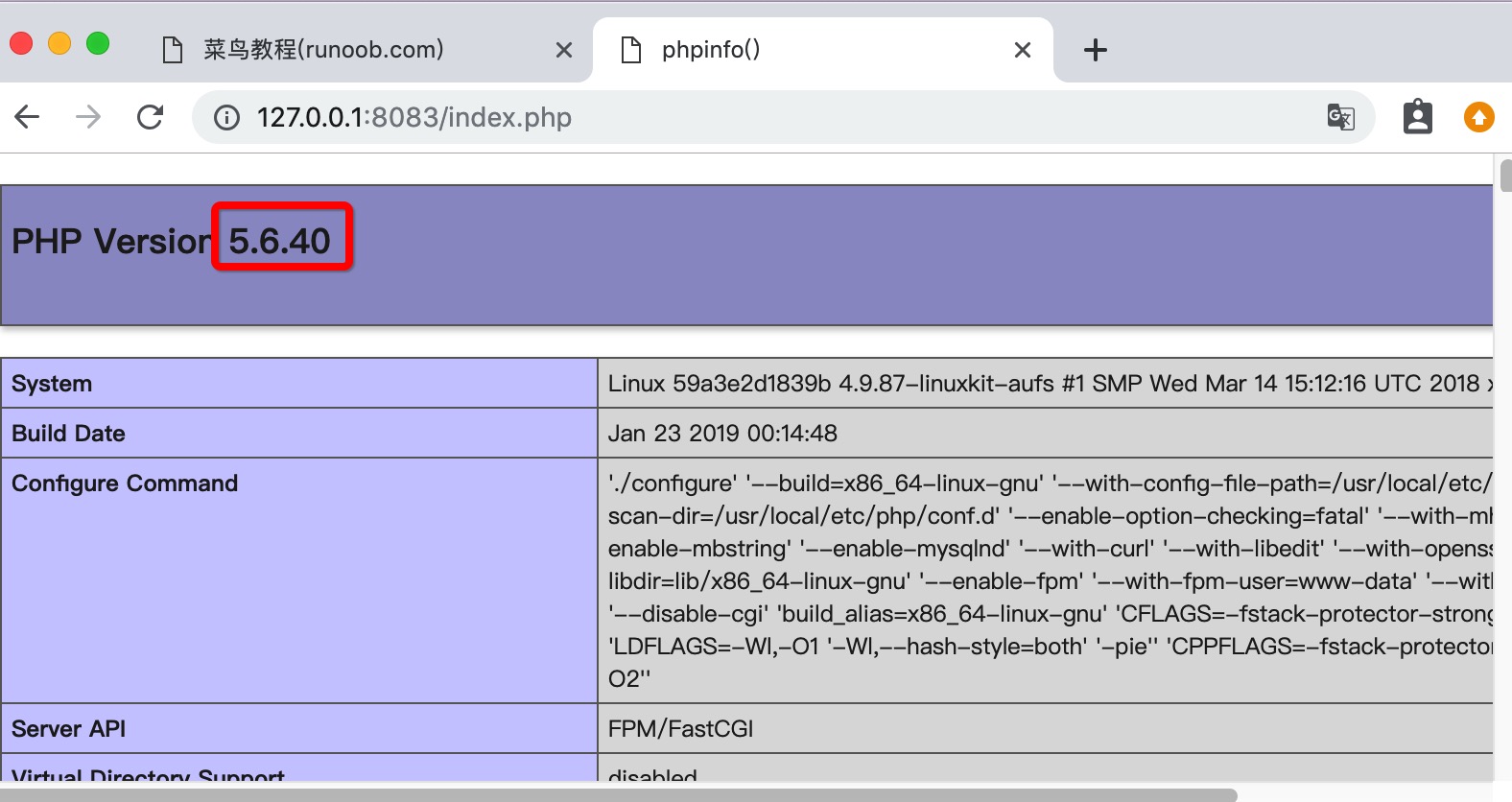
Next, we create an index.php under the ~ / nginx/www directory, as follows:
Browser open http://127.0.0.1:8083/index.php Which is shown as follows: