最近几年来,地理信息系统无论是在理论上还是应用上都处在一个飞速发展的阶段。 GIS被应用于多个领域的建模和决策支持,如城市管理、区划、环境整治等等,地理信息成为信息时代重要的组成部分之一; “数字地球”概念的提出,更进一步推动了作为其技术支撑的GIS的发展。 与此同时,一些学者致力于相关的理论研究,如空间感知、空间数据误差、空间关系的形式化等等。 这恰好说明了地理信息系统作为应用技术和学科的两个方面,并且这两个方面构成了相互促进的发展过程。
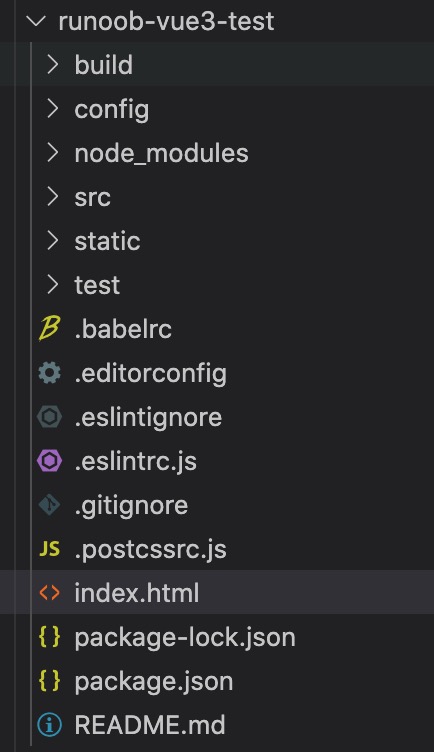
In the previous chapter, we used npm for the installation project (Vue-cli and Vite), we open the directory in IDE (Vscode, Atom, etc.) with the following structure:
Command line tool vue-cli (runoob-vue3-test):
Vite(runoob-vue3-test2)
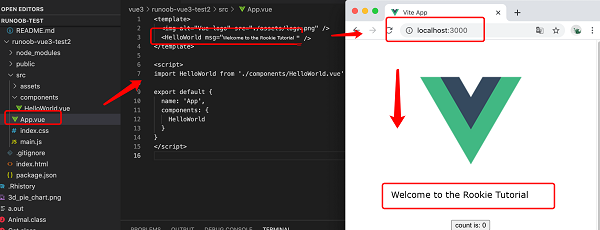
Directory / file Description Project build (webpack) related code Configure the directory, including the port number, etc. We can use the default for beginners. Project dependency modules loaded by npm Here is the directory we are going to develop, and basically everything we need to do is in this directory. It contains several directories and files: Assets: place some pictures, such as logo, etc. Components: there is a component file in the directory, but you don’t need it. App.vue: the projectentry file, or we can write the components directly here instead of using the components directory. Main.js: the core file of the project. Index.css: style file. Static resource directory, such as pictures, fonts, etc. Common resource directory. Initial test directory, which can be deleted These are some configuration files, including syntax configuration, git configuration, etc. Home entry file, you can add some meta information or statistical code and so on. Project profile. Project description document in markup format Using? NPM run build? The directory will be generated after the command is packaged. Next, take runoob-vue3-test2 as an example, open the Next, we can try to modify the initialized project by changing Open the page http://localhost:3000/ , which is automatically refreshed aftermodification, and the display effect is as follows: 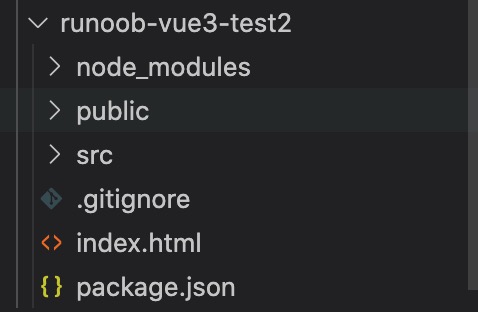
2.5.1. Directory parsing 
build config node_modules src static public test .xxxx文件 index.html package.json README.md dist src/APP.vue file, the code is as follows (explained in comments): src/APP.vue file code 

src/APP.vue to the following code:
src/APP.vue file code ¶ <template> <img alt="Vue logo" src="./assets/logo.png" /> <HelloWorld msg="Welcome to the Rookie Tutorial!" /> template> <script> import HelloWorld from './components/HelloWorld.vue' export default { name: 'App', components: { HelloWorld } } script>