Perl array is a list variable that stores scalar values, and variables can be of different types.
Array variables to The $symbol in the program usesto escape and let him output as is. Execute the above program, and the output is as follows: Array variables to The second array uses the You can also assign values to the array by index, as follows: Access array elements using the Execute the above program, and the output is as follows: The array index value starts at 0, that is, 0 is the first element, 1 is thesecond element, and so on. Negative numbers are read from the reverse, with-1 as the first element and-2 as the second element Execute the above program, and the output is as follows: The array size is determined by the scalar context in the array: Execute the above program, and the output is as follows: The array length returns the physical size of the array, not the number of elements. We can look at the following example: Execute the above program, and the output is as follows: As you can see from the output, there are only four array elements, but the array size is 51. If you have no previous programming experience, you may ask what a function is, but what we used before The following table lists the common operation functions in the array: Serial number Type and description 1 Push @ ARRAY, LIST puts the values of the list at the end of the array 2 Pop @ ARRAY deletes the last value of the array 3 Shift @ ARRAY pops up the first value of the array and returns it. The indexvalue of the array also decreases by one in turn. 4 Unshift @ ARRAY, LIST puts the list in front of the array and returns the number of elements of the new array. Execute the above program, and the output is as follows: We can cut an array and return the new array after cutting: Execute the above program, and the output is as follows: The array index needs to specify valid index values, which can be positive followed by negative numbers, each separated by a comma. If it is a continuous index, you can use the Execute the above program, and the output is as follows: Parameter description: The following example replaces five elements in the array starting with the sixth element: Execute the above program, and the output is as follows: Parameter description: Execute the above program, and the output is as follows: Parameter description: Execute the above program, and the output is as follows: Parameter description: Execute the above program, and the output is as follows: Note: array sorting is based on the Special variable Execute the above program, and the output is as follows: In general, we do not recommend using special variables. The elements of the array are divided by commas, or we can use commas to merge the arrays, as follows: Execute the above program, and the output is as follows: You can also embed multiple arrays in an array and merge them into the main array: Execute the above program, and the output is as follows: A list can be used as an array, and specifying an index value after the list reads the specified element, as follows: Execute the above program, and the output is as follows: We can also use it in an array Execute the above program, and the output is as follows: @ beginning. Access array elements using the $ + Variable name+[index value] format. Examples are as follows: 5.8.1. Example #
#!/usr/bin/perl@hits=(25,30,40);@names=("google","runoob","taobao");print"\\$hits[0] =$hits[0]\\n";print"\\$hits[1] =$hits[1]\\n";print"\\$hits[2] =$hits[2]\\n";print"\\$names[0] =$names[0]\\n";print"\\$names[1] =$names[1]\\n";print"\\$names[2] =$names[2]\\n"; $hits[0] = 25 $hits[1] = 30 $hits[2] = 40 $names[0] = google $names[1] = runoob $names[2] = taobao
Create an array #
@ start with the symbol, and the element is placed in parentheses, or you can start with qw start defining the array.@array = (1, 2, 'Hello'); @array = qw/This is an array/;
qw// operator that returns a list of strings,with array elements separated by spaces. of course, you can also use multiple rows to define an array:@days = qw/google taobao ... runoob/;
$array[0] = 'Monday'; ... $array[6] = 'Sunday';
Access array elements #
$ +Variable name+[index value] format. Examples are as follows: 5.8.2. Example #
@sites=qw/google taobao runoob/;print"$sites[0]\\n";print"$sites[1]\\n";print"$sites[2]\\n";print"$sites[-1]\\n";# Negative number, reverse read
google taobao runoob runoob
Array serial number #
Perl provides an array form that can be output by sequence, in the format of the starting value + .. + end value. An example is as follows: 5.8.3. Example #
#!/usr/bin/perl@var_10=(1..10);@var_20=(10..20);@var_abc=('a'..'z');print"@var_10\\n";# Output 1 to 10print "@ var_20 n"# Output 10 to 20print "@ var_abc n"# Output a to z
1 2 3 4 5 6 7 8 9 10 10 11 12 13 14 15 16 17 18 19 20 a b c d e f g h i j k l m n o p q r s t u v w x y z
Array size #
5.8.4. Example #
@array=(1,2,3);print"Array Size:",scalar@array,"\\n";
Array Size: 3
5.8.5. Example #
#!/uer/bin/perl@array=(1,2,3);$array[50]=4;$size=@array;$max_index=$#array;print" Array Size:$size\\n";print"Maximum Index:$max_index\\n";
Array size: 51 Maximum index: 50
Add and remove array elements #
Perl provides some useful functions to add and remove array elements. print that is, an output function. 5.8.6. Example #
#/ Usr/bin/perl# Create a simple array @ sites=("Google", "runoob", "taobao")$ New_ Size=@ sites; Print "1. @ sites =@ sites n "." Original array length: $new_ Size n "# Add an element $new to the end of the array_ Size=push (@ sites, "baidu"); Print "2. @ sites= @Sites n "." New array length: $new_ Size n "# Add an element $new at the beginning of the array_ Size=unshift (@ sites, "weibo"); Print "3. @ sites =@ sites n "." New array length: $new_ Size n "# Delete element $new at the end of the array_ Byte=pop (@ sites); Print "4. @ sites= @The pop-up element for sites n "." is: $new_ Byte n "# Remove element $new at the beginning of the array_ Byte=shift (@ sites); Print "5. @ sites= @The pop-up element for sites n "." is: $new_ Byte n "; 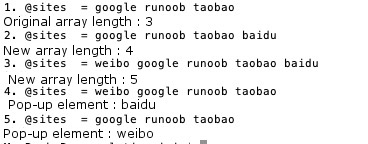
Cut array #
5.8.7. Example #
#!/usr/bin/perl@sites=qw/google taobao runoob weibo qq facebook NetEase/;@sites2=@sites[3,4,5];print"@sites2\\n";
weibo qq facebook
.. to represent the specified range: 5.8.8. Example #
#!/usr/bin/perl@sites=qw/google taobao runoob weibo qq facebook NetEase/;@sites2=@sites[3..5];print"@sites2\\n";
weibo qq facebook
Replace array elements #
Perl substitution of array elements in the splice() function, the syntax format is as follows:splice @ARRAY, OFFSET [ , LENGTH [ , LIST ] ]
@ARRAY : The array to replace OFFSET :Starting position LENGTH : The number of elements to replace LIST : Replace the list of elements 5.8.9. Example #
#!/usr/bin/perl@nums=(1..20);print"Before replacement - @nums\\n";splice(@nums,5,5,21..25);print"After replacement - @nums\\n";
Before replacement - 1 2 3 4 5 6 7 8 9 10 11 12 13 14 15 16 17 18 19 20 After replacement - 1 2 3 4 5 21 22 23 24 25 11 12 13 14 15 16 17 18 19 20
Convert a string to an array #
Perl to convert a string to an array in the split() function, the syntax format is as follows:split [ PATTERN [ , EXPR [ , LIMIT ] ] ]
PATTERN : Delimiter, which defaults to a space EXPR :Specifies the number of strings LIMIT : If this parameter is specified, the number of elements of the array is returned 5.8.10. Example #
#/ Usr/bin/perl# Define string $var_ Test="runoob"$ Var_ String="www runoob com"$ Var_ Names="Google, Taobao, runoob, Weibo"# Convert the string to an array @ test=split ('', $var_test)@ String=split ('-', $var_string)@ Names=split (',', $var_names); Print "$test [3] n"# Output oprint "$string [2] n"# Output compile '$names [3] n'# Output Weibo o com weibo
Convert an array to a string #
Perl to convert an array to a string in the join() function, the syntax format is as follows:join EXPR, LIST
EXPR : Connector. LIST :List or array 5.8.11. Example #
#/ Usr/bin/perl# Define string $var_ String="www runoob com"$ Var_ Names="Google, Taobao, runoob, Weibo"# Convert the string to an array @ string=split ('-', $var_string)@ Names=split (',', $var_names)# Convert the array to the string $string1=join ('-', @ string)$ String2=join (',', @ names); Print "$string1 n"; Print "$string2 n"; www-runoob-com google,taobao,runoob,weibo
Array sorting #
Perl array sorting in the use of sort() function, the syntax formatis as follows:sort [ SUBROUTINE ] LIST
SUBROUTINE :Specify a rule LIST :List or array 5.8.12. Example #
#/ Usr/bin/perl # Define array @ sites=qw (Google Taobao runoob Facebook; Print "Before sorting: @ sites n"# Sort the array @ sites=sort (@ sites); Print "After sorting: @ sites n";
Before sorting: google taobao runoob facebook After sorting: facebook google runoob taobao
ASCII sort by numeric values. So when we sort the array, it’s best to convert each element to lowercase before sorting.Special variable: $[ #
$[ represents the first index value of the array, which is usually 0, if we set the $[ set to 1, the first index value ofthe array is 1, the second is 2, and so on. Examples are as follows: 5.8.13. Example #
#/ Usr/bin/perl # Define array @ sites=qw (Google Taobao runoob Facebook; Print "Website: @ sites n"# Set the first index of the array to 1 $[=1; print " @ sites [1]: $sites [1] n"; Print " @ sites [2]: $sites [2] n";
website: google taobao runoob facebook @sites[1]: google @sites[2]: taobao
$[ in the new version of Perl, this variable is obsolete.Merge array #
5.8.14. Example #
#!/usr/bin/perl@numbers=(1,3,(4,5,6));print"numbers = @numbers\\n"; numbers = 1 3 4 5 6
5.8.15. Example #
#!/usr/bin/perl@odd=(1,3,5);@even=(2,4,6);@numbers=(@odd,@even);print"numbers = @numbers\\n";
numbers = 1 3 5 2 4 6
Select an element from the list #
5.8.16. Example #
#!/usr/bin/perl$var=(5,4,3,2,1)[4];print"var's value =$var\\n" var's value = 1
.. to read the specified range of elements: 5.8.17. Example #
#!/usr/bin/perl@list=(5,4,3,2,1)[1..3];print"list's value = @list\\n"; list's value = 4 3 2