We can install Bootstrap5 in two ways:
Use Bootstrap5 CDN.
From the official website getbootstrap.com download Bootstrap 5.
Libraries on Staticfile CDN are recommended in China: Bootstrap5 CDN Note: Bootstrap5 CDN In addition, you can use the following CDN services: Domestic recommended use: https://www.staticfile.org/ Internationally recommended: https://cdnjs.com/ You can download the Bootstrap5 repository from the official website https://getbootstrap.com/ . Note: in addition, you can also install it through the package management tools npm, yarn, gem, composer, etc. Bootstrap requires the use of the HTML5 file type, so you need to add a HTML5 doctype declaration. HTML5 doctype declares in the document header and sets the corresponding encoding: To make the website developed by Bootstrap friendly to mobile devices and ensure proper rendering and touchscreen scaling, you need to add a viewport meta tag to the head of the web page, as shown below: Bootstrap 5 requires a container element to wrap the content of the site. We can use the following two container classes: Bootstrap5 The following example shows a container that occupies all viewports (viewport). Bootstrap5
In recent years, Geographic Information Systems (GIS) have undergone rapid development in both theoretical and practical dimensions. GIS has been widely applied for modeling and decision-making support across various fields such as urban management, regional planning, and environmental remediation, establishing geographic information as a vital component of the information era. The introduction of the “Digital Earth” concept has further accelerated the advancement of GIS, which serves as its technical foundation. Concurrently, scholars have been dedicated to theoretical research in areas like spatial cognition, spatial data uncertainty, and the formalization of spatial relationships. This reflects the dual nature of GIS as both an applied technology and an academic discipline, with the two aspects forming a mutually reinforcing cycle of progress. 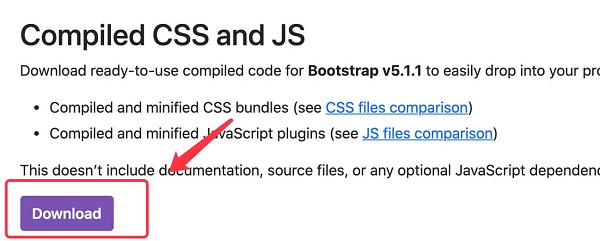
7.2.1. Bootstrap 5 CDN 
popper.min.js used to set pop-up windows, prompts, and drop-down menus. bootstrap.bundle.js (uncompressed version) or bootstrap.bundle.min.js (compressed version) contains bundled plug-ins such as popper.min.js and other dependent scripts, so we can also use the following code directly:
7.2.2. Download Bootstrap 5 
npm install bootstrap
yarn add bootstrap
gem install bootstrap -v 5.1.1
composer require twbs/bootstrap:5.1.1
Create the first Bootstrap 5 page 
7.2.3. 1.Add HTML5 doctype 
7.2.4. Mobile device priority 
<meta name="viewport" content="width=device-width, initial-scale=1">
width=device-width Indicates that the width is the width of the device screen. initial-scale=1 Represents the initial scale.Container class 
.container class is used for containers that are fixed in width and support a responsive layout. .container-fluid class is used for containers that are 100% wide and occupy all viewports (viewport).
Two Bootstrap 5 pages 
.container example<div class="container">
<h1>My first Bootstrap pageh1>
<p>These are some texts.p>
div>
.container-fluid example <div class="container-fluid">
<h1>My first Bootstrap pageh1>
<p>Used. container fluid, 100% width, occupying all viewport containers.p>
div>
Principles, Technologies, and Methods of Geographic Information Systems
102