One In C # The following is Next, it will judge After the execution The conditions are judged again. If true, the loop is executed, and the process is repeated over and over again (loop body, then increase the step value, and then re-determine the condition). When the condition becomes false When the above code is compiled and executed, it produces the following results: C # also supports The following example has three parts: Pass through Pass through The output is as follows: for loop is a repetitive control structure that allows you to writea loop that executes a specific number of times. 1.17.1. Grammar #
for syntax of the loop:for ( init; condition; increment ) { statement(s); }
for control flow of the loop: init will be executed first, and only once. This step allows you to declare and initialize any loop control variables. You can also not write any statements here, as long as a semicolon appears. condition . If true, the loop body is executed. If false, the loop body is not executed, and the control flow jumps to the following for statement of the loop. for after looping the body, the control flow jumps back to the increment statement. This statement allows you to update loop control variables. This statement can be left blank as long as a semicolon appears after the condition. for cycle ends. 1.17.2. Flow chart #
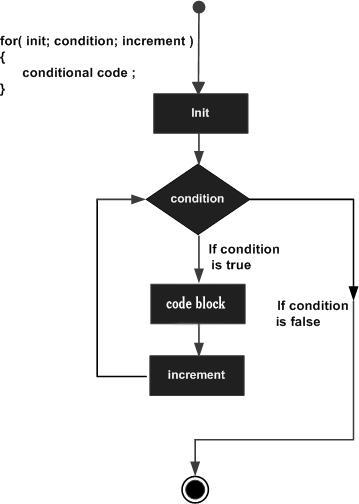
1.17.3. Example #
using System; namespace Loops { class Program { static void Main(string[] args) { /* for loop execution */ for (int a = 10; a < 20; a = a + 1) { Console.WriteLine("Value of a: {0}", a); } Console.ReadLine(); } } }
Value of a: 10 Value of a: 11 Value of a: 12 Value of a: 13 Value of a: 14 Value of a: 15 Value of a: 16 Value of a: 17 Value of a: 18 Value of a: 19
1.17.4. Foreach #
foreach looping, use foreach , you can iterate through an array or a collection object. foreach loop outputs elements in an integer array. for loop outputs elements in an integer array. foreach loops to set the calculator for array elements.class ForEachTest { static void Main(string[] args) { int[] fibarray = new int[] { 0, 1, 1, 2, 3, 5, 8, 13 }; foreach (int element in fibarray) { System.Console.WriteLine(element); } System.Console.WriteLine(); // Similar to foreach loop for (int i = 0; i < fibarray.Length; i++) { System.Console.WriteLine(fibarray[i]); } System.Console.WriteLine(); // Set the calculator for elements in the collection int count = 0; foreach (int element in fibarray) { count += 1; System.Console.WriteLine("Element #{0}: {1}", count, element); } System.Console.WriteLine("Number of elements in the array: {0}", count); } }
0 1 1 2 3 5 8 13 0 1 1 2 3 5 8 13 Element #1: 0 Element #2: 1 Element #3: 1 Element #4: 2 Element #5: 3 Element #6: 5 Element #7: 8 Element #8: 13 Number of elements in the array: 8