最近几年来,地理信息系统无论是在理论上还是应用上都处在一个飞速发展的阶段。 GIS被应用于多个领域的建模和决策支持,如城市管理、区划、环境整治等等,地理信息成为信息时代重要的组成部分之一; “数字地球”概念的提出,更进一步推动了作为其技术支撑的GIS的发展。 与此同时,一些学者致力于相关的理论研究,如空间感知、空间数据误差、空间关系的形式化等等。 这恰好说明了地理信息系统作为应用技术和学科的两个方面,并且这两个方面构成了相互促进的发展过程。
In this section, we focus on the operators of MySQL and their precedence. MySQL has the following main operators:
Arithmetic operator
Comparison operator
Logical operator
Bit operator
Arithmetic operator 
The arithmetic operators supported by MySQL include:
Operator | Action |
|---|---|
Addition | |
Subtraction | |
* | Multiplication |
/ or DIV | Division |
% or MOD | Take the remainder |
In division and modular operations, if the divisor is 0, it will be an illegal divisor and the return result will be NULL.
1、加
mysql> select 1+2; +-----+ | 1+2 | +-----+ | 3 | +-----+ 2、减
mysql> select 1-2; +-----+ | 1-2 | +-----+ | -1 | +-----+ 3、乘
mysql> select 2*3; +-----+ | 2*3 | +-----+ | 6 | +-----+ 4、除
mysql> select 2/3; +--------+ | 2/3 | +--------+ | 0.6667 | +--------+ 5、商
mysql> select 10 DIV 4; +----------+ | 10 DIV 4 | +----------+ | 2 | +----------+ 6、取余
mysql> select 10 MOD 4; +----------+ | 10 MOD 4 | +----------+ | 2 | +----------+ Comparison operator 
Comparison operators are often used in conditional statements in SELECT statements. Through these comparison operators, you can determine which records in the table are qualified. Returns 1 if the comparison result is true, 0 if false, and NULL if the comparison result is uncertain.
Symbol | Description | Remarks |
= | Equal to | |
< >,! = | Not equal to | |
> | Greater than | |
< | Less than | |
< = | Less than or equal to | |
> = | Greater than or equal to | |
BETWEEN | Between two values | > = min&& < = max |
NOT BETWEEN | Not between two values | |
IN | In the collection | |
NOT IN | Not in the collection | |
< = > | Strictly compare whether two null values are equal | When both opcodes are NULL, the value is 1, while when one opcode is NULL, the value is 0. |
LIKE | Fuzzy matching | |
REGEXP or RLIKE | Regular matching | |
IS NULL | Empty | |
IS NOT NULL | Not empty |
1、等于
mysql> select 2=3; +-----+ | 2=3 | +-----+ | 0 | +-----+ mysql> select NULL = NULL; +-------------+ | NULL = NULL | +-------------+ | NULL | +-------------+ 2、不等于
mysql> select 2<>3; +------+ | 2<>3 | +------+ | 1 | +------+ 3、安全等于
The difference between and = is that when both opcodes are NULL, the value is 1 instead of NULL, and when an opcode is NULL, the value is 0 instead of NULL.
mysql> select 2<=>3; +-------+ | 2<=>3 | +-------+ | 0 | +-------+ mysql> select null=null; +-----------+ | null=null | +-----------+ | NULL | +-----------+ mysql> select null<=>null; +-------------+ | null<=>null | +-------------+ | 1 | +-------------+ 4、小于
mysql> select 2<3; +-----+ | 2<3 | +-----+ | 1 | +-----+ 5、小于等于
mysql> select 2<=3; +------+ | 2<=3 | +------+ | 1 | +------+ 6、大于
mysql> select 2>3; +-----+ | 2>3 | +-----+ | 0 | +-----+ 7、大于等于
mysql> select 2>=3; +------+ | 2>=3 | +------+ | 0 | +------+ 8 、 BETWEEN
mysql> select 5 between 1 and 10; +--------------------+ | 5 between 1 and 10 | +--------------------+ | 1 | +--------------------+ 9 、 IN
mysql> select 5 in (1,2,3,4,5); +------------------+ | 5 in (1,2,3,4,5) | +------------------+ | 1 | +------------------+ 10 、 NOT IN
mysql> select 5 not in (1,2,3,4,5); +----------------------+ | 5 not in (1,2,3,4,5) | +----------------------+ | 0 | +----------------------+ 11 、 IS NULL
mysql> select null is NULL; +--------------+ | null is NULL | +--------------+ | 1 | +--------------+ mysql> select 'a' is NULL; +-------------+ | 'a' is NULL | +-------------+ | 0 | +-------------+ 12 、 IS NOT NULL
mysql> select null IS NOT NULL; +------------------+ | null IS NOT NULL | +------------------+ | 0 | +------------------+ mysql> select 'a' IS NOT NULL; +-----------------+ | 'a' IS NOT NULL | +-----------------+ | 1 | +-----------------+ 13 、 LIKE
mysql> select '12345' like '12%'; +--------------------+ | '12345' like '12%' | +--------------------+ | 1 | +--------------------+ mysql> select '12345' like '12_'; +--------------------+ | '12345' like '12_' | +--------------------+ | 0 | +--------------------+ 14 、 REGEXP
mysql> select 'beijing' REGEXP 'jing'; +-------------------------+ | 'beijing' REGEXP 'jing' | +-------------------------+ | 1 | +-------------------------+ mysql> select 'beijing' REGEXP 'xi'; +-----------------------+ | 'beijing' REGEXP 'xi' | +-----------------------+ | 0 | +-----------------------+ Logical operator 
Logical operators are used to determine whether an expression is true or false. If the expression is true, the result returns 1. If the expression is false, the result returns 0.
Operational symbol | Action |
|---|---|
NOT or! | Logic is not |
AND | Logic vs. |
OR | Logical OR |
XOR | Logical XOR |
1、与
mysql> select 2 and 0; +---------+ | 2 and 0 | +---------+ | 0 | +---------+ mysql> select 2 and 1; +---------+ | 2 and 1 | +---------+ | 1 | +---------+ 2, or
mysql> select 2 or 0; +--------+ | 2 or 0 | +--------+ | 1 | +--------+ mysql> select 2 or 1; +--------+ | 2 or 1 | +--------+ | 1 | +--------+ mysql> select 0 or 0; +--------+ | 0 or 0 | +--------+ | 0 | +--------+ mysql> select 1 || 0; +--------+ | 1 || 0 | +--------+ | 1 | +--------+ 3、非
mysql> select not 1; +-------+ | not 1 | +-------+ | 0 | +-------+ mysql> select !0; +----+ | !0 | +----+ | 1 | +----+ 4、异或
mysql> select 1 xor 1; +---------+ | 1 xor 1 | +---------+ | 0 | +---------+ mysql> select 0 xor 0; +---------+ | 0 xor 0 | +---------+ | 0 | +---------+ mysql> select 1 xor 0; +---------+ | 1 xor 0 | +---------+ | 1 | +---------+ mysql> select null or 1; +-----------+ | null or 1 | +-----------+ | 1 | +-----------+ mysql> select 1 ^ 0; +-------+ | 1 ^ 0 | +-------+ | 1 | +-------+ Bit operator 
Bit operators are operators that compute on binary numbers. The bit operation first changes the Operand into a binary number to perform the bit operation. Then change the calculation result from binary to decimal.
Operational symbol | Action |
|---|---|
& | Bitwise vs. |
| | Bitwise or |
^ | Bitwise XOR |
! | Take reverse |
< < | Move left |
> > | Move to the right |
1、按位与
mysql> select 3&5; +-----+ | 3&5 | +-----+ | 1 | +-----+ 2、按位或
mysql> select 3|5; +-----+ | 3|5 | +-----+ | 7 | +-----+ 3、按位异或
mysql> select 3^5; +-----+ | 3^5 | +-----+ | 6 | +-----+ 4、按位取反
mysql> select ~18446744073709551612; +-----------------------+ | ~18446744073709551612 | +-----------------------+ | 3 | +-----------------------+ 5、按位右移
mysql> select 3>>1; +------+ | 3>>1 | +------+ | 1 | +------+ 6、按位左移
mysql> select 3<<1; +------+ | 3<<1 | +------+ | 6 | +------+ Operator precedence 
The lowest priority is: =.
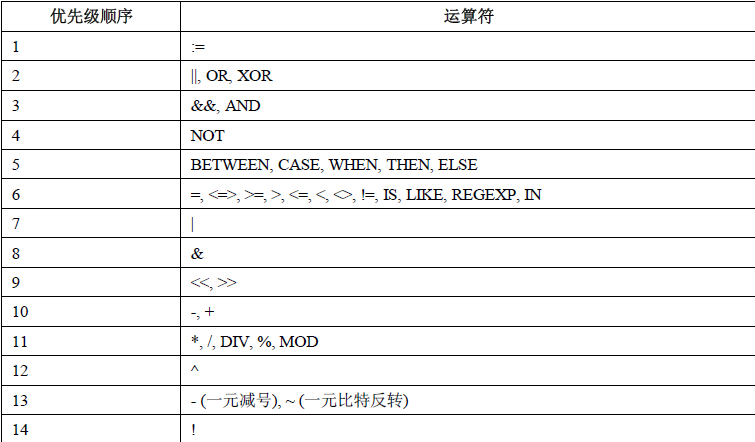
The highest priority is:!, BINARY, COLLATE.