最近几年来,地理信息系统无论是在理论上还是应用上都处在一个飞速发展的阶段。 GIS被应用于多个领域的建模和决策支持,如城市管理、区划、环境整治等等,地理信息成为信息时代重要的组成部分之一; “数字地球”概念的提出,更进一步推动了作为其技术支撑的GIS的发展。 与此同时,一些学者致力于相关的理论研究,如空间感知、空间数据误差、空间关系的形式化等等。 这恰好说明了地理信息系统作为应用技术和学科的两个方面,并且这两个方面构成了相互促进的发展过程。
The following table contains a complete list of metacharacters and their behavior in the context of regular expressions:
Character | Description | ||||||||||||||||||||||||||||||||||||||||||||||||||
|---|---|---|---|---|---|---|---|---|---|---|---|---|---|---|---|---|---|---|---|---|---|---|---|---|---|---|---|---|---|---|---|---|---|---|---|---|---|---|---|---|---|---|---|---|---|---|---|---|---|---|---|
| 将下一个字符标记为一个特殊字符、或一个原义字符、或一个 向后引用、或一个八进制转义符。例如,’n’ 匹配字符 “n”。’n’ 匹配一个换行符。序列 ‘\’ 匹配 “" 而 “(” 则匹配 “(”。 | ||||||||||||||||||||||||||||||||||||||||||||||||||
| Matches the starting position of the input string. If the Multiline property of the RegExp object is set, ^ also matches the position after’n’or’r’. | ||||||||||||||||||||||||||||||||||||||||||||||||||
| Matches the end position of the input string. If the Multiline property of the RegExp object is set, $also matches the position before’n’or’r’. | ||||||||||||||||||||||||||||||||||||||||||||||||||
| 匹配前面的子表达式零次或多次。例如,zo* 能匹配 “z” 以及 “zoo”。* 等价于{0,}。 | ||||||||||||||||||||||||||||||||||||||||||||||||||
| Matches the previous subexpression one or more times. For example, ‘zo+’ can match “zo” and “zoo”, but not “z”. + is equivalent to {1,}. | ||||||||||||||||||||||||||||||||||||||||||||||||||
| Matches the previous subexpression zero or once. For example, “do (es)?” Can match “do” or “does”. ? It is equivalent to {0jue 1}. | ||||||||||||||||||||||||||||||||||||||||||||||||||
| N is a non-negative integer. Match the determined n times. For example,’o {2} ‘does not match the’ o’in ‘Bob’, but does match the two o in ‘food’. | ||||||||||||||||||||||||||||||||||||||||||||||||||
| N is a non-negative integer. Match at least n times. For example,’o {2,} ‘does not match’ o’in ‘Bob’, but does match all o in ‘foooood’. O {1,}’is equivalent to ‘oasis’. O {0,}’is equivalent to ‘oval’. | ||||||||||||||||||||||||||||||||||||||||||||||||||
| M and n are non-negative integers, where n < = m. There are at least n matches and a maximum of m matches. For example, “o {1pm 3}” will match the first three o in “fooooood”.’ O {0jue 1}’is equivalent to ‘oval’. Please note that there can be no spaces between commas and two numbers. | ||||||||||||||||||||||||||||||||||||||||||||||||||
| 当该字符紧跟在任何一个其他限制符 ( | ||||||||||||||||||||||||||||||||||||||||||||||||||
| 匹配除换行符(n、r)之外的任何单个字符。要匹配包括 ‘n’ 在内的任何字符,请使用像”(.|n)”的模式。 | ||||||||||||||||||||||||||||||||||||||||||||||||||
| Match pattern and get the match. The obtained match can be obtained from the resulting Matches collection, which uses the SubMatches collection in VBScript and $0 in JScript. $9 attribute. To match parenthesis characters, use’(‘or’)’. | ||||||||||||||||||||||||||||||||||||||||||||||||||
| Matches the pattern but does not get the match result, which means that it is a non-acquisition match and is not stored for later use. This is useful when using the “or” character (|) to combine parts of a pattern. For example, ‘industr (?: y | ies) is a simpler expression than’ industry | industries’. | ||||||||||||||||||||||||||||||||||||||||||||||||||
| Positive look ahead positive assert, matching the lookup string at the beginning of any string that matches the pattern. This is a non-acquisition match, that is, the match does not need to be fetched for later use. For example, “Windows (? = 95” |98| NT | 2000) “can match” Windows “in” Windows2000 “, but not” Windows “in” Windows3.1 “. Pre-checking does not consume characters, that is, after a match occurs, the next match starts immediately after the last match, rather than after containing the pre-checked characters. | ||||||||||||||||||||||||||||||||||||||||||||||||||
| Forward negative precheck (negative assert) matches the lookup string at the beginning of any string that does not match the pattern. This is a non-acquisition match, that is, the match does not need to be fetched for later use. For example, “Windows (?! 95” |98| NT | 2000) “can match” Windows “in” Windows3.1 “, but not” Windows “in” Windows2000 “. Pre-checking does not consume characters, that is, after a match occurs, the next match starts immediately after the last match, rather than after containing the pre-checked characters. | ||||||||||||||||||||||||||||||||||||||||||||||||||
| Look behind positive pre-check is similar to positive positive pre-check, but in the opposite direction. For example, “(? < = 95 |98| NT | 2000) Windows “can match” Windows “in” 2000Windows “, but not” Windows “in” 3.1Windows “. | ||||||||||||||||||||||||||||||||||||||||||||||||||
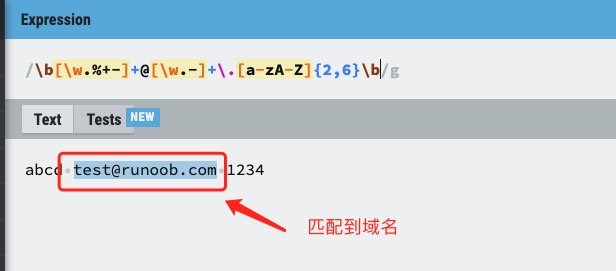
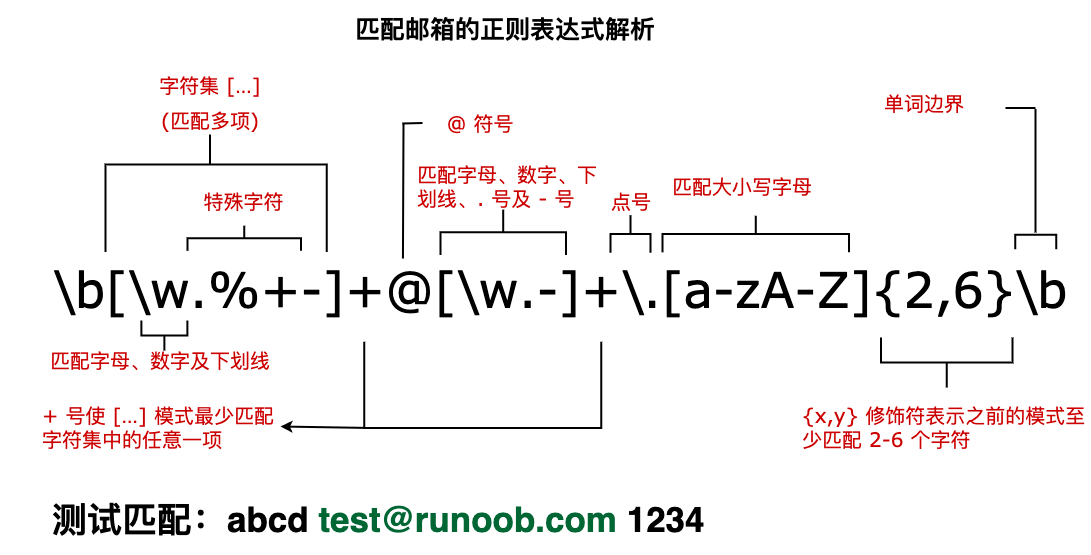
Reverse negative pre-examination is similar to positive negative pre-examination, but in the opposite direction. For example, “(? |98| NT | 2000) Windows “can match” Windows “in” 3.1Windows “, but not” Windows “in” 2000Windows “. Match x or y. For example,’z | food’ can match’z’or ‘food’. (Z | f) ood’ matches “zood” or “food”. A collection of characters. Matches any of the characters contained. For example,’ [abc] ‘can match the’a’in ‘plain’. A collection of negative characters. Matches any characters that are not included. For example,’ [^abc] ‘can match’p’,’l’,’i’,’n’ in “plain”. Character range. Matches any character within the specified range. For example,’ [a-z] ‘can match any lowercase character in the range’a’to’z’. Range of negative characters. Matches any character that is not within the specified range. For example,’ [^a-z] ‘can match any character that is not in the range of’a’to’z’. Match a word boundary, that is, the position between the word and the space. For example,’erb ‘can match’ er’,’in ‘never’ but not ‘er’’ in ‘verb’. Matches non-word boundaries.’ ErB’ can match ‘er’,’ in ‘verb’ but not ‘er’’ in ‘never’. Matches the control characters indicated by x. For example,cM matches a Control-M or carriage return. The value of x must be one of Amurz or aMuz. Otherwise, c is treated as a literal’c ‘character. Matches a numeric character. Equivalent to [0-9] . Matches a non-numeric character. Equivalent to [^0-9] . Matches a feed character. Equivalent tox0c andcL. Matches a newline character. Equivalent tox0a andcJ. Matches a carriage return. Equivalent tox0d andcM. 匹配任何空白字符,包括空格、制表符、换页符等等。等价于 [ fnrtv]。 匹配任何非空白字符。等价于 [^ fnrtv]。 Matches a tab. Equivalent tox09 andcI. Matches a vertical tab. Equivalent tox0b andcK. Match letters, numbers, underscores. Equivalent to Matches non-letters, numbers, and underscores. Equivalent to Matches n, where n is the hexadecimal escape value. The hexadecimal escape value must be a determined two-digit length. For example,’x41 ‘matches “A”.’ x041’ is equivalent to’x04’ & “1”. ASCII encoding can be used in regular expressions. Matches num, where num is a positive integer. A reference to the obtained match. For example,’(.)1’ matches two consecutive identical characters. Identifies an octal escape value or a backward reference. If there are at least n previous acquired subexpressions, n is a backward reference. Otherwise, if n is an octal number (0-7), n is an octal escape value. Identifies an octal escape value or a backward reference. If there are at least nm acquired subexpressions beforenm, nm is a backward reference. If there are at least n fetches beforenm, n is a backward reference followed by the text m. If none of the previous conditions are met, if both n and m are octal numbers (0-7),nm will match the octal escape value nm. If n is an octal number (0-3) and m and l are both octal numbers (0-7), the octal escape value nml is matched. Matches n, where n is a Unicode character represented by four hexadecimal digits. For example,u00A9 matches the copyright symbol. Next, we analyze a regular expression that matches the mailbox, as shown in the following figure: The text of the following tag is the obtained matching expression: |