Go language supports the following systems:
Linux
FreeBSD
Mac OS X (also known as Darwin)
Windows
The download address of the installation package is https://golang.org/dl/ .
If you can’t open it, you can use this address: https://golang.google.cn/dl/ .
The package name corresponding to each system:
Operating system | Package name |
|---|---|
Windows | Go1.4.windows-amd64.msi |
Linux | Go1.4.linux-amd64.tar.gz |
Mac | Go1.4.darwin-amd64-osx10.8.pkg |
FreeBSD | Go1.4.freebsd-amd64.tar.gz |
The following describes the installation method of using source code on UNIX/Linux/Mac OS X and FreeBSD systems: 1.Download binary package: go1.4.linux-amd64.tar.gz. 2.Extract the downloaded binary package to the/usr/local directory. 3.Set The above can only be added temporarily We can edit it. After adding, you need to execute: Note: you can use the MAC system. Can be used under Windows By default Create a working directory Use 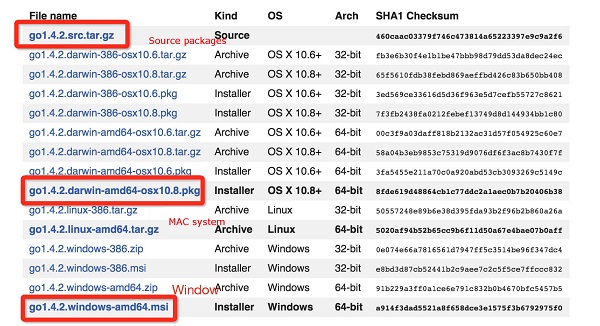
2.2.1. UNIX/Linux/Mac OS X, and FreeBSD installation #
tar -C /usr/local -xzf go1.4.linux-amd64.tar.gz
/usr/local/go/bin directory added to PATH environment variables:export PATH=$PATH:/usr/local/go/bin
PATH if you close the terminal and log in again, it will be gone. ~/.bash_profile or /etc/profile and add the following command to the end of the file, which is permanent:export PATH=$PATH:/usr/local/go/bin
source ~/.bash_profile or source /etc/profile
.pkg double-click directly at the end of the installation package to complete the installation, and the installation directory is in /usr/local/go/ . 2.2.2. Installation under Windows system #
.msi install the package with the suffix (the file can be found in the download list, such as go1.4.2.windows-amd64.msi). .msi files will be installed in the c:Go directory. You can add the c:Gobin directory to the Path in the environment variable. After adding, you need to restart the command window to take effect. 2.2.3. Installation test #
C:\>Go_WorkSpace . test.go file code: # package main import "fmt" func main() { fmt.Println("Hello, World!") }
go output of the above code executed by the command is as follows:C:\Go_WorkSpace>go run test.go Hello, World!