Ruby is a general language, not only a language for WEB development, but Ruby development in WEB applications and WEB tools is the most common.
With Ruby, you can not only write your own SMTP server, FTP program, or RubyWeb server, but also use Ruby for CGI programming.
Next, let’s take a moment to learn about CGI editing for Ruby. To better understand how CGI works, we can start from clicking a link or URLprocess on a web page: 1.Use your browser to access URL and connect to the HTTP web server. 2.After receiving the request information, the Web server parses the URL and finds whether the accessed file exists on the server. If there is a content of the returned file, an error message is returned. 3.The browser receives information from the server and displays the received files or error messages. CGI programs can be Ruby scripts, Python scripts, PERL scripts, SHELL scripts, C or C++ programs, etc. Before you do CGI programming, make sure your Web server supports CGI and isconfigured with CGI handlers. Apache supports CGI configuration: Set up the CGI directory: All HTTP server execution CGI programs are saved in a preconfigured directory. This directory is called the CGI directory, and by convention, itis named the / var/www/cgi-bin directory. The extension of the CGI file is By default, the Linux server configures the If you want to specify a different directory to run the CGI script, you can modify it Add in AddHandler The most basic Ruby CGI code is as follows: You can keep this code in the test.cgi file, and the last time you went to the server and given sufficient permissions, it can be executed as a CGI script. If the address of your station is http://www.example.com/ , you can use http://www.example.com/test.cgi to access the program, and the output resultis “This is a test.” After the browser visits the URL, the Web server will find it in the site directory Ruby can call the CGI library to write more complex CGI scripts. The following code invokes the CGI library to create a CGI script for a script. In the following code, the CGI object is created and the header information is printed. Using the CGI library, you can get data from a form submission (or parameters in URL) in two ways, such as URL:/cgi-bin/test.cgi?FirstName=Zara&LastName=Ali. You can use Another way to get form data: The following code is used to retrieve all key values: If the form contains multiple fields with the same name, the value of the same field is saved in the array. In the following example, specify three identical fields “name” in the form, with values of “Zara”, “Huma”, and “Nuha”, respectively: Note: Ruby automatically determines the GET and POST methods, so there is noneed to treat the two methods differently. The following is the relevant HML code: CGI contains a number of methods to create HTML, and each HTML tag has a corresponding method. Before using these methods, you must pass the To make nesting of tags easier, these methods use the content as a code block, which returns a string as the content of the tag. As follows: When you are dealing with parameters in URL or HTML form data, you need to escape specified special characters, such as quotation marks (“), backslashes (/). The Ruby CGI object provides The execution result of the above code is as follows: Another set of instances: The execution result of the above code is as follows: Here are the methods for the complete CGI class in Ruby Ruby CGI-related methods of Standard CGI Library
最近几年来,地理信息系统无论是在理论上还是应用上都处在一个飞速发展的阶段。 GIS被应用于多个领域的建模和决策支持,如城市管理、区划、环境整治等等,地理信息成为信息时代重要的组成部分之一; “数字地球”概念的提出,更进一步推动了作为其技术支撑的GIS的发展。 与此同时,一些学者致力于相关的理论研究,如空间感知、空间数据误差、空间关系的形式化等等。 这恰好说明了地理信息系统作为应用技术和学科的两个方面,并且这两个方面构成了相互促进的发展过程。 6.36.1. Web browsing #
6.36.2. CGI architecture diagram #
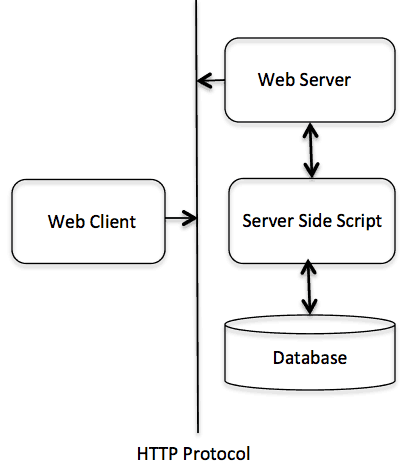
6.36.3. Web server support and configuration #
ScriptAlias /cgi-bin/ /var/www/cgi-bin/
.cgi Ruby can also be used .rb extension name. cgi-bin in the directory for /var/www . httpd.conf configuration file, as follows:<Directory "/var/www/cgi-bin"> AllowOverride None Options +ExecCGI Order allow,deny Allow from all Directory>
.rb suffix so that we can access the .rb Ruby script file at the end: AddHandler cgi-script .cgi .pl .rb
6.36.4. Write CGI scripts #
#!/usr/bin/ruby puts "Content-type: text/html\n\n" puts "This is a test"
test.cgi file, and then parse the script code and access the HTML document through the Ruby parser. 6.36.5. Use
cgi.rb # #!/usr/bin/ruby require 'cgi' cgi = CGI.new puts cgi.header puts "This is a test"
6.36.6. Form processing #
CGI#[] to get the parameters directly FirstName and LastName : #!/usr/bin/ruby require 'cgi' cgi = CGI.new cgi['FirstName'] # => ["Zara"] cgi['LastName'] # => ["Ali"]
#!/usr/bin/ruby require 'cgi' cgi = CGI.new h = cgi.params # => {"FirstName"=>["Zara"],"LastName"=>["Ali"]} h['FirstName'] # => ["Zara"] h['LastName'] # => ["Ali"]
#!/usr/bin/ruby require 'cgi' cgi = CGI.new cgi.keys # => ["FirstName", "LastName"]
#!/usr/bin/ruby require 'cgi' cgi = CGI.new cgi['name'] # => "Zara" cgi.params['name'] # => ["Zara", "Huma", "Nuha"] cgi.keys # => ["name"] cgi.params # => {"name"=>["Zara", "Huma", "Nuha"]}
<html> <body> <form method="POST" action="http://www.example.com/test.cgi"> First Name :<input type="text" name="FirstName" value="" /> <br /> Last Name :<input type="text" name="LastName" value="" /> <input type="submit" value="Submit Data" /> form> body> html>
6.36.7. Create Form forms and HTML #
CGI.new to create a CGI object. #!/usr/bin/ruby require "cgi" cgi = CGI.new("html4") cgi.out{ cgi.html{ cgi.head{ "\n"+cgi.title{"This Is a Test"} } + cgi.body{ "\n"+ cgi.form{"\n"+ cgi.hr + cgi.h1 { "A Form: " } + "\n"+ cgi.textarea("get_text") +"\n"+ cgi.br + cgi.submit } } } }
6.36.8. String escape #
CGI.escape and CGI.unescape method tohandle the escape of these special characters #!/usr/bin/ruby require 'cgi' puts CGI.escape(Zara Ali/A Sweet & Sour Girl")
#!/usr/bin/ruby require 'cgi' puts CGI.escape(Zara Ali/A Sweet & Sour Girl")
#!/usr/bin/ruby require 'cgi' puts CGI.escapeHTML('
Zara Ali/A Sweet & Sour Girl
') <h1>Zara Ali/A Sweet & Sour Girl</h1>'
6.36.9. Methods commonly used in the CGI class #