
WebSocket is a protocol that HTML5 began to provide for full-duplex communication over a single TCP connection.
WebSocket makes it easier to exchange data between the client and the server, allowing the server to actively push data to the client. In WebSocket API, only one handshake is needed between the browser and the server, and a persistent connection can be directly created between the browser and the server for two-way data transmission.
In WebSocket API, the browser and the server only need to shake hands, and then a fast channel is formed between the browser and the server. Data can be transmitted directly between the two.
Now, in order to implement the push technology, many websites use Ajax polling. Polling is a browser in which the browser issues a HTTP request to the server at a specific time interval (such as every 1 second), and then the server returns the latest data to the client. This traditional mode brings obvious disadvantages, that is, browsers need to constantly send requests to the server, but HTTP requests may contain long headers, in which the really effective data may be only a small part, which will obviously waste a lot of bandwidth and other resources.
The WebSocket protocol defined by HTML5 can better save server resources and bandwidth, and can communicate in more real time.
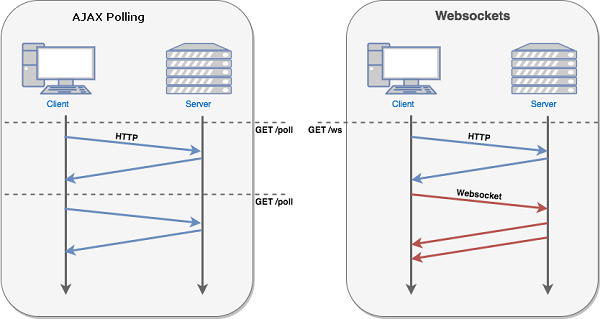
The browser sends a request to the server to establish a WebSocket connection through JavaScript. After the connection is established, the client and the server can exchange data directly through the TCP connection.
When you get the Web Socket connection, you can use the send() method to send data to the server, and through the onmessage event to receive the data returned by the server.
The following API is used to create the WebSocket object.
var Socket = new WebSocket(url, [protocol] );
The first parameter in the above code The following is Attribute Description Socket.readyState The read-only attribute readyState represents the connection status and can have the following values: 0-indicates that the connection has not been established. 1-indicates that the connection is established and can communicate. 2-indicates that the connection is being closed. 3-indicates that the connection is closed or cannot be opened. Socket.bufferedAmount The read-only attribute bufferedAmount has been placed in a queue by send () waiting for transmission, but the number of bytes of UTF-8 text that have not been issued. The following are events related to the WebSocket object. Suppose we created the Socket object using the above code: Event Event handler Description Open Socket.onopen Triggered when a connection is established Message Socket.onmessage Triggered when the client receives server data Error Socket.onerror Triggered when a communication error occurs Close Socket.onclose Triggered when the connection is closed The following is Method Description Socket.send () Send data using a connection Socket.close () Close the connection WebSocket protocol is essentially a TCP-based protocol. In order to establish a WebSocket connection, the client browser first initiates a HTTP request to the server, which, unlike the usual HTTP request, contains some additional header information, in which the additional header information “Upgrade: WebSocket” indicates that this is a HTTP request to apply for protocol upgrade. The server parses the additional header information and then generates the reply information and returns it to the client. The WebSocket connection between the client side and the server side is established, and both parties can freely transmit information through this connection channel, and the connection will persist until the client or server side actively closes the connection. At present, most browsers support Before performing the above procedure, we need to create a service that supports WebSocket. From pywebsocket download
mod_pywebsocket Python environment support is required extract the downloaded file. Enter the pywebsocket directory. Execute command:
In recent years, Geographic Information Systems (GIS) have undergone rapid development in both theoretical and practical dimensions. GIS has been widely applied for modeling and decision-making support across various fields such as urban management, regional planning, and environmental remediation, establishing geographic information as a vital component of the information era. The introduction of the “Digital Earth” concept has further accelerated the advancement of GIS, which serves as its technical foundation. Concurrently, scholars have been dedicated to theoretical research in areas like spatial cognition, spatial data uncertainty, and the formalization of spatial relationships. This reflects the dual nature of GIS as both an applied technology and an academic discipline, with the two aspects forming a mutually reinforcing cycle of progress. url that specifies the URL of the connection The second parameter protocol is optional and an acceptable subprotocol is specified. 11.57.1. WebSocket attribute 
WebSocket Properties of the object. Suppose we used the above code to create the Socket Object: 11.57.2. WebSocket event 
11.57.3. WebSocket method 
WebSocket gets or sets the related methods. Suppose we used the above code to create the Socket object: 11.57.4. WebSocket instance 
11.57.5. HTML and JavaScript of the client 
WebSocket() interface, you can try examples in the following browsers: Chrome, Mozilla, Opera and Safari. runoob_websocket.html file content
11.57.6. Install pywebsocket 
mod_pywebsocket or use the git command to download:git clone https://github.com/googlearchive/pywebsocket
$ python setup.py build
$ sudo python setup.py install
Principles, Technologies, and Methods of Geographic Information Systems
102