最近几年来,地理信息系统无论是在理论上还是应用上都处在一个飞速发展的阶段。 GIS被应用于多个领域的建模和决策支持,如城市管理、区划、环境整治等等,地理信息成为信息时代重要的组成部分之一; “数字地球”概念的提出,更进一步推动了作为其技术支撑的GIS的发展。 与此同时,一些学者致力于相关的理论研究,如空间感知、空间数据误差、空间关系的形式化等等。 这恰好说明了地理信息系统作为应用技术和学科的两个方面,并且这两个方面构成了相互促进的发展过程。
This tutorial assumes that you already know how JDBC applications work. Before you begin to learn Servlet database access, please visit the Java MySQL connection to set up the relevant drivers and configurations.
Note:
You can download the provided jar package: mysql-connector-java-5.1.39-bin.jar
In a java project, you only need to introduce in the Eclipse mysql-connector-java-5.1.39-bin.jar can run the java project.
But in Eclipse web projects, when executing Class.forName("com.mysql.jdbc.Driver"); I won’t look for the driver when I do. So in this example, we need to put mysql-connector-java-5.1.39-bin.jar copy it to the lib directory under tomcat.
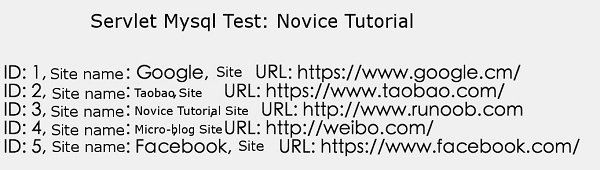
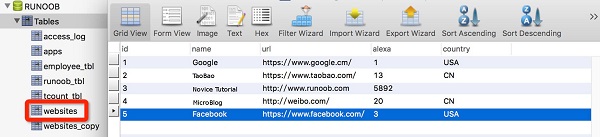
Starting with the basic concepts, let’s create a simple table and create a few records in the table. Next, we create the RUNOOB database in MySQL and create the websites data table, which is structured as follows: Insert some data: The data table is shown as follows: The following example demonstrates how to use Servlet to access a RUNOOB database. Now let’s compile the Servlet above, and in the Now call this Servlet, enter the link: http://localhost:8080/TomcatTest/DatabaseAccess , and the following response result will be displayed: 2.14.1. Create test data 
CREATE TABLE `websites` (
  `id` int(11) NOT NULL AUTO_INCREMENT,
  `name` char(20) NOT NULL DEFAULT '' COMMENT 'Site Name',
  `url` varchar(255) NOT NULL DEFAULT '',
  `alexa` int(11) NOT NULL DEFAULT '0' COMMENT 'Alexa ranking',
  `country` char(10) NOT NULL DEFAULT '' COMMENT 'country',
  PRIMARY KEY (`id`)
) ENGINE=InnoDB AUTO_INCREMENT=10 DEFAULT CHARSET=utf8;
INSERT INTO `websites` VALUES ('1', 'Google', 'https://www.google.cm/',
'1', 'USA'), ('2', 'TaoBao', 'https://www.taobao.com/', '13', 'CN'),
('3', 'Rookie Tutorial', 'http://www.runoob.com', '5892', ''),
('4', 'MicroBlog', 'http://weibo.com/', '20', 'CN'), ('5', 'Facebook',
'https://www.facebook.com/', '3', 'USA');
2.14.2. Access the database 
package com.runoob.test;
import java.io.IOException;
import java.io.PrintWriter;
import java.sql.*;
import javax.servlet.ServletException;
import javax.servlet.annotation.WebServlet;
import javax.servlet.http.HttpServlet;
import javax.servlet.http.HttpServletRequest;
import javax.servlet.http.HttpServletResponse;
/**
* Servlet implementation class DatabaseAccess
*/
@WebServlet("/DatabaseAccess")
public class DatabaseAccess extends HttpServlet {
private static final long serialVersionUID = 1L;
// JDBC Driver Name and Database URL
static final String JDBC_DRIVER = "com.mysql.jdbc.Driver";
static final String DB_URL = "jdbc:mysql://localhost:3306/RUNOOB";
// The username and password of the database need to be set according to your own settings
static final String USER = "root";
static final String PASS = "123456";
/**
* @see HttpServlet#HttpServlet()
*/
public DatabaseAccess() {
super();
// TODO Auto-generated constructor stub
}
/**
* @see HttpServlet#doGet(HttpServletRequest request, HttpServletResponse response)
*/
protected void doGet(HttpServletRequest request, HttpServletResponse response) throws ServletException, IOException {
Connection conn = null;
Statement stmt = null;
// Set response content type
response.setContentType("text/html;charset=UTF-8");
PrintWriter out = response.getWriter();
String title = "Servlet Mysql Testing - Rookie Tutorial";
String docType = "\n";
out.println(docType +
"\n" +
"
\"center\">" + title + "\n");
try{
// Register JDBC driver
Class.forName("com.mysql.jdbc.Driver");
// Open a connection
conn = DriverManager.getConnection(DB_URL,USER,PASS);
// Execute SQL query
stmt = conn.createStatement();
String sql;
sql = "SELECT id, name, url FROM websites";
ResultSet rs = stmt.executeQuery(sql);
// Expand Result Set Database
while(rs.next()){
// Retrieve through fields
int id = rs.getInt("id");
String name = rs.getString("name");
String url = rs.getString("url");
// output data
out.println("ID: " + id);
out.println(", Site Name: " + name);
out.println(", Site URL: " + url);
out.println("
");
}
out.println("");
// Close after completion
rs.close();
stmt.close();
conn.close();
} catch(SQLException se) {
// Handling JDBC errors
se.printStackTrace();
} catch(Exception e) {
// Processing Class. forName error
e.printStackTrace();
}finally{
// Finally, there is a block for closing resources
try{
if(stmt!=null)
stmt.close();
}catch(SQLException se2){
}
try{
if(conn!=null)
conn.close();
}catch(SQLException se){
se.printStackTrace();
}
}
}
/**
* @see HttpServlet#doPost(HttpServletRequest request, HttpServletResponse response)
*/
protected void doPost(HttpServletRequest request, HttpServletResponse response) throws ServletException, IOException {
// TODO Auto-generated method stub
doGet(request, response);
}
}
web.xml create the following entries in the file: ....
<servlet>
<servlet-name>DatabaseAccessservlet-name>
<servlet-class>com.runoob.test.DatabaseAccessservlet-class>
servlet>
<servlet-mapping>
<servlet-name>DatabaseAccessservlet-name>
<url-pattern>/TomcatTest/DatabaseAccessurl-pattern>
servlet-mapping>
....