Go language supports multi-dimensional arrays. The following are common declaration methods of multi-dimensional arrays:
var variable_name [SIZE1][SIZE2]...[SIZEN] variable_type The following example declares a 3D array of integers:
var threedim [5][10][4]int 2.30.1. Two-dimensional array #
Two-dimensional array is the simplest multi-dimensional array, and two-dimensional array is essentially composed of one-dimensional array. A two-dimensional array is defined as follows:
var arrayName [ x ][ y ] variable_type variable_type for Go data type of the language arrayName is the name of the array, the two-dimensional array can be thought of as a table, x is the row and y is the column. The following figure shows that a two-dimensional array a has three rows and four columns:
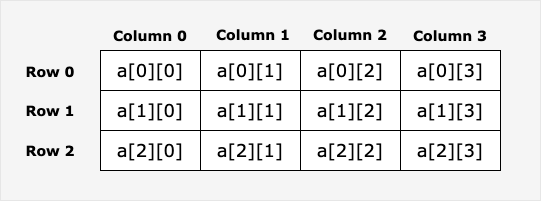
Elements in a two-dimensional array can be passed through the The output of the above instance is as follows: a[ i ][ j ] to visit.Example #
package main import "fmt" func main() { // Step 1: Create an array values := [][]int{} // Step 2: Add two rows of one-dimensional arrays to an empty two-dimensional array using the append() function row1 := []int{1, 2, 3} row2 := []int{4, 5, 6} values = append(values, row1) values = append(values, row2) // Step 3: Display two rows of data fmt.Println("Row 1") fmt.Println(values[0]) fmt.Println("Row 2") fmt.Println(values[1]) // Step 4: Accessing the first element fmt.Println("The first element is:") fmt.Println(values[0][0]) }
Row 1 [1 2 3] Row 2 [4 5 6] The first element is: 1
2.30.2. Initialize two-dimensional array #
Multidimensional arrays can be initialized by curly braces. The following example is a two-dimensional array of three rows and four columns:
a := [3][4]int{ {0, 1, 2, 3} , /* The first row index is 0 */ {4, 5, 6, 7} , /* The second row has an index of 1 */ {8, 9, 10, 11}, /* The third row has an index of 2 */ } Note: the penultimate line in the above code } , there must be a comma, because the last line } you can’t have a single line, but it can be written like this:
a := [3][4]int{ {0, 1, 2, 3} , /* The first row index is 0 */ {4, 5, 6, 7} , /* The second row has an index of 1 */ {8, 9, 10, 11}} /* The third row has an index of 2 */ The following example initializes a two-dimensional array of two rows and two columns: The output of the above instance is as follows:Example #
package main import "fmt" func main() { // Create a 2D array sites := [2][2]string{} // Adding Elements to a 2D Array sites[0][0] = "Google" sites[0][1] = "Runoob" sites[1][0] = "Taobao" sites[1][1] = "Weibo" // Display Results fmt.Println(sites) }
[[Google Runoob] [Taobao Weibo]]
2.30.3. Access two-dimensional array #
A two-dimensional array is accessed by specifying coordinates. Such as row and column indexes in an array, for example:
val := a[2][3] or var value int = a[2][3] The above example accesses the fourth element in the third row of the two-dimensional array val .
Two-dimensional arrays can use loop nesting to output elements: The output of the above instance is as follows: The following example creates a multi-dimensional array with a different number of elements in each dimension: The output of the above instance is as follows:Example #
package main import "fmt" func main() { /* Array -5 rows and 2 columns*/ var a = [5][2]int{ {0,0}, {1,2}, {2,4}, {3,6},{4,8}} var i, j int /* Output array elements */ for i = 0; i < 5; i++ { for j = 0; j < 2; j++ { fmt.Printf("a[%d][%d] = %d\\n", i,j, a[i][j] ) } } }
a[0][0] = 0 a[0][1] = 0 a[1][0] = 1 a[1][1] = 2 a[2][0] = 2 a[2][1] = 4 a[3][0] = 3 a[3][1] = 6 a[4][0] = 4 a[4][1] = 8
Example #
package main import "fmt" func main() { // Create an empty two-dimensional array animals := [][]string{} // Create a three-dimensional array with different lengths for each array row1 := []string{"fish", "shark", "eel"} row2 := []string{"bird"} row3 := []string{"lizard", "salamander"} // Add a one-dimensional array to a two-dimensional array using the append() function animals = append(animals, row1) animals = append(animals, row2) animals = append(animals, row3) // Loop output for i := range animals { fmt.Printf("Row: %v\\n", i) fmt.Println(animals[i]) } }
Row: 0 [fish shark eel] Row: 1 [bird] Row: 2 [lizard salamander]