最近几年来,地理信息系统无论是在理论上还是应用上都处在一个飞速发展的阶段。 GIS被应用于多个领域的建模和决策支持,如城市管理、区划、环境整治等等,地理信息成为信息时代重要的组成部分之一; “数字地球”概念的提出,更进一步推动了作为其技术支撑的GIS的发展。 与此同时,一些学者致力于相关的理论研究,如空间感知、空间数据误差、空间关系的形式化等等。 这恰好说明了地理信息系统作为应用技术和学科的两个方面,并且这两个方面构成了相互促进的发展过程。
Recommended for Vue version axios to finish ajax request.
Axios is a Promise-based HTTP library that can be used in browsers and node.js .
Github open source address: https://github.com/axios/axios Use Or Use Use Use How to use it: We can simply read JSON data: Use It can be done by calling the For ease of use, the official provides aliases for all supported request methods, and you can directly use aliases to initiate requests: Note: when using alias methods Helper functions that handle concurrent requests: You can create a new one using a custom configuration The following are the available instance methods. The specified configuration is merged with the configuration of the instance: The following are the configuration options available when creating a request, note that only Use When use You can specify the configuration default values that will be used for each request. Global Custom instance defaults: Configurations are merged in a priority order. The order is: in After the request or response is If you want to remove the interceptor later, you can do this: Can be customized for Error handling: Can be used Use Axios’s Can be used You can also pass a Note: you can use the same browser In a browser environment, you can use URLSearchParams API: In addition, you can use the In Of course, like browsers, you can also use the If your environment does not support ES6 Promise, you can use the `polyfill 2.19.1. Installation method 
cdn :<script src="https://unpkg.com/axios/dist/axios.min.js">script>
<script src="https://cdn.staticfile.org/axios/0.18.0/axios.min.js">script>
npm : $ npm install axios
bower : $ bower install axios
yarn : $ yarn add axios
Vue.axios.get(api).then((response) => { console.log(response.data) }) this.axios.get(api).then((response) => { console.log(response.data) }) this.$http.get(api).then((response) => { console.log(response.data) }) 2.19.2. Browser support 
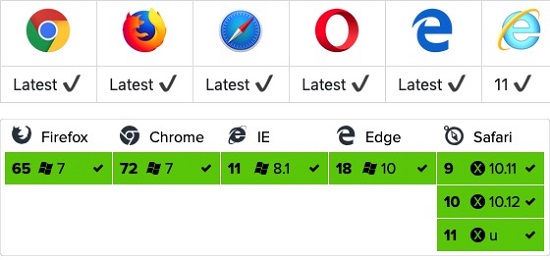
2.19.3. GET method 
GET instance 
constapp={data(){return{info:'Ajax test!!'}},mounted(){axios.get('https://www.runoob.com/try/ajax/json_demo.json'). then(response=>(this.info=response)).catch(function(error) {//Request failure handling console.log(error);});}}Vue.createApp(app).mount('#app') response.data read JSON data: GET instance 
<divid="app"><h1>Website Listh1><divv-for="site in info">{{ site.name }}div>div><scripttype="text/javascript">const app = { data() { return { info: 'Ajax test!!' } }, mounted () { axios .get('https://www.runoob.com/try/ajax/json_demo.json') .then(response => (this.info = response)) .catch(function (error) { // Request failure handling console.log(error); }); } } Vue.createApp(app).mount('#app')script>
GET format of parameters passed by the method is as follows: Pass parameter description 
//Add parameters directly to the URL ID=12345axios.get('/user?ID=12345').then(function(response){console.log(response);}). catch(function(error){console.log(error);});//It can also be achieved through params Set parameters:axios.get('/user',{params:{ID:12345}}).then(function(response) {console.log(response);}).catch(function(error){console.log(error);}); 2.19.4. POST method 
POST instance 
newVue({el:'#app',data(){return{info:null}},mounted(){axios.post ('https://www.runoob.com/try/ajax/demo_axios_post.php').then(response=>(this.info=response)). catch(function(error){//Request failure handling console.log(error);});}})
POST format of parameters passed by the method is as follows: Pass parameter description 
axios.post('/user',{firstName:'Fred',//parameter firstNamelastName:'Flintstone'//parameter lastName}).then(function(response){console.log(response);}). catch(function(error){console.log(error);});
2.19.5. Execute multiple concurrent requests 
Example 
functiongetUserAccount(){returnaxios.get('/user/12345');}functiongetUserPermissions() {returnaxios.get('/user/12345/permissions');}axios.all([getUserAccount(), getUserPermissions()]).then(axios.spread(function(acct,perms){//Both requests are now completed}));
2.19.6. Axios API 
axios pass the relevant configuration to create the request. Example 
axios(config)//sending POST request axios({method:'post',url:'/user/12345',data:{firstName:'Fred',lastName:'Flintstone'}});//GET Request remote image axios({method:'get',url:'http://bit.ly/2mTM3nY',responseType:'stream'}). then(function(response){response.data.pipe(fs.createWriteStream('ada_lovelace.jpg'))});axios(url[,config])//sent GET Request (default method) axios('/user/12345');
2.19.7. Alias of the request method 
axios.request(config) axios.get(url[, config]) axios.delete(url[, config]) axios.head(url[, config]) axios.post(url[, data[, config]]) axios.put(url[, data[, config]]) axios.patch(url[, data[, config]])
url 、 method 、 data none of these properties need to be specified in the configuration. 2.19.8. Concurrence 
axios.all(iterable) axios.spread(callback)
2.19.9. Create an instance 
axios example: axios.create([config]) const instance = axios.create({ baseURL: 'https://some-domain.com/api/', timeout: 1000, headers: {'X-Custom-Header': 'foobar'} });
2.19.10. Example method 
axios#request(config) axios#get(url[, config]) axios#delete(url[, config]) axios#head(url[, config]) axios#post(url[, data[, config]]) axios#put(url[, data[, config]]) axios#patch(url[, data[, config]])
2.19.11. Request configuration item 
url is necessary. If not specified method the request will be used by default get method. { // `url` is a server used for requests URL url: "/user", // `method` is the method used when creating a request method: "get", // Default is get // `BaseURL` will automatically be added before `URL` unless `URL` is an absolute URL. // It can facilitate passing relative URLs for axios instance methods by setting a `baseURL` baseURL: "https://some-domain.com/api/", // `transformRequest` Allow modification of request data before sending to the server // Can only be used in request methods such as "PUT", "POST", and "PATCH" // The function in the subsequent array must return a string, or ArrayBuffer,or Stream transformRequest: [function (data) { // Perform arbitrary conversion processing on data return data; }], // `transformResponse` allow modification of response data before passing to then/catch transformResponse: [function (data) { // Perform arbitrary conversion processing on data return data; }], // `headers` is the custom request header that will be sent soon headers: {"X-Requested-With": "XMLHttpRequest"}, // `params` is the URL parameter to be sent together with the request // Must be a plain object or URLSearchParams object params: { ID: 12345 }, // `paramsSerializer` is a function responsible for serializing `params` // (e.g. https://www.npmjs.com/package/qs, http://api.jquery.com/jquery.param/) paramsSerializer: function(params) { return Qs.stringify(params, {arrayFormat: "brackets"}) }, // `data` is the data sent as the requesting subject // Only applicable to these request methods "PUT", "POST", and "PATCH" // When `transformRequest` is not set, it must be one of the following types: // - string, plain object, ArrayBuffer, ArrayBufferView, URLSearchParams // - Browser exclusive:FormData, File, Blob // - Node exclusive: Stream data: { firstName: "Fred" }, // `timeout` Specify the number of milliseconds for request timeout (0 indicates no timeout) // If the request takes more than 'timeout', the request will be interrupted timeout: 1000, // `withCredentials` indicates whether credentials are required for cross domain requests withCredentials: false, // default // `adapter` allow custom processing of requests to make testing easier // Return a promise and apply a valid response (refer to [response docs](#response-api)). adapter: function (config) { /* ... */ }, // `auth` indicates that HTTP basic authentication should be used and credentials should be provided // This will set an `Authorization` header to overwrite any existing custom `Authorization` headers set using `headers` auth: { username: "janedoe", password: "s00pers3cret" }, // `responseType` The data type representing the server response can be "arraybuffer", "blob", "document", "json", "text", "stream" responseType: "json", // default // `xsrfCookieName` the name of the cookie used as the value for the xsrf token xsrfCookieName: "XSRF-TOKEN", // default // `xsrfHeaderName` the name of the HTTP header that carries the value of the xsrf token xsrfHeaderName: "X-XSRF-TOKEN", // default // `onUploadProgress` allow processing progress events for uploading onUploadProgress: function (progressEvent) { // Handling native progress events }, // `onDownloadProgress` allow processing progress events for downloads onDownloadProgress: function (progressEvent) { // Handling native progress events }, // `maxContentLength` Define the maximum size of allowed response content maxContentLength: 2000, // `validateStatus` define whether the given HTTP response status code is resolve or reject promise. If `validateStatus` return `true` (Or set to `null` or `undefined`),promise will be resolve; Otherwise, the promise will be rejected validateStatus: function (status) { return status >= 200 && status < 300; // default }, // `maxRedirects` define the maximum number of redirects to follow in node.js // If set to 0, no redirection will be followed maxRedirects: 5, // default // `httpAgent` and `httpsAgent` used in node.js to define custom proxies to be used when executing HTTP and HTTPS, respectively. Allow configuration options like this: // `keepAlive` is not enabled by default httpAgent: new http.Agent({ keepAlive: true }), httpsAgent: new https.Agent({ keepAlive: true }), // "proxy" define the host name and port of the proxy server // `auth` indicates that HTTP basic authentication should be used to connect to the proxy and provide credentials // This will set a `Proxy Authorization` header,Overwrite existing custom `Proxy Authorization` headers set by using `header`. proxy: { host: "127.0.0.1", port: 9000, auth: : { username: "mikeymike", password: "rapunz3l" } }, // `cancelToken` specify for canceling requests cancel token // (Check out the Cancellation section later to learn more) cancelToken: new CancelToken(function (cancel) { }) } 2.19.12. Response structure 
axios response to the request contains the following information: { // `data` response provided by the server data: {}, // `status` HTTP status status: 200, // `statusText` HTTP status information from server response statusText: "OK", // `headers` server response header headers: {}, // `config` is the configuration information provided for the request config: {} } then the following response is received: axios.get("/user/12345") .then(function(response) { console.log(response.data); console.log(response.status); console.log(response.statusText); console.log(response.headers); console.log(response.config); });
catch ,or pass rejection callback as then the response can pass through the second parameter of error object can be used. 2.19.13. Default values for configuration 
axios default value: axios.defaults.baseURL = 'https://api.example.com'; axios.defaults.headers.common['Authorization'] = AUTH_TOKEN; axios.defaults.headers.post['Content-Type'] = 'application/x-www-form-urlencoded';
// Set default values for configuration when creating an instance var instance = axios.create({ baseURL: 'https://api.example.com' }); // Modify default values after the instance has been created instance.defaults.headers.common['Authorization'] = AUTH_TOKEN;
2.19.14. Priority of configuration 
lib/defaults.js the default value of the library found, followed by the instance’s defaults property, and finally the requested config parameters. The latter will take precedence over the former. Here is an example: // Create an instance using the default values of the configuration provided by the library // The default value for timeout configuration at this time is `0` var instance = axios.create(); // Overwrite library timeout default value // Now, before timeout, all requests will wait for 2.5 seconds instance.defaults.timeout = 2500; // Overwrite timeout settings for requests that are known to take a long time instance.get('/longRequest', { timeout: 5000 }); 2.19.15. Interceptor 
then or catch intercept them before processing. // Add request interceptor axios.interceptors.request.use(function (config) { // What to do before sending a request return config; }, function (error) { // What to do about request errors return Promise.reject(error); }); // Add response interceptor axios.interceptors.response.use(function (response) { // Do something about the response data return response; }, function (error) { // Do something about response errors return Promise.reject(error); });
var myInterceptor = axios.interceptors.request.use(function () {/*...*/}); axios.interceptors.request.eject(myInterceptor);
axios instance to add an interceptor. var instance = axios.create(); instance.interceptors.request.use(function () {/*...*/});
axios.get('/user/12345') .catch(function (error) { if (error.response) { // The request has been sent, but the status code of the server response is not within the range of 2xx console.log(error.response.data); console.log(error.response.status); console.log(error.response.headers); } else { // Something happened in setting up the request that triggered an Error console.log('Error', error.message); } console.log(error.config); });
validateStatus the configuration option defines an error range for a custom HTTP status code. axios.get('/user/12345', { validateStatus: function (status) { return status < 500; // Only reject when the status code is greater than or equal to 500 } })
2.19.16. cancel 
cancel token cancel the request. cancel token API based on cancelable promises proposal CancelToken.source factory method creation cancel token , like this: var CancelToken = axios.CancelToken; var source = CancelToken.source(); axios.get('/user/12345', { cancelToken: source.token }).catch(function(thrown) { if (axios.isCancel(thrown)) { console.log('Request canceled', thrown.message); } else { // process error } }); // Cancel request (message parameter is optional) source.cancel('Operation canceled by the user.');
executor function to CancelToken to create a cancel , token : var CancelToken = axios.CancelToken; var cancel; axios.get('/user/12345', { cancelToken: new CancelToken(function executor(c) { // executor The function takes a cancel function as a parameter cancel = c; }) }); // Cancel request cancel();
cancel token cancel multiple requests. 2.19.17. Use when requesting
application/x-www-form-urlencoded ¶ axios JavaScript object is serialized to JSON by default. If you want to use the application/x-www-form-urlencoded format, you can use the following configuration. const params = new URLSearchParams(); params.append('param1', 'value1'); params.append('param2', 'value2'); axios.post('/foo', params);
URLSearchParams not all browsers support it. qs library to encode the data: const qs = require('qs'); axios.post('/foo', qs.stringify({ 'bar': 123 })); // Or in another way (ES6), import qs from 'qs'; const data = { 'bar': 123 }; const options = { method: 'POST', headers: { 'content-type': 'application/x-www-form-urlencoded' }, data: qs.stringify(data), url, }; axios(options);
2.19.18.
Node.js environment ¶ node.js can use the querystring module: const querystring = require('querystring'); axios.post('http://something.com/', querystring.stringify({ foo: 'bar' }));
qs library. 2.19.19. Promises 
axios relying on the native ES6 Promise implementation supported . 2.19.20. TypeScript support 
axios contains the definition of TypeScript. import axios from "axios"; axios.get("/user?ID=12345");