Variables come from mathematics and can store calculation results or represent abstract concepts of values in computer language.
Variables can be accessed through variable names.
The Go language variable name consists of letters, numbers, and underscores, where the first character cannot be a number.
The general form of declaring variables is to use the var keywords:
var identifier type You can declare multiple variables at a time:
var identifier1, identifier2 type 2.7.1. Example #
package main import "fmt" func main() { var a string = "Runoob" fmt.Println(a) var b, c int = 1, 2 fmt.Println(b, c) } The output result of the above example is:
Runoob 1 2 Variable declaration #
First, specify the variable type, which defaults to zero if it is not initialized.
var v_name v_type v_name = value Zero is the default value set by the system when the variable is not initialized.
2.7.2. Example #
package main import "fmt" func main() { // Declare a variable and initialize it var a = "RUNOOB" fmt.Println(a) // Zero value without initialization var b int fmt.Println(b) // Bool has a zero value of false var c bool fmt.Println(c) } The execution result of the above example is:
RUNOOB 0 false Numeric type (including complex64/128) is 0
Boolean type is
falseThe string is
""(empty string)The following types are
nil:
var a *int var a []int var a map[string] int var a chan int var a func(string) int var a error // error is an interface 2.7.3. Example #
package main import "fmt" func main() { var i int var f float64 var b bool var s string fmt.Printf("%v %v %v %q\\n", i, f, b, s) } The output is as follows:
0 0 false "" The second is to determine the type of variable according to the value.
var v_name = value 2.7.4. Example #
package main import "fmt" func main() { var d = true fmt.Println(d) } The output is as follows:
true Third, if the variable is already used var after the declaration, use the := declare a variable, resulting in a compilation error, format:
v_name := value For example:
var intVal int intVal :=1 // At this point, a compilation error will occur because intVal has already been declared and does not need to be redeclared You can simply use the following statement:
intVal := 1 // At this point, no compilation error will occur because a new variable is declared because:=is a declaration statement intVal := 1 equal to:
var intVal int intVal =1 You can set the var f string = "Runoob" abbreviated as f := "Runoob":
2.7.5. Example #
package main import "fmt" func main() { f := "Runoob" // var f string = "Runoob" fmt.Println(f) } The output is as follows:
Runoob Multivariable declaration #
//Multiple variables of the same type, non global variables var vname1, vname2, vname3 type vname1, vname2, vname3 = v1, v2, v3 var vname1, vname2, vname3 = v1, v2, v3 // Similar to Python, it does not need to display declaration types and automatically infers vname1, vname2, vname3 := v1, v2, v3 // The variable appearing on the left side of:=should not have been declared, otherwise it will cause compilation errors // This factorization keyword writing method is generally used to declare global variables var ( vname1 v_type1 vname2 v_type2 ) 2.7.6. Example #
package main var x, y int var ( // This factorization keyword writing method is generally used to declare global variables a int b bool ) var c, d int = 1, 2 var e, f = 123, "hello" //This type of non declarative format can only appear in the function body //g, h := 123, "hello" func main(){ g, h := 123, "hello" println(x, y, a, b, c, d, e, f, g, h) } The execution result of the above example is:
0 0 0 false 1 2 123 hello 123 hello Value type and reference type #
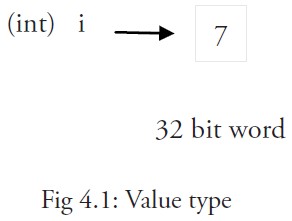
All the images int 、 float 、 bool and string , these basic types are value types, and variables that use these types point directly to values that exist in memory:
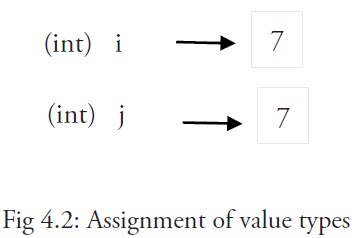
When using the equal sign = assigning the value of one variable to another, such as: j = i , which is actually in memory i has beencopied:
You can pass &i to get variables i the memory address of, for example: 0xf840000040 , the address may be different each time.
The value of a value type variable is stored in the heap.
Memory addresses vary from machine to machine, and even the same program will have different memory addresses after it is executed on different machines. Because each machine may have a different memory layout, and the location allocation may also be different.
More complex data usually requires the use of multiple words, which are generally saved using reference types.
A variable of a reference type r1 what is stored is r1 , the memory address (number) where the value of the or the first word in the memory address is located.
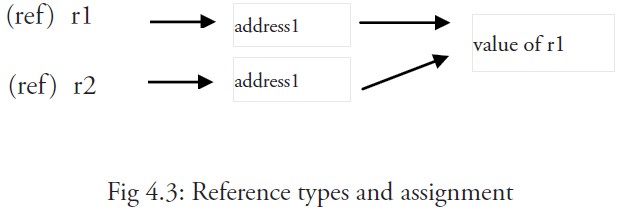
This memory address is called a pointer, and the pointer is actually stored in another value.
Pointers of the same reference type can point to multiple words in contiguous memory addresses (the memory layout is contiguous), which is the most computationally efficient form of storage, or they can be scattered in memory. each word indicates the memory address of the next word.
When using an assignment statement r2 = r1 only references (addresses) are copied.
If r1 is changed, then all references to the value point to the modified content, in this case r2 will also be affected.
Short form, using the: = assignment operator #
We know that the type of the variable can be omitted during the initialization of the variable and automatically inferred by the system, andthe declaration statement is written on var keywords are actually a little superfluous, so we can abbreviate them as a := 50 or b := false .
a and b type of int and bool will be automatically inferred by the compiler
This is the preferred form of using variables, but it can only be used in the body of a function, not for the declaration and assignment of global variables. Use operator := you can efficiently create a new variable called an initialization declaration.
Matters needing attention #
If we are in the same code block, we cannot use initialization declarations for variables with the same name again, for example: a:= 20 is not allowed, the compiler will prompt an error no new variables on left side of := , but a = 20 is possible, because it is assigning a new value to the same variable.
If you’re defining variables, if you use a before, you will get a undefined: a compilation error.
If you declare a local variable but do not use it in the same block of code,you will also get a compilation error, such as the variable in the following example a :
2.7.7. Example #
package main import "fmt" func main() { var a string = "abc" fmt.Println("hello, world") } Trying to compile this code will get an error a declared but not used .
In addition, simply give a assignment is also not enough, this value must be used
fmt.Println("hello, world", a) The error is removed.
But global variables are allowed to be declared but not used. Multiple variables of the same type can be declared on the same line, such as:
var a, b, c int Multiple variables can be assigned on the same line, such as:
var a, b int var c string a, b, c = 5, 7, "abc" The above line assumes that the variables a , b , and c have already been declared, otherwise they should be used as follows:
a, b, c := 5, 7, "abc" The values on the right are assigned to the variables on the left in the same order, so the value of a is 5 , the value of b is 7 , andthe value of c is "abc" .
This is called parallel or simultaneous assignment.
If you want to exchange the values of two variables, you can simply use a , b = b , a , and the types of the two variables must be the same.
Blank identifier \_ is also used to discard values, such as the value 5 in :_ abandoned in b = 5 , 7 .
\_ actually a write-only variable, and you can’t get its value. I did it because Go you have to use all the declared variables in the language, but sometimes you don’t need to use all the return values you get from a function.
Parallel assignment is also used when a function returns multiple return values, such as the val and mistakes. err is by calling the Func1 function also gets val, err = Func1 (var1) .